Lesson 29 of 31
How this connects: a breach becomes a risk in the risk register
What you will be able to do
This lesson is for the compliance officer who keeps the risk register, and for the privacy team who feed it. It shows that a logged breach appears in the risk register as a data privacy risk, scored by the severity chosen when the breach was logged, next to risks raised by other modules such as Contracts.
Before you start
- A breach has been logged and is not yet closed, as in lessons twelve to seventeen.
- You hold a role that can open the Risk Register, such as compliance officer. The Data Protection Officer role on its own cannot.
Steps
- 1
Open the Risk Register
In the left menu, under Risk and Governance, select Risk Register. It is the central list of risks from every module. The tiles count the risks by level, and the heat map places each one by likelihood and impact.
- Select Risk Register
- 2
Select Sync Modules
Select Sync Modules. ComplianceOS reads the other modules and adds a risk for each open issue it finds. A blue line then says how many risks were imported and from which modules, here including Data Breach.
- Select Sync Modules
- 3
Find the breach in the list
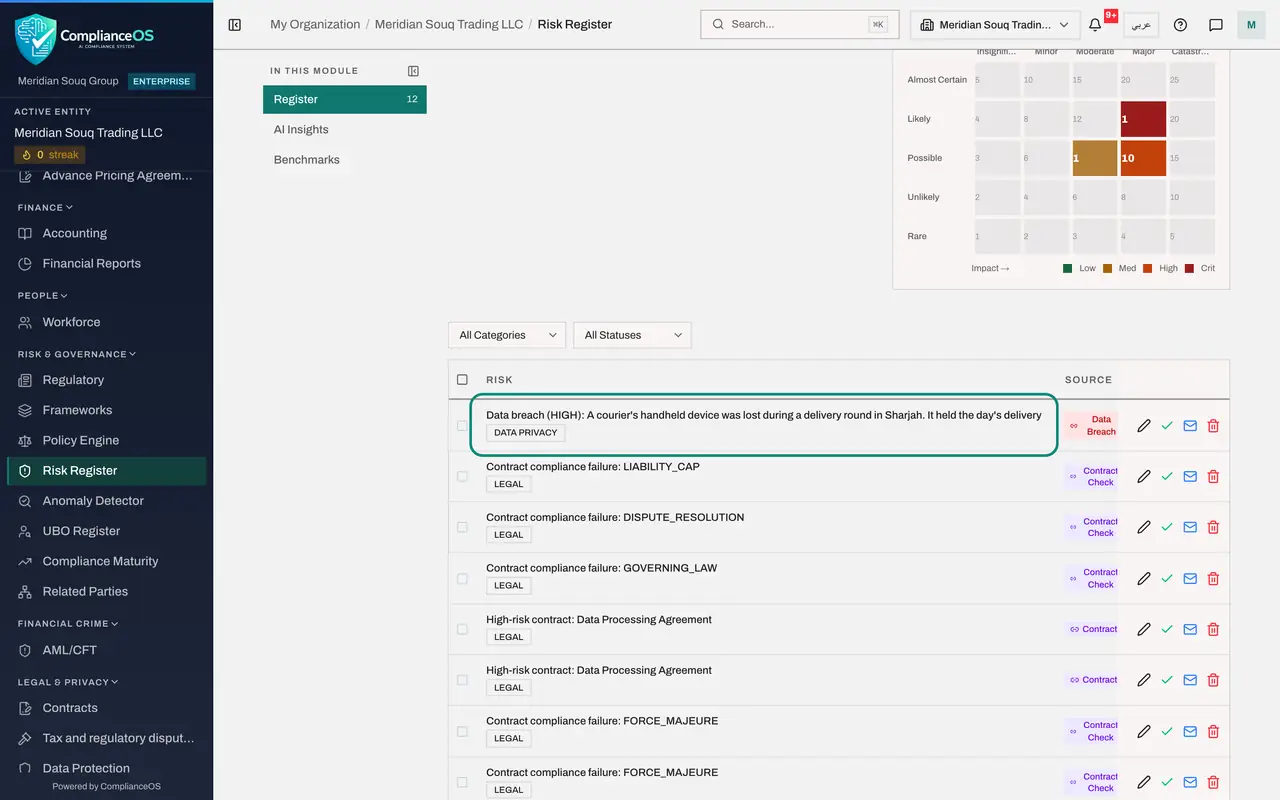
Scroll to the list. The first risk is titled Data breach, High, followed by the description you typed when you logged the breach. Its category is Data privacy and its source is Data Breach.
- 4
Read how it is scored
Scroll the table sideways to the Score column. It shows four times four equals 16. The severity you chose for the breach sets both the likelihood and the impact: High gives four for each. A score of 16 is rated Critical. A breach logged as Medium would score three times three.
- 5
See it on the heat map
Go back up to the heat map. The breach is the number one in the Likely row under Major. Risks raised by other modules, such as Contracts, sit on the same map. Every module's risks are weighed on the same scale.
- 6
Filter to data privacy risks
Open the category list above the table, which reads All Categories, and choose Data privacy. Only the risks raised by Data Protection remain. From here the compliance officer assigns an owner and a treatment, which the course on the risk register covers.
How to check it worked
The Risk Register lists a risk whose title begins Data breach, with the source Data Breach, a score of four times four and the level Critical, and the heat map shows it in the Likely row under Major.
Common mistakes
- Expecting the risk the moment the breach is logged. Risks from other modules arrive when you select Sync Modules, or with the scheduled sync.
- Changing the severity in the risk register to fix the breach record. Correct the severity on the breach itself, in Data Protection, and sync again.
- Assuming a voided breach leaves no trace here. A breach voided as entered in error can still be listed as a risk after a sync. Close that risk by hand, with a note.
Check your understanding
1. A breach was logged with the severity High. How is its risk scored?
- A.One times one
- B.Three times three, Medium
- C.Four times four, which is 16
- D.It is not scored
Show answer
Answer: C. Four times four, which is 16
The severity sets both likelihood and impact: Low is two, Medium three, High four and Critical five. Four times four is 16, which the register rates Critical.
2. When does the breach's risk close by itself?
- A.Never
- B.When the breach is set to Closed in Data Protection and the modules are synced
- C.After 72 hours
- D.When the regulator replies
Show answer
Answer: B. When the breach is set to Closed in Data Protection and the modules are synced
The sync follows the breach: once the breach is closed, the risk it raised is closed too.