Lesson 31 of 31
How this connects: the vendor you assessed is the supplier on its contract
What you will be able to do
This lesson is for legal counsel, and for the privacy team who work with them. It shows that the vendor assessed in Vendor risk and the counterparty on a contract are one and the same record. You will open the data processing agreement uploaded in lesson twenty-eight, read what was extracted from it, and link its counterparty to the vendor that the Data Protection Officer added.
Before you start
- The vendor is in the vendor risk register, as in lesson three.
- The signed agreement has been uploaded and its status is Complete, as in lesson twenty-eight.
Steps
- 1
Open Contracts and find the agreement
In the left menu, under Legal and Privacy, select Contracts. The agreement uploaded earlier is in the list. Its status is now Complete, and it has a risk score and a one-line summary naming both parties.
- Select Contracts
- 2
Open the contract
Select the file name. The page shows the risk score, a summary, and a Key details box with the parties, the dates, the value and the Vendor record. For a new contract, Vendor record says Not linked.
- 3
Select Edit details
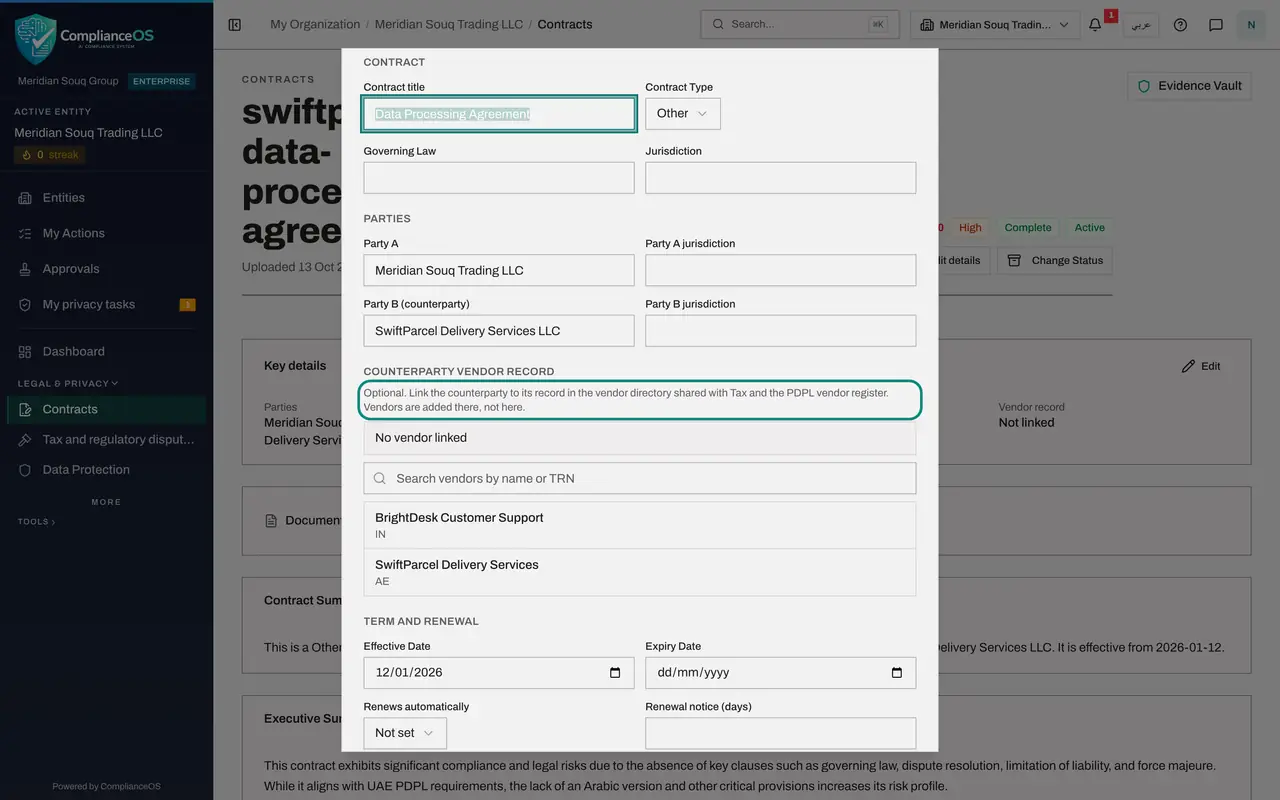
Select Edit details at the top. The form lets you correct the key details that were read from the document. Scroll to Counterparty vendor record. The note says the counterparty can be linked to its record in the vendor directory that is shared with Tax and with the vendor risk register.
- Select Edit details
- 4
Search for the vendor and select it
Type part of the vendor's name in the search box. The list shows the vendor that the Data Protection Officer added in Vendor risk, with its country. Select it. The line above the search now names the vendor.
- Type Search vendors by name or TRN:
Swift
- Type Search vendors by name or TRN:
- 5
Select Save
Select Save at the bottom of the form. The Key details box now shows the vendor's name beside Vendor record. The contract, the vendor's privacy assessment and its tax record all point to the same supplier.
- Select Save
- 6
See the same vendor in Data Protection
Select Data Protection in the left menu. Legal counsel sees one section there, Vendor risk, and can read it but not change it: there is no Add vendor or Send questionnaire button. The same vendor is listed with its risk tier and its latest assessment.
How to check it worked
On the contract's page, the Key details box shows the vendor's name beside Vendor record, where it said Not linked before.
Common mistakes
- Typing the supplier's name again somewhere instead of linking it. Vendors are added in the vendor directory, which Tax and Vendor risk share. In the contract you only search for the vendor and select it.
- Linking the wrong company with a similar name. Check the country shown under the vendor's name before you select it.
- Treating the risk score of the contract as the vendor's risk tier. The contract score rates the clauses of this document. The vendor's tier comes from its questionnaire.
Check your understanding
1. Where is a new supplier added so that both Contracts and Vendor risk can use it?
- A.In each module separately
- B.In the shared vendor directory, for example through Add vendor in Vendor risk
- C.Only in Contracts
- D.It is created automatically from e-mail
Show answer
Answer: B. In the shared vendor directory, for example through Add vendor in Vendor risk
The vendor directory is shared. A vendor added in Vendor risk or Tax can be linked to a contract as its counterparty.
2. What does linking the counterparty to a vendor record give you?
- A.A lower risk score
- B.One supplier record behind the contract, the vendor assessment and tax
- C.An automatic renewal
- D.Nothing
Show answer
Answer: B. One supplier record behind the contract, the vendor assessment and tax
With the link in place, the contract and the vendor's privacy assessment refer to the same supplier.