Lesson 8 of 31
Accept the revised answer, raise a finding and request approval
What you will be able to do
This lesson is for the Data Protection Officer who prepares the review. You will accept the answer the vendor revised, recalculate the score, raise a finding with an owner and a due date for a gap that remains, and ask a second person to approve the vendor's risk tier.
Before you start
- The vendor has resubmitted the questionnaire, as in lesson seven. Its row in the register shows To review again.
- You know who in your business will follow up a gap with the vendor.
Steps
- 1
Open the resubmitted questionnaire
In Data Protection, select Vendor risk. The vendor shows To review again. Select the vendor's name, then Review in its Assessment history.
- Select Review
- 2
Find the answer the vendor revised
Scroll to the question you challenged. It is tagged Revised by vendor, and the answer now reads 24. Your comment stays underneath as a record.
- 3
Accept the revised answer
Select Accept on the revised answer. The tag changes to Accepted.
- Select Accept
- 4
Spot a gap that needs a finding
Under Security of processing, the vendor ticked five of the six security measures. Multi-factor authentication for access is missing. That is a real gap, so select Raise finding on this answer.
- Select Raise finding
- 5
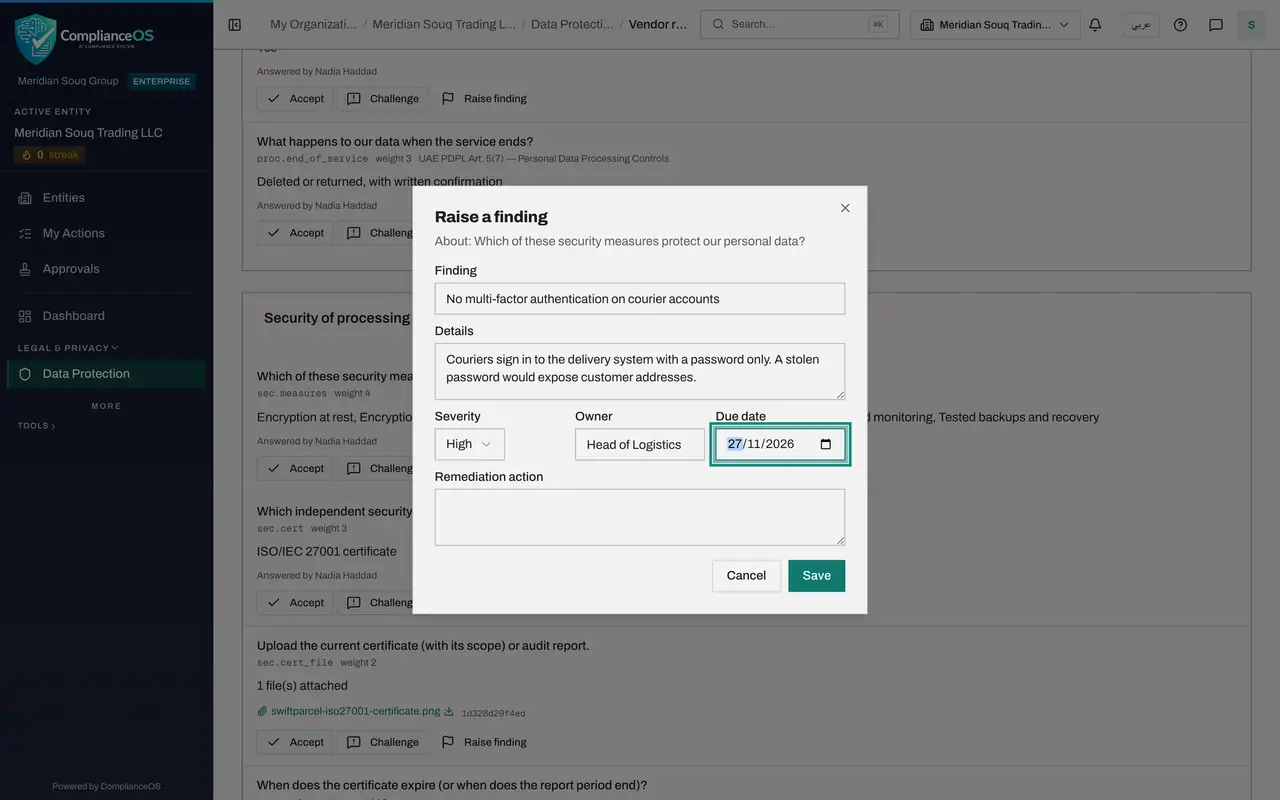
Give the finding a title and details
Under Finding, type a short title that names the gap. Under Details, say why it matters. The line at the top of the window shows which question the finding is about.
- Type Finding:
No multi-factor authentication on courier accounts - Type Details:
Couriers sign in to the delivery system with a password only. A stolen…
- Type Finding:
- 6
Set the severity, the owner and the due date
Choose the severity, here High. Under Owner, name the person in your business who will follow the finding up. Under Due date, set the date by which the gap must be closed.
- Select Medium
- Choose High
- Type Owner:
Head of Logistics - Type Due date:
2026-11-27
- 7
Write the remediation action and save
Under Remediation action, write what the vendor must do. Then select Save.
- Type Remediation action:
SwiftParcel to switch on multi-factor authentication for every courier… - Select Save
- Type Remediation action:
- 8
See the finding on the assessment
The finding is listed under Findings at the bottom of the page, with its severity, owner, due date and the status Open. It also appears on the vendor's profile and under the Findings tab of Vendor risk.
- 9
Select Recalculate score
Go back to the top and select Recalculate score. Use it after the vendor's profile or the settings have changed, so that the score uses the latest figures. Here the revised answer has already lifted the control score.
- Select Recalculate score
- 10
Select Request approval
Select Request approval. The status changes to Awaiting approval, and the request goes to the approvers' inbox.
- Select Request approval
- 11
Read the note for the preparer
Because you prepared this review, there are no Approve and Reject buttons for you. A note says that someone else has to approve or reject it, and that it is in the approvers' inbox. The next lesson is recorded as that second person.
How to check it worked
The assessment shows Awaiting approval, the finding is listed at the bottom of the page as Open, and in place of Approve and Reject you see a note that someone else has to decide because you prepared the review.
Common mistakes
- Raising a finding with no owner or due date. Nobody then follows it up. Give every finding a named owner and a date.
- Requesting approval before the vendor's revised answers are read. An answer the vendor changed is tagged Revised by vendor so that you can find it quickly.
- Expecting to approve your own review. Whoever reviewed the answers or raised findings is a preparer, and a different person must approve.
Check your understanding
1. The vendor has no multi-factor authentication yet but has promised to add it. What do you raise?
- A.Nothing
- B.A challenge
- C.A finding with a remediation action, an owner and a due date
- D.A new questionnaire
Show answer
Answer: C. A finding with a remediation action, an owner and a due date
A finding records a real gap and the action that will close it, and stays open on the vendor until it is resolved.
2. After you select Request approval, who can approve?
- A.You, straight away
- B.Anyone in the company
- C.A person with the right to approve vendor risk who did not prepare the review
- D.The vendor
Show answer
Answer: C. A person with the right to approve vendor risk who did not prepare the review
Approval needs a second person. The preparer sees a note instead of the Approve and Reject buttons.