Lesson 30 of 31
How this connects: privacy records as evidence for an audit
What you will be able to do
This lesson is for the auditor, and for the privacy team who prepare for one. It shows that the work done in this course leaves sealed evidence behind: the files a vendor uploaded, the record that a breach was logged, and the training completion records saved from a campaign all appear in the Evidence Vault, where an auditor can read and download them but not change them.
Before you start
- The privacy team has saved a campaign's completion records to the evidence vault, as in lesson twenty-six.
- You hold the auditor role, which reads every module and changes nothing.
Steps
- 1
Open the Evidence Vault
In the left menu, under Assurance, select Evidence Vault. It stores evidence from every module as sealed records. As an auditor you see Download Audit Pack and Retention at the top, but no Upload button: your access is read-only.
- Select Evidence Vault
- 2
Read the tiles
The tiles count the evidence records, how many are immutable, how many are within their retention period, and how many kinds of source they come from. Immutable means the record can no longer be changed by anyone.
- 3
Find the training completion records
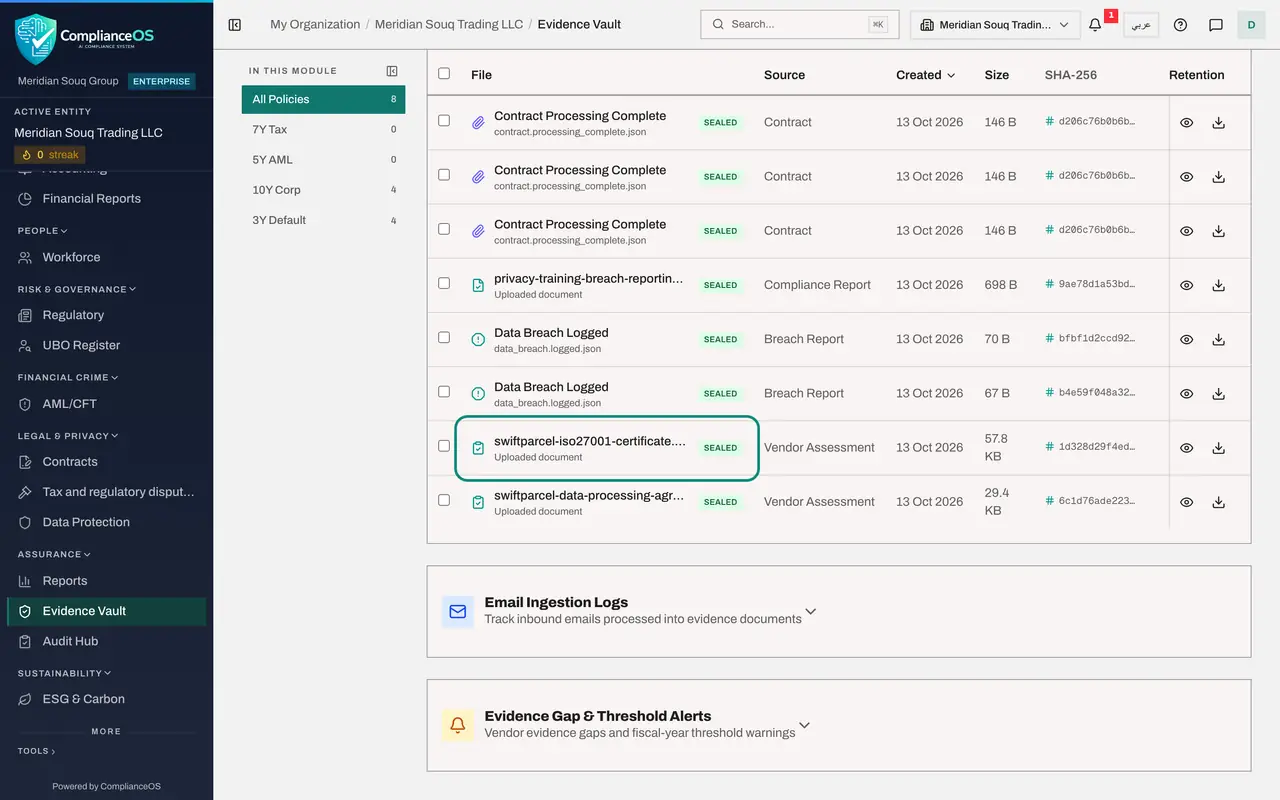
Scroll to the list. The file whose name begins privacy-training is the completion record that the Data Protection Officer saved from the training campaign. It is marked Sealed, with its source, its size, its fingerprint, its retention period and the date it expires.
- 4
Find the vendor's evidence
The certificate image and the data processing agreement are the files the courier attached to its questionnaire. Their source is Vendor Assessment. The fingerprint here matches the short code shown beside each file on the assessment.
- 5
Find the breach record
The entries named Data Breach Logged were written when each breach was logged. Their source is Breach Report. Together with the notices kept on the breach itself, they show an auditor when the organisation knew and what it did.
- 6
Download a record
Each row ends with a button to view the record and a button to download it. Select the download button on the training completion file to get the sealed file itself.
- 7
Know where audits themselves are run
Select Audit Hub in the left menu. An audit run there maps policies to points that can be checked and collects evidence for each one. The auditor sees the audits once someone starts them. Course sixteen covers the Audit Hub.
- Select Audit Hub
How to check it worked
The Evidence Vault lists the training completion file, the two files the vendor attached to its questionnaire and the breach record, each marked Sealed with a fingerprint and an expiry date.
Common mistakes
- Asking the privacy team to e-mail spreadsheets. The sealed copy in the vault carries a fingerprint and a custody trail, which an e-mailed file does not.
- Expecting campaign records to appear by themselves. They are stored when someone selects Save to evidence vault on the campaign.
- Looking for an edit button. Evidence is immutable. As an auditor you also have no Upload button: you read and download.
Check your understanding
1. How does a training campaign's completion record reach the Evidence Vault?
- A.Automatically every night
- B.Someone selects Save to evidence vault on the campaign
- C.The employee uploads it
- D.It cannot
Show answer
Answer: B. Someone selects Save to evidence vault on the campaign
Save to evidence vault stores the campaign's completion records as a sealed file.
2. What does the SHA-256 column show?
- A.The file's size
- B.A fingerprint of the file that proves it has not changed
- C.The password
- D.The retention period
Show answer
Answer: B. A fingerprint of the file that proves it has not changed
The fingerprint is worked out from the file's content. If the file changed, the fingerprint would no longer match.