Lesson 12 of 31
Log a personal data breach, field by field
What you will be able to do
This lesson is for the Data Protection Officer. You will record a personal data breach as soon as you learn of it, filling in every field of the form: what happened, when it was detected, how severe it is, how many people and which data are affected, what has been done, and what the report to the regulator must say.
Before you start
- You are signed in with the Data Protection Officer role for the entity.
- You know when the breach was detected and roughly what data and how many people are involved. You can update the details later.
Steps
- 1
Open the Breach Log
In Data Protection, select Breach Log. A personal data breach is any loss, leak or unauthorised access involving personal data. The four tiles count this year's breaches: the total, those still open, those reported to the regulator, and reports that are overdue. The line underneath states the reporting rule that applies to this entity.
- 2
Select Log Breach
Select Log Breach. Only the title, the description and the detection time are required, so you can log a breach within minutes of hearing about it.
- Select Log Breach
- 3
Give the breach a title and describe it
Under Title, type a short name that colleagues will recognise. Under Description, describe the incident in plain words: what was lost or exposed, where and how. Both are required.
- Type Title *:
Courier handheld lost with delivery addresses - Type Description *:
A courier's handheld device was lost during a delivery round in Sharja…
- Type Title *:
- 4
Set when it was detected and when it happened
Detected At starts with the current date and time. Change it to the moment the breach was actually detected, here three hours ago, because the reporting deadline is counted from it. A future time is refused. Breach Date is optional and records the day the breach itself happened, if you know it.
- Type Detected At:
2026-10-13T02:45 - Type Breach Date (optional):
2026-10-13
- Type Detected At:
- 5
Choose the severity
Under Severity choose Low, Medium, High or Critical. Judge it by the harm people could suffer. Addresses and phone numbers of several hundred customers make this one High. The severity is also used to score the risk that this breach raises in the risk register.
- Select Medium
- Choose High
- 6
Look at Fill from data map
If the affected systems are in your data map, select Fill from data map and tick them. ComplianceOS then enters the data categories and an estimate of the records for you. This company has no systems mapped yet, so select Cancel and enter the figures by hand.
- Select Fill from data map
- Select Cancel
- 7
Enter how many records and which data are affected
Under Affected Records Count, enter your best estimate. Under Data Categories Affected, list the kinds of personal data involved, separated by commas. Both can be corrected later.
- Type Affected Records Count (optional):
340 - Type Data Categories Affected (comma-separated):
Customer name, Delivery address, Mobile number
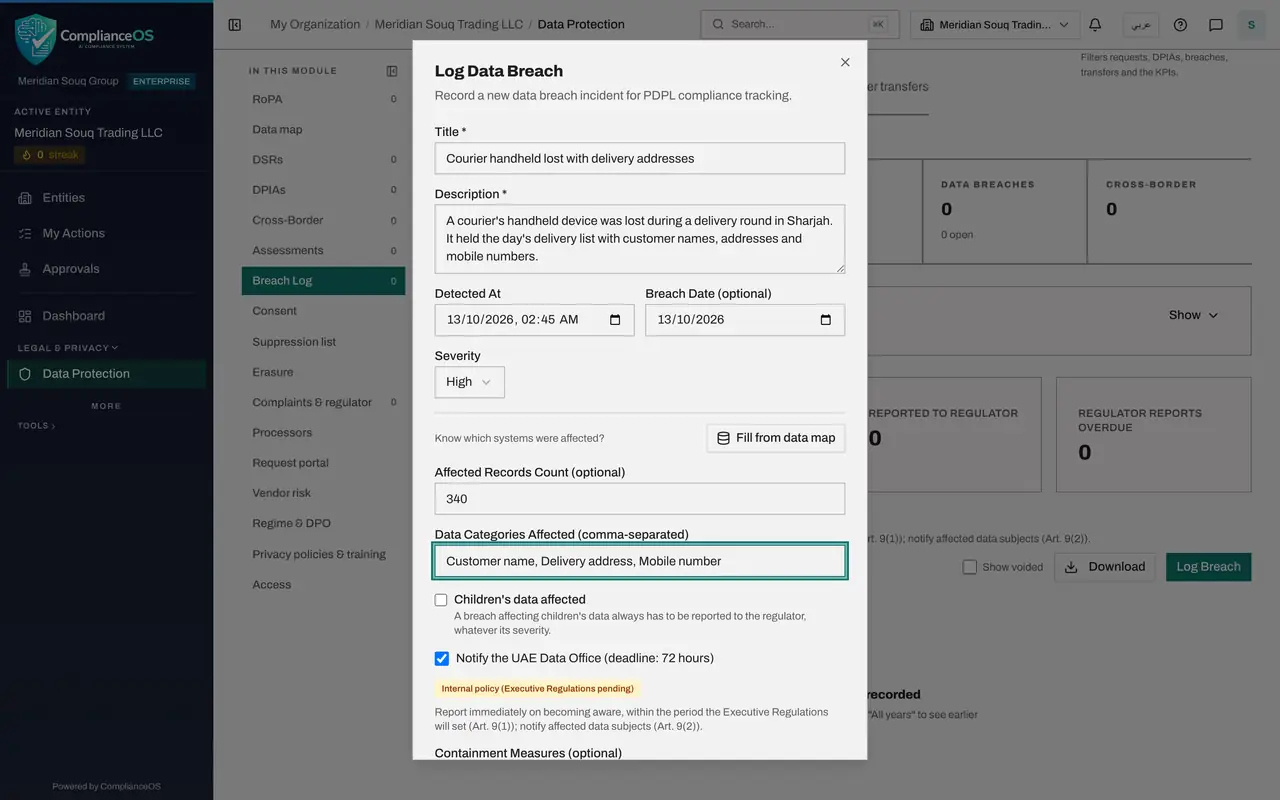
- Type Affected Records Count (optional):
- 8
Check the children's data box
Tick Children's data affected only if the breach involves data about children. Such a breach must always be reported to the regulator, so ticking it also ticks and locks the box below. Leave it clear here.
- 9
Confirm that the regulator must be notified
The next box is ticked for you and names the regulator and the deadline in hours that applies to your entity. Leave it ticked unless you have decided, and can justify, that the breach does not need reporting. The line underneath repeats the rule.
- 10
Record what has been done to contain it
Under Containment Measures, write the steps already taken to stop the harm. Regulator reference stays empty for now. It is for the reference number the regulator gives you once you have reported.
- Type Containment Measures (optional):
Device locked and wiped remotely within one hour. Courier account pass…
- Type Containment Measures (optional):
- 11
Describe the cause and the likely effects
The box titled Report content holds what the notice to the regulator must describe. Under Nature, form and cause of the breach, say what happened and why. Under Likely effects, say what could happen to the people affected.
- Type Nature, form and cause of the breach:
Handheld left unattended in a delivery vehicle and lost. The device wa… - Type Likely effects:
Customers could receive unwanted calls or messages. No payment data or…
- Type Nature, form and cause of the breach:
- 12
Describe the measures and corrective actions
Under Measures taken or proposed, say how you are limiting the effects. Under Corrective actions, say what will change so that it does not happen again. Investigation findings can stay empty until the investigation has something to report.
- Type Measures taken or proposed:
Affected customers to be told and advised to be alert to unexpected ca… - Type Corrective actions:
Handhelds to lock after two minutes and to be carried by the courier a…
- Type Measures taken or proposed:
- 13
Select Log Breach to save
Select Log Breach at the bottom of the form. The breach joins the log with the status Detected. The Regulator report due column shows the hours left, and under it the date and time of the deadline in United Arab Emirates time.
- Select Log Breach
- 14
Check the tiles
Total Breaches and Open now each show one. Reported to regulator stays at zero until you record that the notice has been sent, which you will do in lesson seventeen.
How to check it worked
The breach is listed in the Breach Log with its severity and the status Detected, the Regulator report due column shows the hours left with the date and time of the deadline, and the Total Breaches and Open tiles each show one more.
Common mistakes
- Waiting until the investigation is finished before logging. The clock runs from when the breach was detected, not from when you log it, so log at once and update the record as you learn more.
- Entering the time you are typing instead of the time the breach was detected. Detected At sets the deadline, so use the real detection time.
- Clearing the notify-the-regulator box to make the deadline disappear. Clear it only when you have decided, and can justify, that the breach does not need to be reported.
Check your understanding
1. From which moment is the regulator report deadline counted?
- A.When the breach is logged in ComplianceOS
- B.When the breach was detected
- C.When the investigation ends
- D.When the notice is approved
Show answer
Answer: B. When the breach was detected
The deadline runs from the Detected At date and time, which is why that field must hold the real detection time.
2. A breach involves children's data. What happens to the notify-the-regulator box?
- A.It is cleared
- B.It is ticked and cannot be cleared
- C.It disappears
- D.Nothing
Show answer
Answer: B. It is ticked and cannot be cleared
A breach affecting children's data must always be reported, whatever its severity, so the box is ticked and locked.