Lesson 10 of 30
What a person without the permission sees
What you will be able to do
This lesson is for administrators who answer the question, why can I not see that. Signed in as Sara Ahmed, a data protection officer with no administration rights, you will open each administration screen and read what it shows instead: which permission is missing, and which access administrators can grant it.
Before you start
- You are signed in as a person whose only role is Data protection officer on one entity.
- You are comparing with what the administrator saw in the earlier lessons.
Steps
- 1
Open the menu under your initial and select Profile and preferences
Select the round button with your initial. For a person who is not an administrator the menu is short: Notification preferences, Profile and preferences, and Sign out. Select Profile and preferences. The settings page opens, because it holds your own profile. Your roles lists exactly what you hold: here Data protection officer on Meridian Souq Trading LLC.
- Select Account menu
- Select Profile & preferences
- 2
Read the notes on the alert settings
Scroll to Alert settings. The controls are greyed out, and under each one a line names the permission it needs: Organisation, Manage to pause all emails, and Notifications, Configure to save the organisation default.
- 3
Select Billing
Select Billing in the settings menu. Instead of plans and credits, the page says You don't have access to this, names the permission Organisation, View, and lists who can grant it: your organisation's access administrators, Layla Hassan and Omar Khalid.
- Select Billing
- 4
Select Webhooks
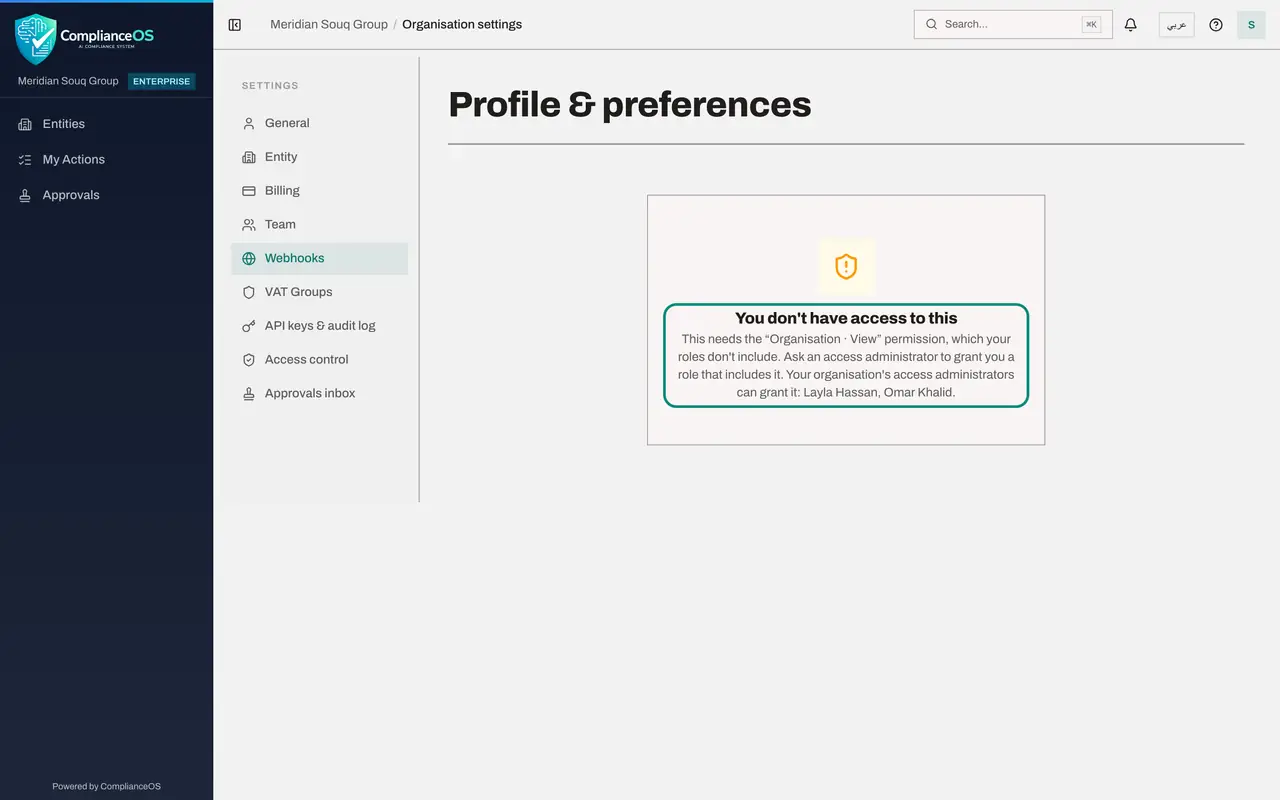
Select Webhooks. The same message appears: reading the endpoints and their delivery log needs Organisation, View.
- Select Webhooks
- 5
Select Access control
Select Access control. A note says you can't view access settings, which needs the access view permission. Only two tabs remain: Delegations, for your own cover, and Access reviews, for reviews you have been asked to complete. There is no Approval policies tab.
- Select Access control
- 6
Try API keys
Go back to settings, select API keys and audit log, then Manage API Keys. The page says this needs the permission Organisation, Manage, which your roles don't include, and again names the access administrators who can grant it.
- Select Back to settings
- Select API keys & audit log
- Select Manage API Keys →
- 7
Try Integrations on the entity
Integrations is not listed under Tools in your left menu. If you open Integrations from a link a colleague sent, the page reads Module access required: you don't hold Integrations, View on this entity, followed by the names of the access administrators.
- 8
Open Notification preferences
Open the menu under your initial and select Notification preferences. The entity's delivery settings open, with a note that you can view them but changing them needs the permission to edit compliance tasks. WhatsApp Alerts is marked Not available, and push notifications say they are not available yet. Your choices are saved for when they are.
- Select Account menu
- Select Notification preferences
How to check it worked
You can name the permission each screen asks for: Access control needs access view, API keys need Organisation Manage, Billing, Webhooks and White-label branding need Organisation View, and Integrations needs integrations view on the entity.
Common mistakes
- Granting Full access to make a message go away. Read which permission the screen names and grant the smallest role that includes it.
- Assuming a greyed-out control is a fault. Each disabled control states the permission it needs underneath.
Check your understanding
1. A colleague opens Integrations and reads Module access required. What should the administrator do?
- A.Give them Full access
- B.Grant them a role on that entity that includes integrations view, if their job needs it
- C.Tell them to try again later
- D.Share the administrator's sign-in
Show answer
Answer: B. Grant them a role on that entity that includes integrations view, if their job needs it
The message names the missing permission and the entity. Grant a role that includes it, at the narrowest place that works, and only if the job needs it.
2. What can a person without access rights still do on the Access control page?
- A.Edit approval policies
- B.See their own delegations and the access reviews assigned to them
- C.Grant roles
- D.Nothing at all
Show answer
Answer: B. See their own delegations and the access reviews assigned to them
The page hides the administration tabs but keeps Delegations and Access reviews, because every person may delegate their own work and complete reviews assigned to them.