Lesson 27 of 30
Sanctions watchlists and the AML settings
What you will be able to do
This lesson is for administrators. AML stands for anti-money laundering. You will check that the sanctions watchlists are up to date and learn where they are refreshed. Then you will use the entity's adverse-media switch and set the number of years customer identity documents are kept. These documents are called KYC documents, for know your customer.
Before you start
- You are signed in as an organisation administrator. Refreshing the watchlists needs the permission Organisation, Manage.
- You know your organisation's retention period for customer identity documents. The law requires at least five years.
Steps
- 1
Open AML/CFT and read Screening Coverage
In the left menu, under Financial Crime, select AML/CFT. On its Dashboard, the card Screening Coverage lists the watchlists every party is screened against, each marked Active with its number of entries: the United States, United Nations, UAE, European Union and United Kingdom sanctions lists, and a database of politically exposed persons.
- 2
Select Screening and open the Insights panel
Select the Screening tab, then Insights at the top right. The panel Watchlists shows when each list was last updated. Screening only runs while every list is recent.
- Select Screening
- Select Show insights panel
- 3
Read the Watchlists panel
Each list is marked Required and shows its number of entries and the date and time it was last updated. The note under the lists says screening only runs when every list was updated in the last 7 days. An administrator sees a Refresh Lists button at the top of this panel when the lists have not been updated today. They were updated today, so the button is not shown.
- 4
Close the panel and select Adverse Media
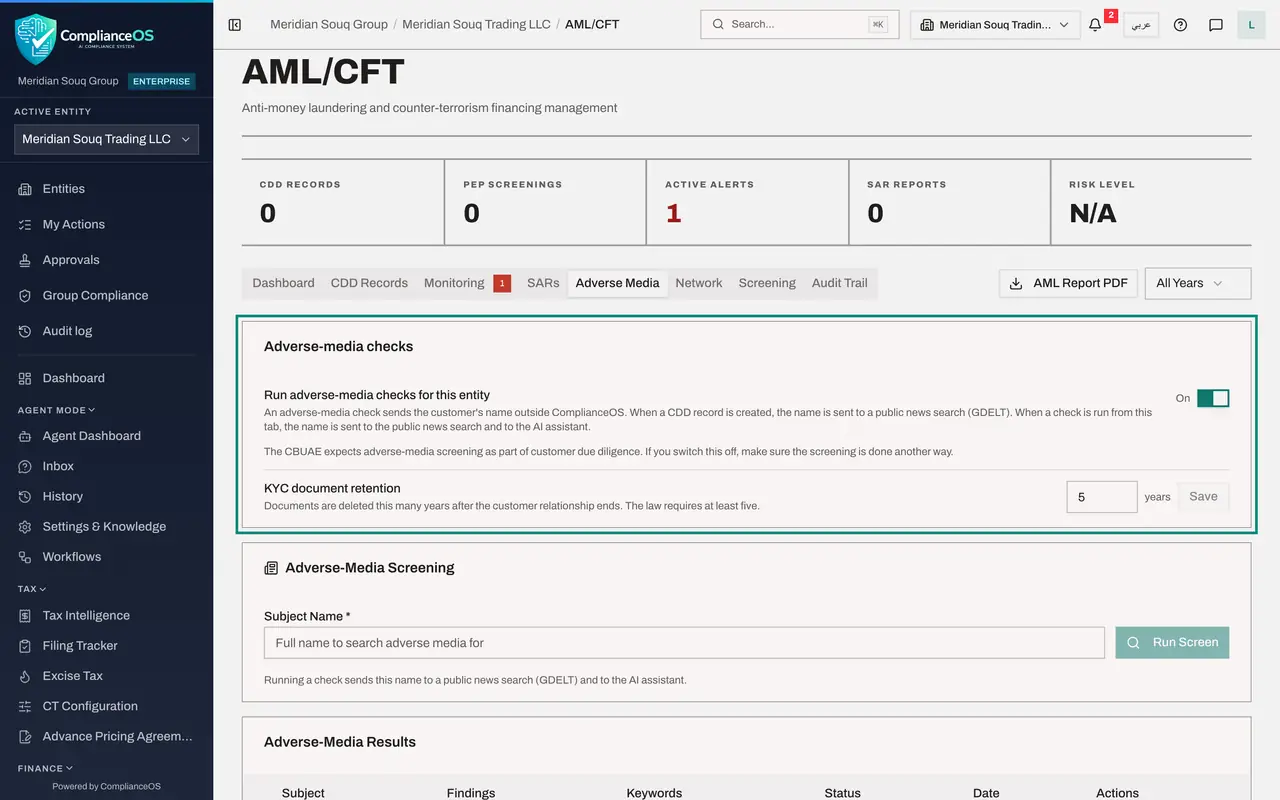
Close the panel and select the Adverse Media tab. The card Adverse-media checks has one switch for this entity. It explains exactly what leaves ComplianceOS: when a customer due diligence record is created, the customer's name is sent to a public news search, and when a check is run from this tab, the name also goes to the AI assistant.
- Select Close
- Select Adverse Media
- 5
Switch the checks off to see the effect
Select the switch. It changes to Off and a message confirms Adverse-media checks switched off. The text under it now says that no adverse-media check runs for this entity and no customer name is sent out. Further down, Run Screen is greyed out, with the note that checks are switched off for this entity.
- 6
Switch the checks back on
The central bank expects adverse-media screening as part of customer due diligence, so select the switch again. It changes back to On, and the line Last changed by shows your name and the date.
- 7
Set how long identity documents are kept
KYC document retention is the number of years identity documents are kept after the customer relationship ends. The law requires at least five. Enter 7 and select Save. A message confirms that KYC documents are now kept for 7 years after the relationship ends.
- Type KYC document retention:
7 - Select Save
- Type KYC document retention:
How to check it worked
Every watchlist shows a recent update date, the adverse-media switch reads On, and the retention period reads the number of years you saved.
Common mistakes
- Leaving the watchlists out of date. Screening only runs when every list was updated recently. While it is paused, new names are recorded as not screened.
- Switching off adverse-media checks without another process in place. The central bank expects adverse-media screening as part of customer due diligence.
- Setting the retention period below what your policy says. The form accepts five to thirty years. Use the number in your written retention policy.
Check your understanding
1. What does an adverse-media check send outside ComplianceOS?
- A.The customer's passport copy
- B.The customer's name
- C.The whole customer record
- D.Nothing
Show answer
Answer: B. The customer's name
The setting explains that the customer's name is sent to a public news search, and to the AI assistant when a check is run from the tab. That is why an administrator can switch it off for an entity.
2. A watchlist was last updated ten days ago. What happens to screening?
- A.It carries on as normal
- B.It is paused until the lists are updated, and new names are recorded as not screened
- C.Everyone is marked as a match
- D.Only that list is skipped
Show answer
Answer: B. It is paused until the lists are updated, and new names are recorded as not screened
The panel states that screening only runs when every list was updated in the last 7 days. An administrator then needs to refresh the lists.