Lesson 5 of 30
Give the final sign-off as the configured approver
What you will be able to do
This lesson is for the second approver, here the compliance officer Mariam Aziz. You will find the request that reached you because of the administrator's condition, see the first approver's decision, approve step 2, and see the privacy notice published.
Before you start
- The first approver has approved step 1 (previous lesson).
- You hold Compliance tasks, Approve on the entity. That is the permission the administrator chose for step 2.
Steps
- 1
Open Approvals in the left menu
Select Approvals. The request is under To decide.
- Select Approvals1
- 2
Read why it is waiting for you
The card says Waiting on step 2, Compliance officer sign-off. Step 1 is complete, with the first approver's name and comment. Major change shows Yes, which is why the second step applies.
- 3
Select Open record
Select Open record. The notice opens with 1 of 2 steps complete and step 2 marked as the current step.
- Select Open record
- 4
Read the notice, then select Approve
Read the text below the box. When you are satisfied, select Approve. The box Approve and publish opens.
- Select Approve
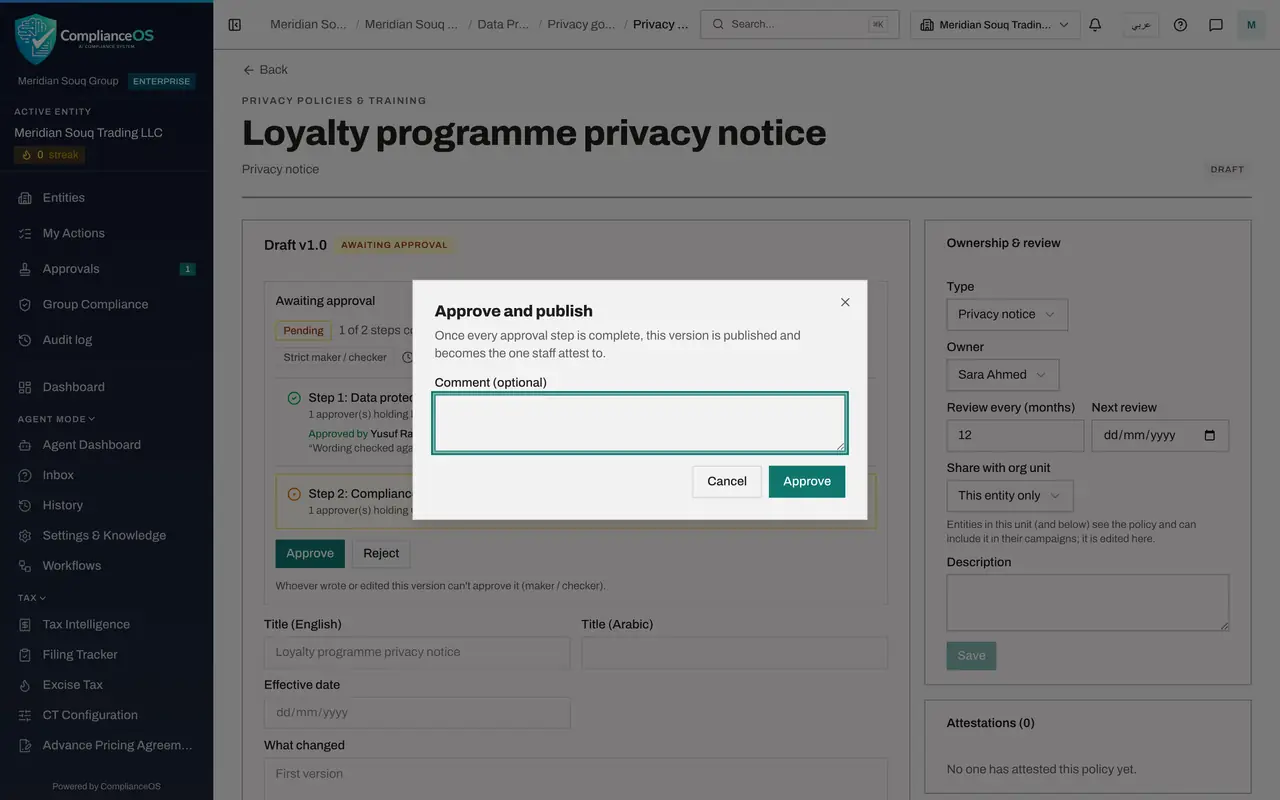
- 5
Add a comment and confirm with Approve
Type a comment, then select Approve in the box. This was the last step, so the version is published straight away.
- Type Comment (optional):
Consistent with the group privacy standard. - Select Approve
- Type Comment (optional):
- 6
Confirm the notice is published
The page now shows Published version 1.0 with its effective date, and the status at the top reads Published. Both approvals are kept with the version and in the audit log.
- 7
Check that your inbox is clear
Open Approvals again. Nothing is waiting under To decide.
- Select Approvals
How to check it worked
The policy page shows Published version 1.0, and the request is no longer under To decide in your Approvals inbox.
Common mistakes
- Wondering why a privacy notice is in a compliance officer's inbox. The request card says which step is waiting for you, and the step name was chosen by your administrator.
- Rejecting without a reason. A rejection goes back to the author, who needs to know what to fix.
Check your understanding
1. Why did this request reach the compliance officer?
- A.Compliance officers approve every record
- B.The approval policy has a step that asks for Compliance tasks, Approve when the change is major
- C.The author chose her as approver
- D.The first approver forwarded it
Show answer
Answer: B. The approval policy has a step that asks for Compliance tasks, Approve when the change is major
Nobody chooses approvers by hand. The policy's step 2 names a permission, and whoever holds it on the entity can decide the step.
2. What happens when the last step of a policy is approved?
- A.Nothing until an administrator confirms
- B.The record moves to its approved state, here Published
- C.The request starts again
- D.The author must submit again
Show answer
Answer: B. The record moves to its approved state, here Published
Once every step that applies is complete, the request is approved and the record moves on by itself. A privacy policy version is published.