Lesson 6 of 30
See the condition skip a step, then withdraw a request
What you will be able to do
This lesson is for the person who prepares records and for administrators who want proof that a condition works. You will start a minor change to the published privacy notice, submit it, and see that the compliance officer's step does not apply this time. Then you will withdraw the request from My requests.
Before you start
- The privacy notice from the earlier lessons is published as version 1.0.
- The administrator's policy is in force: step 2 applies only when major change is yes.
Steps
- 1
Open the published notice
In the Policy library, the notice now shows Published, version 1.0. Select its name to open it.
- Select Loyalty programme privacy notice
- 2
Choose the kind of change
Under Start a new version, open the list. A minor change keeps earlier staff attestations valid. A major change asks staff to read and accept the policy again. Choose Minor change, no re-attestation.
- Select Minor change — no re-attestation
- Choose Minor change — no re-attestation
- 3
Select Start draft
Select Start draft. Draft version 1.1 opens above the published version, with the note Minor change: earlier attestations stay valid. The text of version 1.0 is copied in for you to edit.
- Select Start draft
- 4
Say what changed
In What changed, type a one-line summary. Approvers and the version history show this line.
- Type What changed:
Added how to leave the programme.
- Type What changed:
- 5
Add the sentence to the text
Click at the end of Text, English, and add the new sentence.
- Type Text (English):
Meridian Souq collects your name, mobile number and purchase history w…
- Type Text (English):
- 6
Select Submit for approval
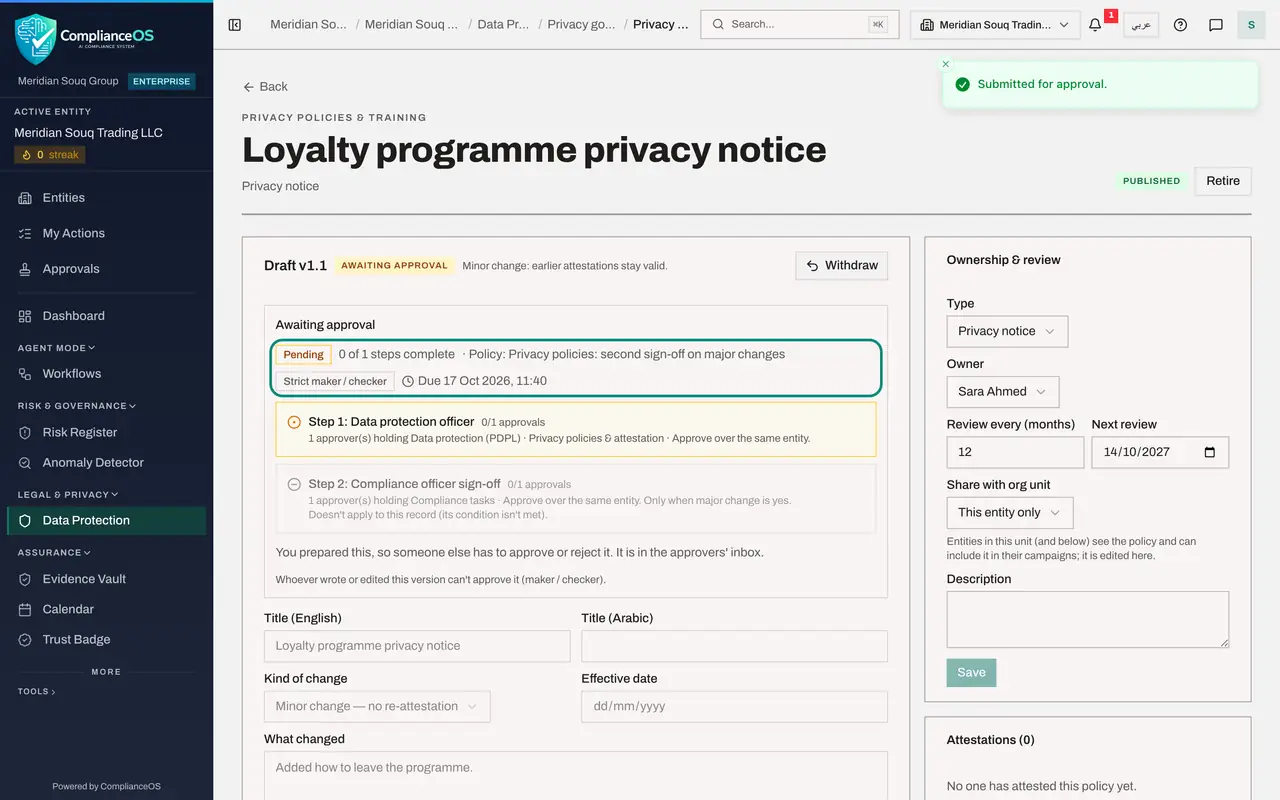
Scroll up and select Submit for approval. The Awaiting approval box appears with the same policy name as before.
- Select Submit for approval
- 7
See that the second step does not apply
The first line now reads 0 of 1 steps complete. Step 1, Data protection officer, is the current step. Step 2 is greyed out with the note Doesn't apply to this record, its condition isn't met. The condition the administrator set is working: a minor change needs one approval only.
- 8
Open Approvals and select My requests
Select Approvals in the left menu, then My requests. The new request is at the top. Its facts show Major change, No.
- Select Approvals
- Select My requests
- 9
Select Withdraw on the request
Suppose you spot a mistake. Select Withdraw on the card. A box asks you to confirm and explains what withdrawing does.
- Select Withdraw
- 10
Give a reason and select Withdraw request
Type a short reason in Reason, which is optional, and select Withdraw request. The card is now marked Cancelled with the line Withdrawn: nothing was changed, and it shows when it was withdrawn. The version is a draft again, ready to be corrected and submitted.
- Type Reason (optional):
Spotted a typing mistake; will correct and resubmit. - Select Withdraw request
- Type Reason (optional):
- 11
Filter your requests by status
Open the Status list above the cards and choose Cancelled. The list filters your requests to Pending, Approved, Rejected or Cancelled. A withdrawn request is kept under Cancelled as a record.
- Select All statuses
- Choose Cancelled
How to check it worked
After submitting the minor change, the request shows that only the data protection officer's step applies. After you withdraw, the request shows as withdrawn under My requests and the version is a draft again.
Common mistakes
- Marking a real change of meaning as minor to avoid the second approver. Minor is for corrections that do not change what staff agreed to. The kind of change is recorded in the version history.
- Withdrawing when you only wanted to check progress. Withdraw cancels the request, and approvals already given do not carry over when you submit again.
Check your understanding
1. A minor change is submitted under this policy. Which steps apply?
- A.Both steps
- B.Only step 1, Data protection officer
- C.Only step 2, Compliance officer sign-off
- D.None
Show answer
Answer: B. Only step 1, Data protection officer
Step 2 carries the condition major change is yes. A minor change does not meet it, so only step 1 applies.
2. What happens to a version when its request is withdrawn?
- A.It is deleted
- B.It is published
- C.It goes back to a draft that the author can edit and submit again
- D.It is rejected
Show answer
Answer: C. It goes back to a draft that the author can edit and submit again
Withdrawing cancels the open request and returns the version to draft. Nothing is lost, and the author can change it and submit again.