Lesson 3 of 30
Test the policy: submit a record that matches it
What you will be able to do
This lesson is for the person who prepares a record, here the data protection officer Sara Ahmed. You will draft a new privacy notice, submit it for approval, and see it wait for the approvers the administrator configured: the data protection officer first, then the compliance officer because a first version is a major change.
Before you start
- The administrator has saved the approval policy from the previous lesson.
- You are signed in as a data protection officer who can create privacy policies for the entity.
Steps
- 1
Open the Policy library and select New policy
In Data Protection, open Privacy policies and training, then Policy library. Select New policy. A small form asks how you want to start.
- Select New policy
- 2
Choose Blank policy, a title and a type
Under Start from choose Blank policy. Type the title, then choose the type Privacy notice.
- Select Privacy notice
- Choose Blank policy
- Type Title (English):
Loyalty programme privacy notice - Select Other
- Choose Privacy notice
- 3
Select Create draft
Select Create draft. The policy opens as Draft version 1.0. A first version always counts as a major change, which matters for the approval policy.
- Select Create draft
- 4
Write the notice
Type the notice in the box Text, English. The approvers read exactly what you write here.
- Type Text (English):
Meridian Souq collects your name, mobile number and purchase history w…
- Type Text (English):
- 5
Select Submit for approval
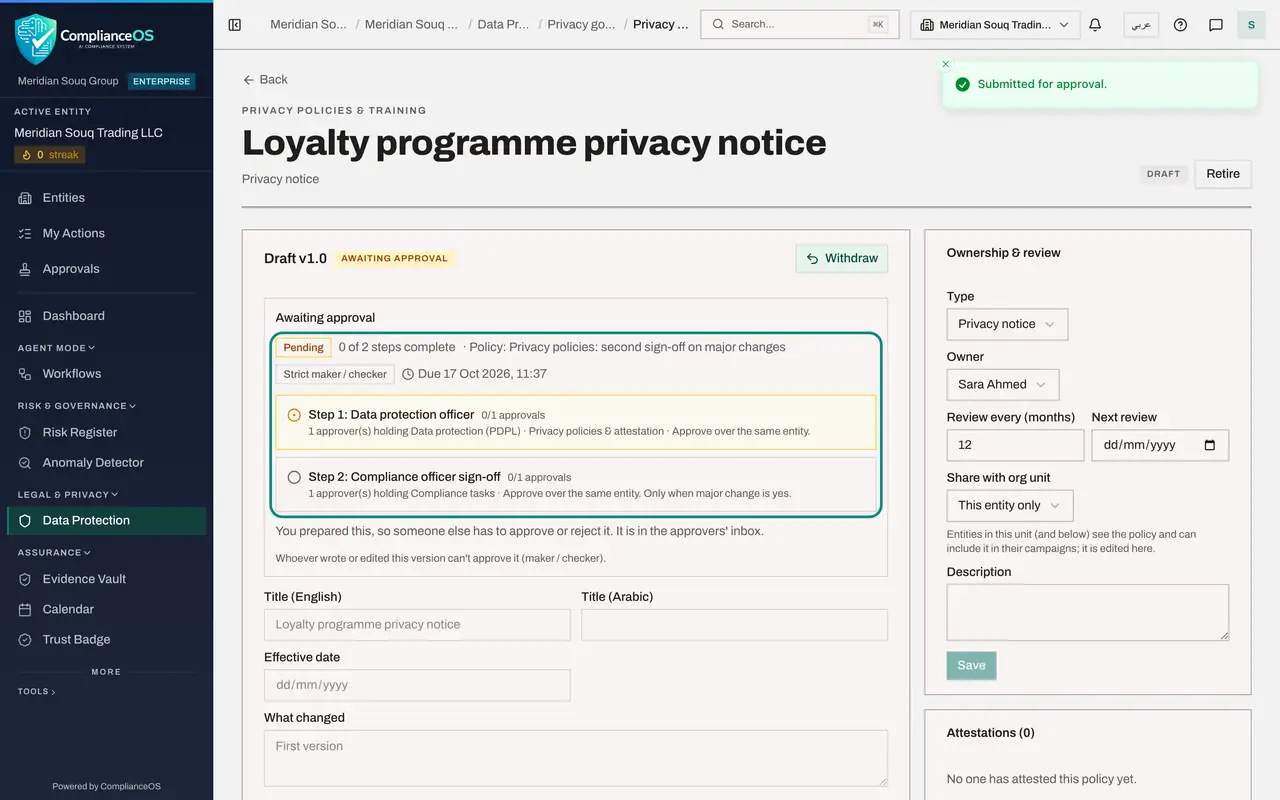
Select Submit for approval at the top of the draft. Your text is saved and the request is opened in one go. The draft now shows Awaiting approval.
- Select Submit for approval
- 6
Read which policy applies
The first line shows Pending, 0 of 2 steps complete, and the name of the policy the administrator saved. Below it are the maker and checker mode, Strict, and the due time, 72 hours from now.
- 7
Read the two steps
Step 1, Data protection officer, is the current step: one person holding the approve permission for privacy policies must approve. Step 2, Compliance officer sign-off, is waiting. It carries the condition Only when major change is yes, which this first version meets.
- 8
Read the note about your own submission
Under the steps, a note says that you prepared this, so someone else has to approve or reject it, and that it is in the approvers' inbox. You have no Approve button. Withdraw, at the top right, takes the version back to a draft if you need to change it.
- 9
Open Approvals and select My requests
Select Approvals in the left menu, then the My requests tab. It lists every record you prepared, with where each approval stands.
- Select Approvals
- Select My requests
- 10
Read your request
The card shows the action, the record and its entity, and the facts the policy tested: Policy type, Major change, Yes, and Legal review outstanding. Under them are the same two steps. Open record takes you back to the draft, and Withdraw cancels the request.
How to check it worked
The draft shows Awaiting approval with 0 of 2 steps complete and the name of the administrator's policy, and the request is listed under My requests in the Approvals inbox.
Common mistakes
- Looking for an Approve button on your own submission and thinking something is broken. Under strict maker and checker the author cannot approve. The note under the steps says so.
- Editing after submitting. A version that is awaiting approval is locked. Select Withdraw first, change it, then submit again.
- Chasing the wrong person. The step marked current step shows whose turn it is. Step 2 does not start until step 1 is complete.
Check your understanding
1. Why does this request have two steps?
- A.Every request always has two steps
- B.Because the first version of a policy is a major change, and the policy adds a second step for major changes
- C.Because Sara asked for two approvers
- D.Because the notice is long
Show answer
Answer: B. Because the first version of a policy is a major change, and the policy adds a second step for major changes
Step 2 of the administrator's policy applies only when major change is yes. A first version is always a major change, so both steps apply.
2. Where can the author see how far every one of their requests has got?
- A.In the audit log
- B.Under My requests in the Approvals inbox
- C.In Organisation settings
- D.Nowhere, only approvers can see it
Show answer
Answer: B. Under My requests in the Approvals inbox
My requests lists the records you prepared, each with its steps and status, and lets you withdraw a request while it is pending.