Lesson 12 of 30
Fill in a connector's set-up form (QuickBooks Online)
What you will be able to do
This lesson is for administrators. You will open the set-up form for QuickBooks Online and learn every field: Client ID, Client Secret, Redirect URI and Environment. You will see when the Save button becomes available, and you will stop before connecting, because a real connection needs your own company's credentials.
Before you start
- You are signed in as an organisation administrator and have opened Integrations for the entity.
- For a real connection, someone in your company has registered an app in the accounting system's developer area. This lesson uses invented values and does not save them.
Steps
- 1
Find the connector you want to set up
On the Integrations page, find the card for your accounting system. This lesson uses QuickBooks Online. Under the coloured button is Set Custom Credentials.
- 2
Select Set Custom Credentials
Select Set Custom Credentials. The form OAuth Credentials opens. OAuth is the sign-in method where the accounting system itself asks you to approve access, so your accounting password is never given to ComplianceOS. Your company registers a small app with the accounting system and copies two values from it into this form. Each entity can use its own app.
- Select Set Custom Credentials
- 3
Client ID: the public name of your app
Client ID identifies your company's registered app to the accounting system. It is not secret. Copy it from the app's page in the accounting system's developer area. Here an invented value is typed to show the form.
- Type Client ID:
MSQ-TRAINING-CLIENT-0001
- Type Client ID:
- 4
Client Secret: the app's password
Client Secret proves the request really comes from your app. Treat it like a password. Copy it straight from the developer area into this box. The box hides what you type.
- Type Client Secret:
(your password)
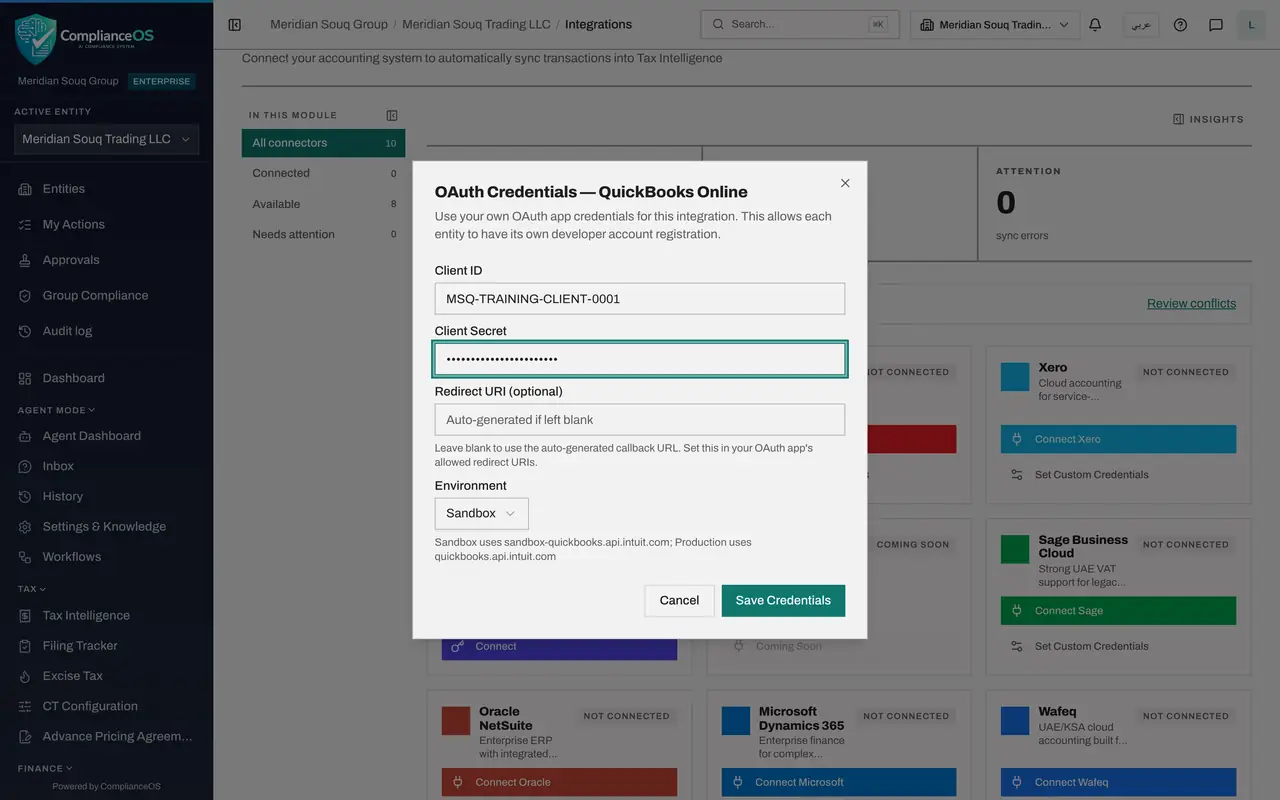
- Type Client Secret:
- 5
Redirect URI: where the accounting system sends you back
After you approve access, the accounting system returns you to this address. The field is optional. Leave it blank to use the address ComplianceOS generates, and add that same address to the allowed redirect addresses in your app.
- 6
Environment: practice or real books
Open Environment. Sandbox is the accounting system's practice area with test data. Production is your real books. The line under the box shows which QuickBooks address each one uses. Start with Sandbox.
- Select Environment
- 7
See the Save button light up
Press Escape to close the list. With Client ID and Client Secret filled in, Save Credentials is no longer greyed out. Saving stores the two values for this entity, and the secret is not shown again afterwards.
- 8
Stop here and select Cancel
This lesson stops before saving, because the values are invented. Select Cancel. Nothing is stored. The Connected total still shows 0 and the card still reads Not connected. With real credentials you would select Save Credentials, then the coloured Connect button, and approve access on the accounting system's own page.
- Select Cancel
How to check it worked
You closed the form with Cancel, the Connected total still shows 0, and the QuickBooks Online card still reads Not connected.
Common mistakes
- Sending the Client Secret by email or chat. Copy it straight from the accounting system into the form.
- Connecting Production first. Start with Sandbox, the practice area, and switch to Production when the test data looks right.
- Forgetting the redirect address. The accounting system only sends you back to addresses listed in your app, so add the ComplianceOS address there.
Check your understanding
1. When does Save Credentials become available?
- A.As soon as the form opens
- B.When both Client ID and Client Secret are filled in
- C.Only after Redirect URI is filled in
- D.Never for administrators
Show answer
Answer: B. When both Client ID and Client Secret are filled in
The button stays greyed out until Client ID and Client Secret both have a value. Redirect URI is optional.
2. What is the Sandbox environment?
- A.Your real books
- B.The accounting system's practice area with test data
- C.A backup of ComplianceOS
- D.The audit log
Show answer
Answer: B. The accounting system's practice area with test data
Sandbox is a practice area provided by the accounting system. Production is your real books.