Lesson 9 of 30
Delegate your approvals while you are away
What you will be able to do
This lesson is for anyone who approves, shown here by the administrator. You will hand part of your work to a named deputy for a set period, limit the delegation to one permission, check that it is in force, and end it early when you are back.
Before you start
- You know who will cover for you, and they have agreed.
- You know the dates you will be away. A delegation can last at most 90 days.
Steps
- 1
Open Access control and select the Delegations tab
In Settings choose Access control, then the Delegations tab. A delegation lets a named deputy act for you for a set period. The audit log records both names. Mine shows the delegations you gave or received, and Everyone's shows the whole organisation's.
- Select Delegations
- 2
Select New delegation
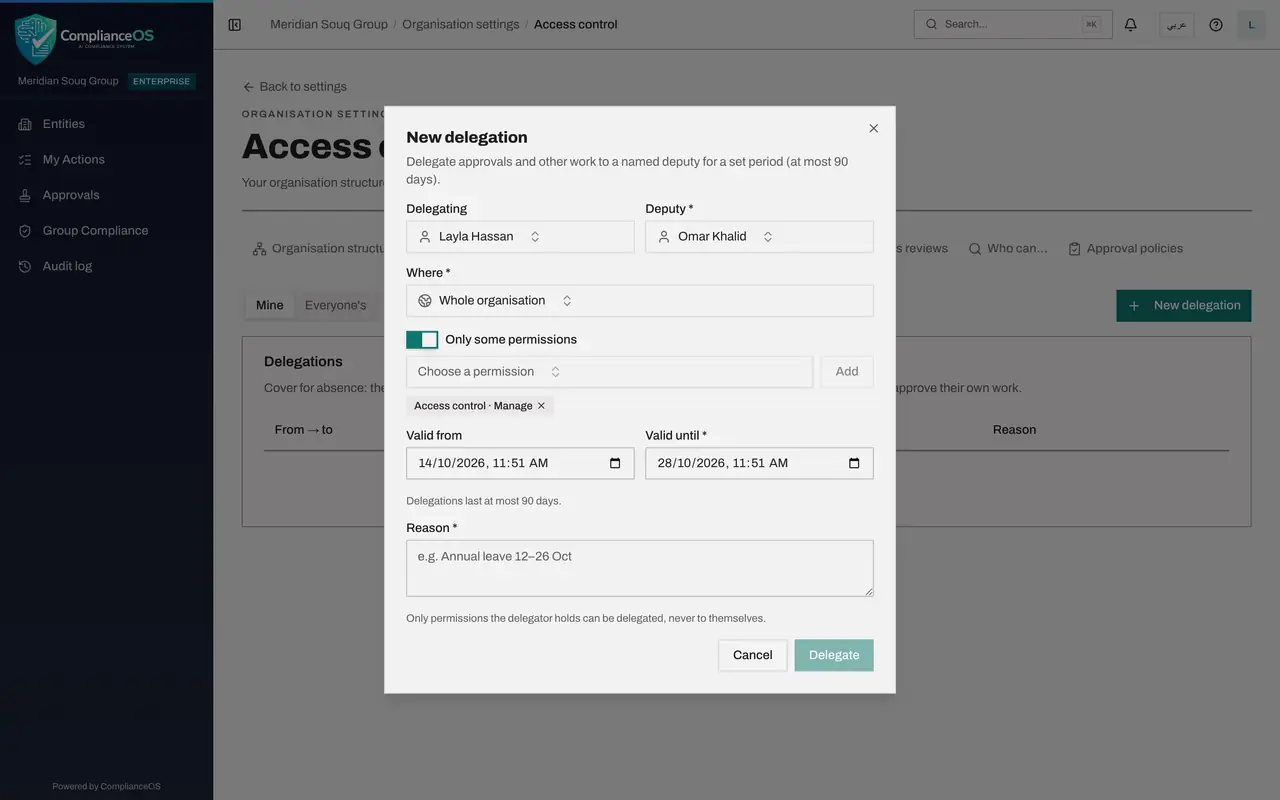
Select New delegation. A form opens. Delegating already shows your own name. As an administrator you could choose another person there, to set up cover on their behalf.
- Select New delegation
- 3
Choose your deputy
Open Deputy and choose the person who will cover for you. Here it is Omar Khalid, the second administrator. You cannot choose yourself.
- Select Choose a person
- 4
Check where the delegation applies
Where is set to Whole organisation, so the deputy covers you everywhere. To cover one unit or one entity only, choose it here.
- 5
Switch on Only some permissions
With the switch off, the deputy gets everything you hold in that place. Switch on Only some permissions to hand over part of your work. A permission box and an Add button appear.
- 6
Choose the permission and select Add
Open Choose a permission, type access in the search box and choose Access control, Manage. That is the permission that approves role requests. Select Add. The permission is listed under the switch.
- Select Choose a permission
- Type Search permissions…:
access control - Select Add
- 7
Set the end date
Valid from is filled in with now. In Valid until, enter the date and time you are back. The form suggests two weeks. The delegation ends by itself at that moment.
- Type Valid until *:
2026-10-24T18:00
- Type Valid until *:
- 8
Give the reason
Type a short reason. It is required. It is kept with the delegation and shown in the list, so anyone reviewing access later can see why it was given.
- Type Reason *:
Annual leave: Omar covers access approvals
- Type Reason *:
- 9
Select Delegate
Select Delegate. The form closes and the delegation takes effect straight away. The new line shows who is delegating to whom, where it applies, what is covered, the dates and your reason.
- Select Delegate
- 10
Select Revoke when you are back early
If you return before the end date, select Revoke on the line. A box asks you to confirm.
- Select Revoke
- 11
Confirm with Revoke
Select Revoke in the box. The delegation ends at once and leaves the list.
- Select Revoke
- 12
Switch on Show ended and revoked
Switch on Show ended and revoked to see past delegations, each marked with how it ended. This history is what an access review looks at.
How to check it worked
The delegation appears in the Delegations list with your name, an arrow and your deputy's name, the place, the permission, the dates and your reason. After you revoke it, it shows only when Show ended and revoked is switched on.
Common mistakes
- Sharing your password instead of delegating. A delegation records both names in the audit log. A shared password hides who really acted.
- Leaving the end date at the default of two weeks. Set the date you are actually back, so the deputy does not keep your access longer than needed.
- Expecting the deputy to approve their own work. A deputy can act for you, but can never approve something they prepared themselves.
Check your understanding
1. What is the longest a delegation can last?
- A.14 days
- B.30 days
- C.90 days
- D.Until you revoke it
Show answer
Answer: C. 90 days
The form states that delegations last at most 90 days. For a longer absence, give the person a role instead.
2. You switch on Only some permissions and add one permission. What does the deputy receive?
- A.Everything you hold
- B.Only the permission you added, in the place you chose
- C.Nothing until an administrator approves
- D.Your password
Show answer
Answer: B. Only the permission you added, in the place you chose
With Only some permissions on, the deputy gets just the listed permissions. With it off, the deputy gets everything the delegator holds in that place.