Lesson 8 of 30
Edit, pause and remove a saved approval policy
What you will be able to do
This lesson is for administrators. You will jump to a saved policy from the list of saved policies, change one of its settings, pause it with the Policy active switch, and finally remove it so that the entity follows the organisation policy again.
Before you start
- The E-Commerce entity has its own saved policy for publishing privacy policies (previous lesson).
- A second privacy lead has now joined the E-Commerce entity, so the entity no longer needs its own rule.
Steps
- 1
Select Publish a privacy policy version
In Settings, Access control, Approval policies, select Publish a privacy policy version. Its badge reads 2 saved. Saved policies for this action lists both places: the E-Commerce entity with one step and the whole organisation with two.
- 2
Jump to the entity's policy
Select Meridian Souq E-Commerce FZ-LLC in the list of saved policies. Policy for changes to that entity and the editor loads its policy. This is quicker than searching in the Policy for box.
- 3
Change a setting and select Save policy
To edit a saved policy, change what you need and save again. Here, enter 48 in SLA, in hours, and select Save policy. Requests opened from now on get a due time two days ahead. Requests already open keep the rules they started with.
- Type SLA (hours):
48 - Select Save policy
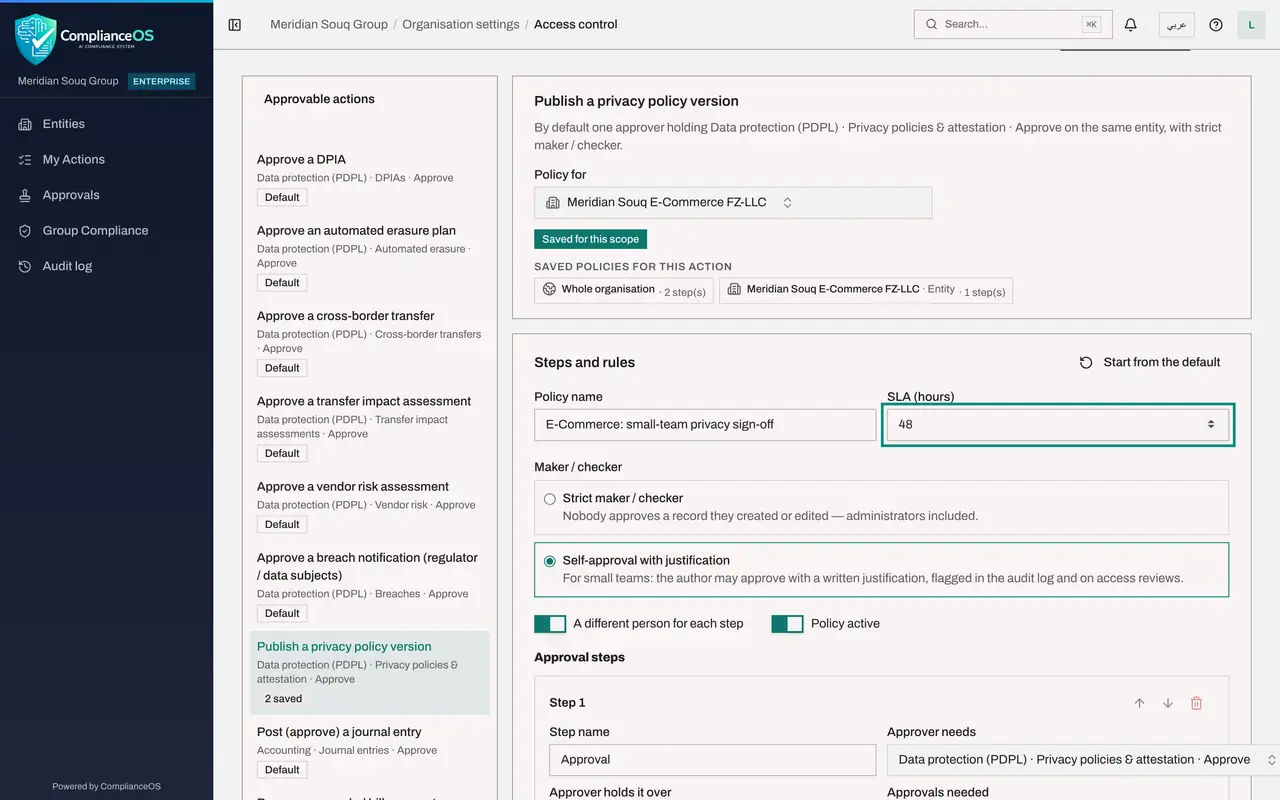
- Type SLA (hours):
- 4
Switch off Policy active and save
To pause a policy without losing it, switch off Policy active and select Save policy. In the list of saved policies, the entity's entry is now marked inactive. The policy is kept, so you can switch it on again later.
- Select Save policy
- 5
Select Remove saved policy
The entity no longer needs its own rule, so remove it. Scroll to the bottom of the editor and select Remove saved policy. A box names the policy and the place, and explains that records will follow the next policy up and that open requests keep the policy they started with.
- Select Remove saved policy
- 6
Confirm with Remove saved policy
Check that the place is Meridian Souq E-Commerce FZ-LLC, then select Remove saved policy in the box. The badge changes to Inherited from the organisation policy, the editor shows the two-step organisation rule again, and the action is back to 1 saved.
- Select Remove saved policy
How to check it worked
Publish a privacy policy version shows 1 saved again. With Policy for set to the E-Commerce entity, the badge reads Inherited from the organisation policy.
Common mistakes
- Expecting a change to affect requests that are already open. Open requests keep the policy they started with. Only new requests follow the edited policy.
- Removing the organisation policy when you meant to remove an entity's. Check the place named in the Remove saved policy box before you confirm.
- Pausing a policy and forgetting it. A paused policy is marked inactive in the list of saved policies. Review that list from time to time.
Check your understanding
1. You remove the policy saved for one entity. What applies to that entity afterwards?
- A.Nothing: no approval is needed
- B.The next policy up: its unit's, then the organisation's, then the platform default
- C.The removed policy, for 30 more days
- D.The policy of the other entity
Show answer
Answer: B. The next policy up: its unit's, then the organisation's, then the platform default
Removing a saved policy never leaves a gap. Records follow the next policy up the organisation structure.
2. A request was opened yesterday. Today the administrator edits the policy. Which rules does the request follow?
- A.The edited policy
- B.The policy as it was when the request was opened
- C.The platform default
- D.It is cancelled
Show answer
Answer: B. The policy as it was when the request was opened
Requests already open keep the policy they started with, so approvals in progress are never changed under people's feet.