Lesson 19 of 30
Load the chart of accounts
What you will be able to do
This lesson is for administrators and finance staff who load data during set-up. You will load the standard chart of accounts with one button, download the template for your own accounts, import a file of accounts, and see how wrong rows are reported.
Before you start
- You are signed in as an organisation administrator, or as a person with create rights in Accounting for the entity, such as the accountant.
- You have a small CSV file of the accounts that are special to your business. The sample file has five accounts, one of them with a deliberate mistake.
Steps
- 1
Open Accounting and select Chart of Accounts
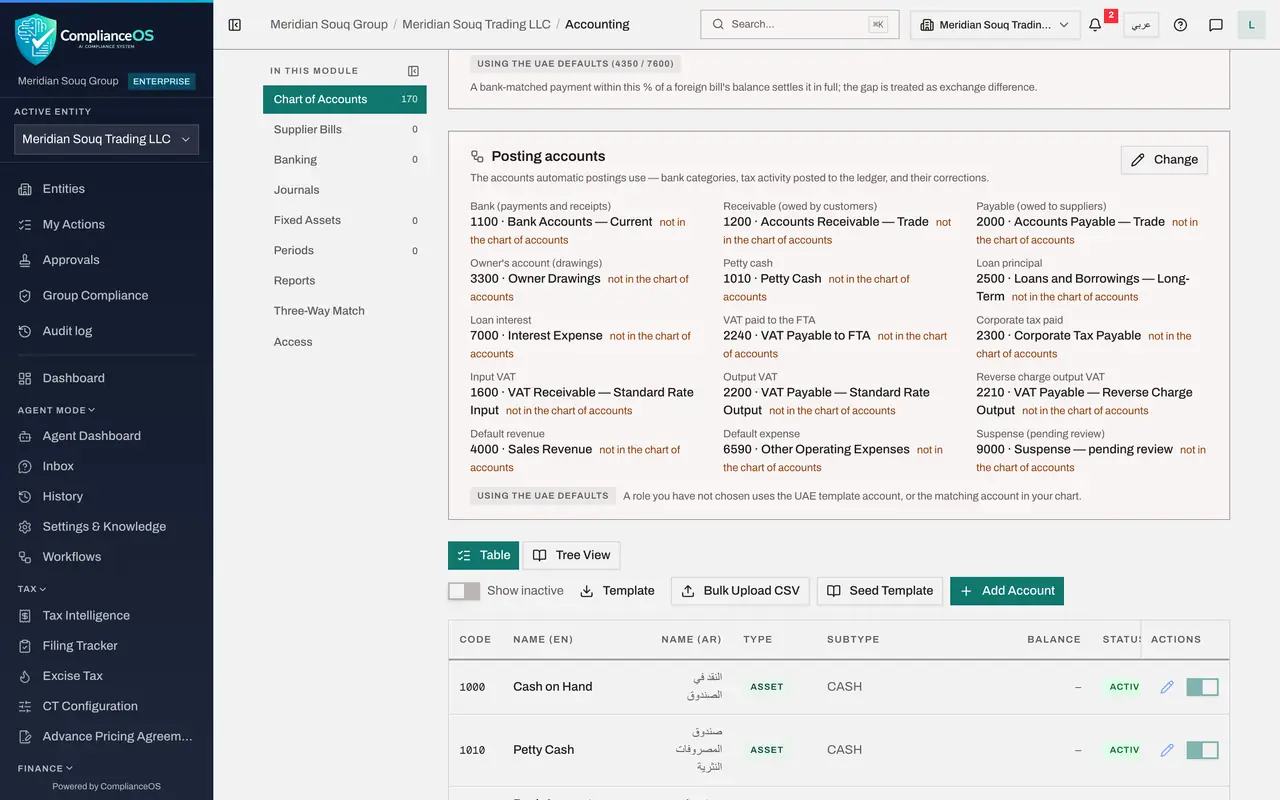
In the left menu select Accounting. The Chart of Accounts section opens. The chart of accounts is the list of headings that every amount in the books is filed under. Scroll down to the list of accounts and its buttons: Template, Bulk Upload CSV, Seed Template and Add Account.
- Select Chart of Accounts0 (0)
- 2
Select Seed Template
Select Seed Template. A small window, Seed Chart of Accounts, asks which standard chart to load. Open the Template list to see the choices.
- Select Seed Template
- Select Template
- 3
Choose UAE Trading and select Seed
Choose UAE Trading, the chart for a trading company, and select Seed. The standard accounts are loaded, each with its code, its English and Arabic name, its type and its subtype. The number beside Chart of Accounts on the left counts them. If the chart already holds accounts, seeding adds only the ones that are missing.
- Choose UAE Trading
- Select Seed
- 4
Select Template
Now add the accounts that are special to your business. Select Template. A file chart_of_accounts_template.csv is downloaded with the column headings and sample rows: account code, account name, account type, account subtype, supply type, parent account code and description.
- Select Template
- 5
Select Bulk Upload CSV and pick the accounts file
Fill in the template, then select Bulk Upload CSV and pick your file. The sample file has five accounts, and the last one has the type COST, which does not exist.
- Upload Choose a file:
meridian-extra-accounts.csv
- Upload Choose a file:
- 6
Find one of your accounts
Messages report each problem with its row number. Row 4, account 2150, already exists as a system account of the standard chart, so it is not modified. Row 6 has the type COST, and its message lists the accepted types: ASSET, LIABILITY, EQUITY, REVENUE or EXPENSE. A last message gives the totals created, updated and skipped. Your own accounts are now in the list, for example 6315, Online Marketplace Fees. The pencil edits an account and the switch makes it inactive.
How to check it worked
The Chart of Accounts lists the standard accounts and your own, such as 6315 Online Marketplace Fees, and you can say which rows of the file were not imported and why.
Common mistakes
- Using an account type that does not exist. The type must be ASSET, LIABILITY, EQUITY, REVENUE or EXPENSE, written exactly so.
- Leaving supply type empty on revenue and expense accounts. Supply type, goods or services, drives the VAT treatment of what is posted to the account.
- Relying on the message at the corner of the screen and missing it. It disappears after a few seconds. If you are not sure what happened, look at the list or import the file again: existing rows are updated, not doubled.
Check your understanding
1. What does Seed Template do on the Chart of Accounts?
- A.Deletes all accounts
- B.Loads the standard UAE chart of accounts in one go
- C.Downloads a spreadsheet
- D.Posts a journal entry
Show answer
Answer: B. Loads the standard UAE chart of accounts in one go
Seed Template fills an empty chart with the standard accounts, so you only need to import the accounts that are special to your business.
2. A row in the accounts file has the type COST. What happens?
- A.It is imported as EXPENSE
- B.The whole file is refused
- C.That row is skipped and reported with its row number, and the other rows are imported
- D.The account is created without a type
Show answer
Answer: C. That row is skipped and reported with its row number, and the other rows are imported
The import reports the row number and the accepted types, counts the row as skipped, and still loads the good rows.