Lesson 15 of 30
A key can only carry what its creator holds
What you will be able to do
This lesson is for administrators who do not hold Full access, and for anyone who wonders why a role is greyed out when creating a key. Rashid Karim is a finance manager who was also given the Organisation administrator role, so he can open API keys. You will see which key roles are closed to him, read the reason shown under each, and see how limiting the key to one entity changes what he may create.
Before you start
- An access administrator has granted you the Organisation administrator role for the whole organisation, and a second administrator approved it. In this course Layla Hassan granted it and Omar Khalid approved it.
- You do not hold Full access. Your other role, Finance manager, covers Meridian Souq Trading LLC only.
Steps
- 1
Open API Keys and select Create Key
In Organisation settings, select API keys and audit log, then Manage API Keys. The page opens because the Organisation administrator role includes Organisation, Manage. Select Create Key.
- Select Create Key
- 2
Type a name
Type a name for the key, as before.
- Type Name *:
Bank feed reader (finance)
- Type Name *:
- 3
Read why some roles are greyed out
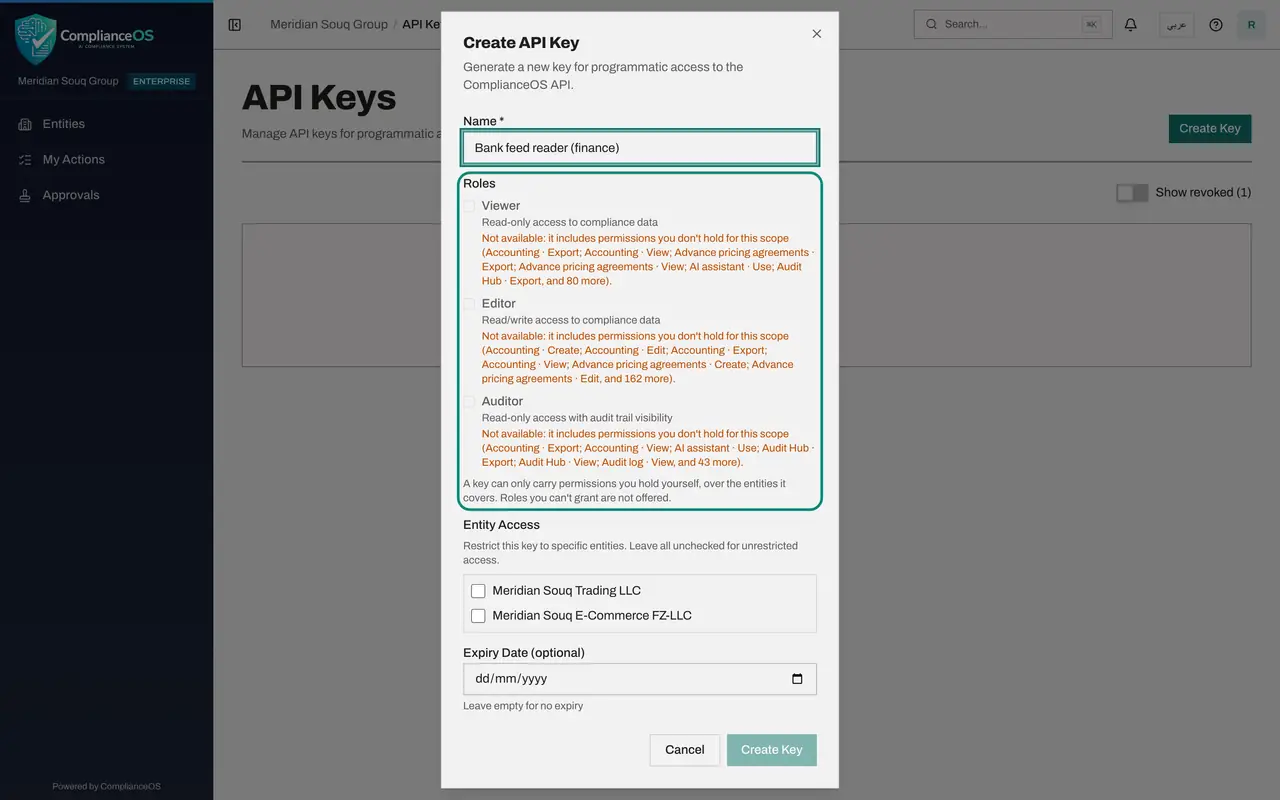
All three roles are greyed out. Under each one an orange line begins Not available: it includes permissions you don't hold for this scope. It then lists the first few missing permissions and says how many more there are. With no entity ticked the key would cover the whole organisation, where Rashid holds little beyond administration.
- 4
Tick one entity and watch the roles change
Under Entity Access tick Meridian Souq Trading LLC, the entity where Rashid is the finance manager. The lists get shorter, because his finance permissions count on this entity: the accounting permissions are no longer listed as missing. The roles stay closed, since each still includes permissions he does not hold.
- Select Meridian Souq Trading LLC
- 5
Select Cancel
Select Cancel. No key is created. If the other system really needs a role you cannot grant, ask a person who holds those permissions to create the key.
- Select Cancel
How to check it worked
You can read, under each greyed-out role, the sentence that begins Not available, and name at least one permission it lists. No key was created in this lesson.
Common mistakes
- Asking for Full access so that the roles are no longer greyed out. Ask instead whether the key really needs that role, or have a person who holds the permissions create it.
- Ignoring Entity Access. Your permissions differ from entity to entity, so the roles you may put on a key change when you tick an entity.
Check your understanding
1. Why is a role greyed out in the Create API Key window?
- A.The plan does not include it
- B.It includes permissions the creator does not hold for the entities the key covers
- C.Someone else is using it
- D.The key name is too long
Show answer
Answer: B. It includes permissions the creator does not hold for the entities the key covers
A key can only carry permissions its creator holds. The line under the role lists the permissions that are missing.
2. Rashid needs a key with a role he cannot grant. What is the right way forward?
- A.Borrow an administrator's sign-in
- B.Ask a person who holds those permissions to create the key, or ask an access administrator for a suitable role
- C.Create the key anyway
- D.Turn off the rule in settings
Show answer
Answer: B. Ask a person who holds those permissions to create the key, or ask an access administrator for a suitable role
The rule cannot be switched off. Either someone who holds the permissions creates the key, or the creator is given a role that includes them, with approval.