Lesson 13 of 30
What the other connectors ask for, and the write-back switch
What you will be able to do
This lesson is for administrators. You will open the set-up forms of the other connectors to see what each one asks for beyond Client ID and Client Secret: nothing more for Zoho Books, an account number for Oracle NetSuite, two values for Microsoft Dynamics 365, and a single API key for ClearTax UAE. Then you will find the switch that decides whether ComplianceOS may write anything back to your accounting system, which is off by default.
Before you start
- You have read the previous lesson on the QuickBooks Online form.
- You are signed in as an organisation administrator and have opened Integrations for the entity.
Steps
- 1
Open the Zoho Books form
On the Zoho Books card select Set Custom Credentials. The form has the same three fields as QuickBooks Online: Client ID, Client Secret and the optional Redirect URI. There is no Environment box. Xero, Sage Business Cloud and Wafeq show the same three fields.
- Select Set Custom Credentials
- 2
Cancel, then open the Oracle NetSuite form
Select Cancel, then select Set Custom Credentials on the Oracle NetSuite card. Below the three usual fields is NetSuite Account ID. You find it in NetSuite under Setup, Company, Company Information. A sandbox account number ends with SB1.
- Select Cancel
- Select Set Custom Credentials
- 3
Cancel, then open the Microsoft Dynamics 365 form
Select Cancel, then select Set Custom Credentials on the Microsoft Dynamics 365 card. This form adds two boxes. Azure AD Tenant ID is the identifier of your company's Microsoft directory. BC Environment is the name of your Business Central environment, usually production or sandbox.
- Select Cancel
- Select Set Custom Credentials
- 4
Cancel, then select Connect on ClearTax UAE
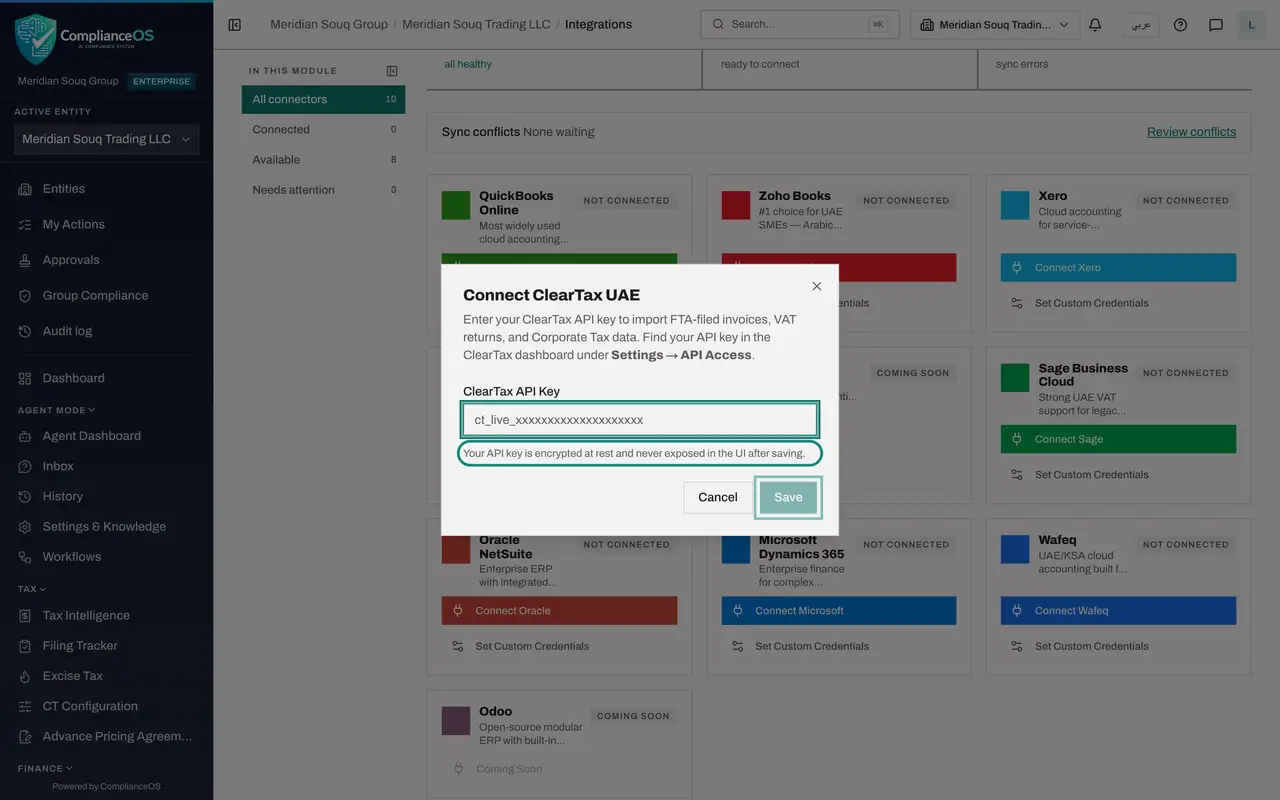
Select Cancel, then select Connect on the ClearTax UAE card. ClearTax does not use an OAuth app. The form asks for one value, the ClearTax API Key, a long code that works like a password for one system talking to another. You find it in the ClearTax dashboard under Settings, then API Access.
- Select Cancel
- Select Connect
- 5
Read how the key is protected
The note under the box says the key is encrypted at rest and never exposed after saving. Save stays greyed out until a key is entered. This lesson enters nothing.
- 6
Select Cancel
Select Cancel. Every card still reads Not connected and the Connected total is 0.
- Select Cancel
- 7
Open Entity settings from the menu under your initial
Now find the write-back switch. While you are on one of the entity's pages, open the menu under your initial at the top right and select Entity settings. The page opens on the General tab, with the entity's details.
- Select Account menu
- Select Entity settings
- 8
Find ERP Write-Back
Scroll down the General tab to ERP Write-Back. ERP means your accounting or business system. The line under it reads: When enabled, computed figures are pushed back to the connected ERP. Off by default. The box is not ticked, so for this entity data only flows in.
- 9
Leave write-back off
Leave the box unticked. Ticking it and selecting Save Changes at the bottom of the page would allow ComplianceOS to push records to the connected system. Agree that with your finance manager first, and only after a system is connected.
How to check it worked
You closed every form with Cancel, nothing is connected, and on the entity's settings page the ERP Write-Back box is not ticked.
Common mistakes
- Pasting a ClearTax API key into chat or email to ask a colleague to enter it. Enter it yourself. It is hidden as you type and is not shown again after saving.
- Using the NetSuite production account number while testing. A sandbox account number ends with SB1.
- Ticking ERP Write-Back without agreeing it with finance. With it on, ComplianceOS may change records in your accounting system. With it off, data only flows in.
Check your understanding
1. Which connector is linked with an API key instead of an OAuth app?
- A.Zoho Books
- B.Xero
- C.ClearTax UAE
- D.Wafeq
Show answer
Answer: C. ClearTax UAE
ClearTax UAE asks for one API key, found in the ClearTax dashboard under Settings, API Access. The others use an OAuth app with a Client ID and Client Secret.
2. ERP Write-Back is off for an entity. What does that mean?
- A.Nothing can be imported from the accounting system
- B.Data flows in from the accounting system, but ComplianceOS does not push anything back to it
- C.The connector is disconnected
- D.Sync runs once a day only
Show answer
Answer: B. Data flows in from the accounting system, but ComplianceOS does not push anything back to it
Write-back controls the outward direction only. It is off by default, so a connected system is read from but never changed.