Lesson 29 of 30
Posting accounts and exchange-difference settings
What you will be able to do
This lesson is for administrators and finance managers. Some entries reach the books automatically, for example when a bank line is categorised or tax activity is posted. Two settings in Accounting decide which accounts those automatic entries use. You will read the posting accounts, change one and save it, and look at the accounts and tolerance used for exchange differences on foreign-currency payments.
Before you start
- You are signed in as an organisation administrator, or as a finance manager for the entity.
- The entity has a chart of accounts. It was loaded in the lesson on the chart of accounts, customers and items.
- You have agreed any change with the person responsible for the books.
Steps
- 1
Open Accounting, Chart of Accounts
In the left menu select Accounting. The Chart of Accounts section opens. Above the list of accounts are two settings cards: Foreign exchange on payments, and Posting accounts.
- Select Chart of Accounts172 (172)
- 2
Read the posting accounts
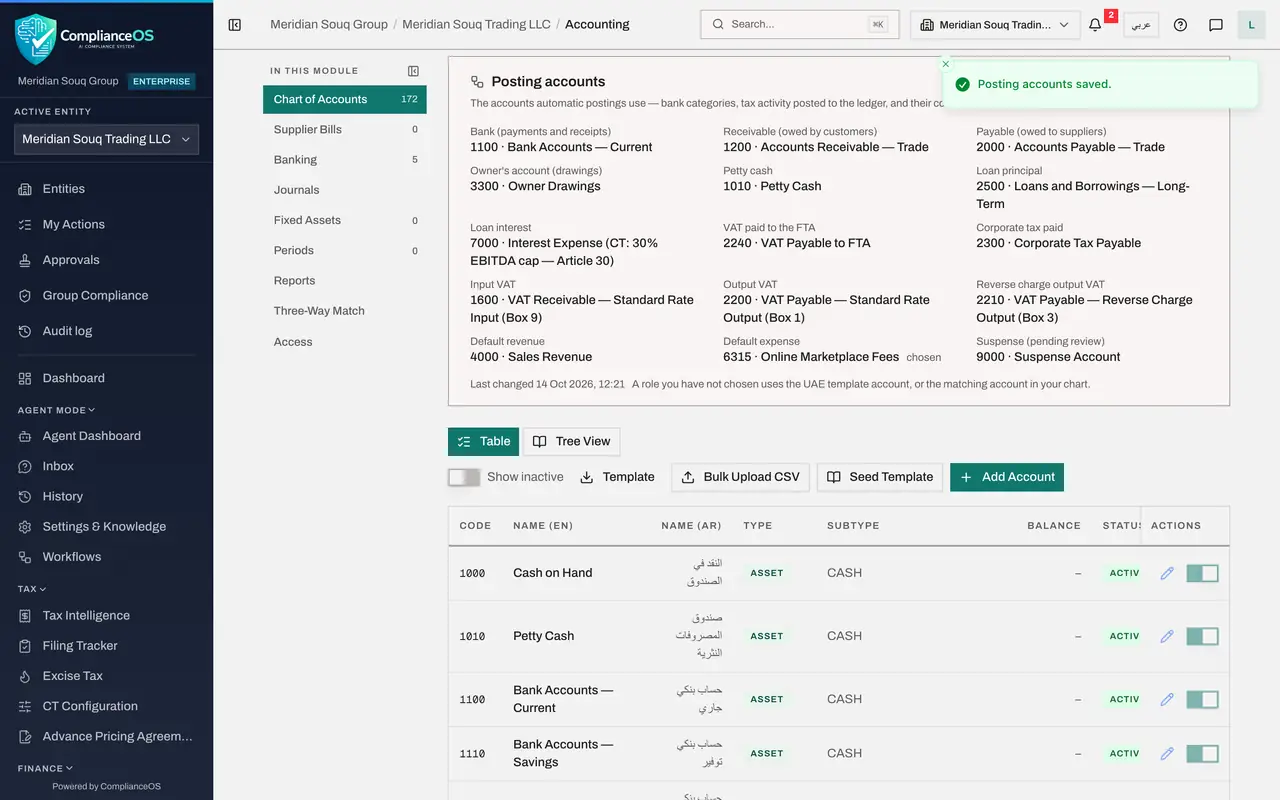
Posting accounts lists the accounts that automatic postings use. Each line is a role: bank, receivable, payable, the owner's account, petty cash, loan principal and interest, the tax accounts for VAT and corporate tax, default revenue, default expense, and suspense, which holds items pending review. Beside each role is the account in use. The label Using the UAE defaults means nothing has been changed.
- 3
Select Change
Select Change. Each role becomes a list. A role set to Default uses the standard account shown in brackets. The note under the lists says each role only offers accounts of the right type.
- Select Change
- 4
Choose the account for Default expense
Open the list for Default expense, the account used when an expense has no better home. The list offers Default and the expense accounts in your chart. Choose 6315, Online Marketplace Fees, to see how a choice is shown.
- Select Default (6590)
- Choose 6315 · Online Marketplace Fees
- 5
Select Save
Select Save. The message Posting accounts saved confirms it. The card now shows the account with the word chosen beside it, and a line saying when the settings were last changed.
- Select Save
- 6
Put the role back to Default
A general expense should not land in a marketplace account, so put the role back. Select Change again, open Default expense, choose Default, and select Save. Choosing Default returns the role to the automatic lookup.
- Select Change
- Select 6315 · Online Marketplace Fees
- Choose Default (6590)
- Select Save
- 7
Read Foreign exchange on payments
Scroll up to Foreign exchange on payments. When a bill in a foreign currency is paid at a different rate from the one it was booked at, the difference is posted to the exchange gain account or the exchange loss account. The third value is the bank-match settlement tolerance.
- 8
Select Edit to see the choices
Select Edit. Exchange gain account must be a revenue account, and Exchange loss account must be an expense account. Bank-match settlement tolerance is a percentage: a payment matched from the bank within that percentage of a foreign bill's balance settles the bill in full, and the gap is treated as exchange difference.
- Select Edit
- 9
Select Cancel
The standard accounts and the tolerance of 2 per cent suit most companies, so select Cancel and leave them as they are.
- Select Cancel
How to check it worked
After the first Save the Posting accounts card showed the account you chose for Default expense with the word chosen. After the second Save the role is back on its default account.
Common mistakes
- Changing a posting account in the middle of a period without telling finance. Entries posted from then on go to the new account, which splits the period's figures over two accounts.
- Pointing a role at an account of the wrong type. The lists only offer accounts of the right type for each role, so if your account is missing, check its type in the chart.
- Setting the bank-match tolerance too wide. A wide tolerance settles bills in full although a real amount is still unpaid.
Check your understanding
1. A role in Posting accounts shows Default. Which account is used?
- A.None
- B.The UAE template account, or the matching account in your chart
- C.The first account in the chart
- D.The suspense account
Show answer
Answer: B. The UAE template account, or the matching account in your chart
The card says a role you have not chosen uses the UAE template account, or the matching account in your chart.
2. What is the bank-match settlement tolerance for?
- A.It limits how much may be paid per day
- B.A payment matched from the bank within this percentage of a foreign bill's balance settles the bill in full, and the gap is treated as exchange difference
- C.It sets the VAT rate
- D.It is the bank's fee
Show answer
Answer: B. A payment matched from the bank within this percentage of a foreign bill's balance settles the bill in full, and the gap is treated as exchange difference
Foreign-currency bills are rarely paid at exactly the booked rate. Within the tolerance the small gap is posted as an exchange gain or loss, not left as an unpaid balance.