Lesson 24 of 29
Record the outcome, read the insights and export
What you will be able to do
This lesson is for the legal and tax teams. The authority has cancelled the penalty of 12,000 dirhams that was escalated in lesson 23. You will record that outcome, see how the figures and the track record change, open the Insights panel, and export the disputes to a spreadsheet file.
Before you start
- The penalty dispute of 12,000 dirhams is on record with the status Escalated, Level 1, as left by lesson 23.
- You have the authority's decision to hand.
- You are signed in with the Legal counsel role, which may edit and export disputes.
Steps
- 1
Choose Resolve on the dispute
On the row of the penalty dispute, select the three dots and choose Resolve. The form is headed Resolve Dispute. It records the outcome and closes the dispute.
- Select Actions
- Select Resolve
- 2
Choose the resolution
Open Resolution. Upheld means the authority's decision stands. Overturned means it was cancelled. Partial means it was reduced or changed in part. Withdrawn means you dropped the dispute. A resolution is required. The penalty was cancelled in full, so choose Overturned.
- Select Resolution
- Choose Overturned
- 3
Write the outcome and resolve
In Notes, record the decision: its date and reference, and what happens next. The notes are optional but they are the only place the detail of the outcome is kept. Then select Resolve Dispute. A message confirms that the dispute was resolved.
- Type Describe the resolution outcome and any relevant details...:
Reconsideration decision of 13 October 2026: penalty of AED 12,000 can… - Select Resolve Dispute
- Type Describe the resolution outcome and any relevant details...:
- 4
Read the resolved row
The status is now Resolved, with the level it reached and the outcome Overturned under it. The phase deadline column says Closed, no deadline running, so no more reminders are sent for this dispute.
- 5
Read the outcome in the detail panel
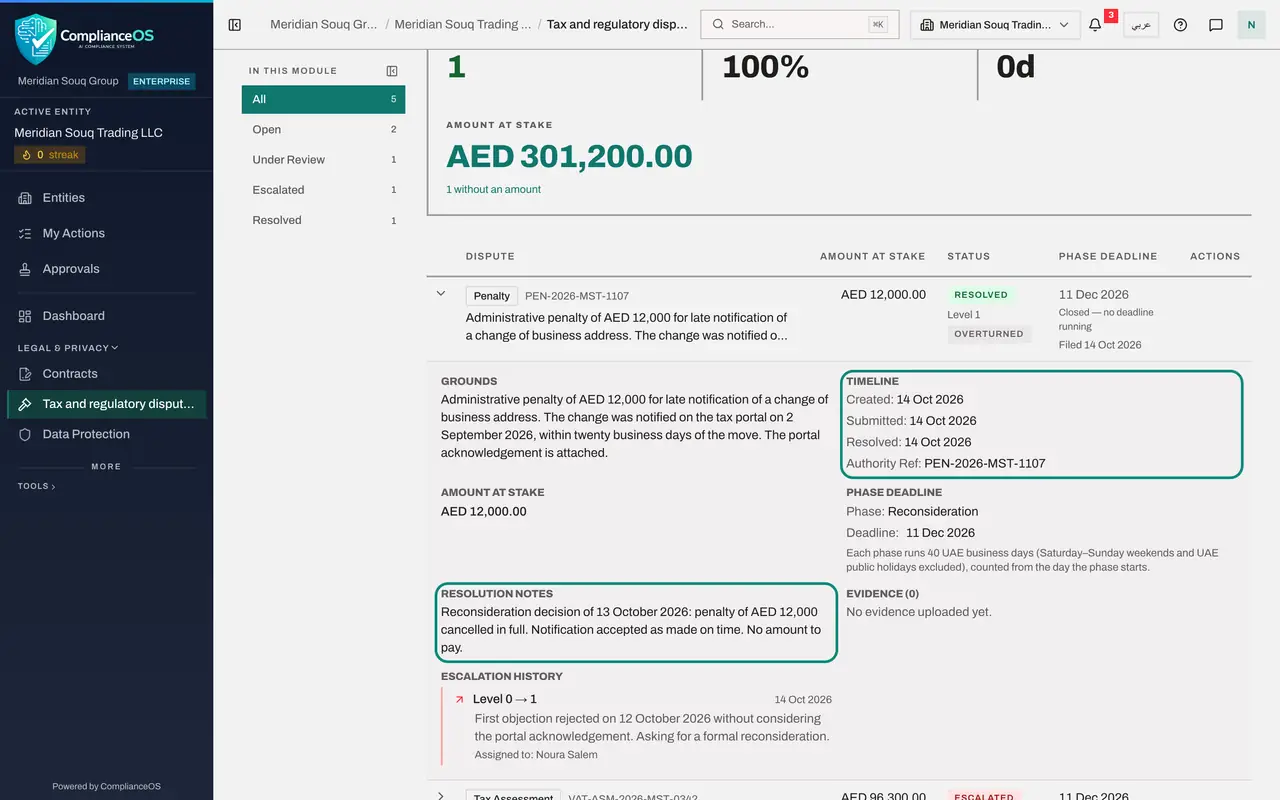
Select the row to open its detail panel. Timeline now includes the date the dispute was resolved, and Resolution Notes shows what you wrote. The evidence and the escalation history stay on record.
- Select Details of dispute PEN-2026-MST-1107
- 6
Read the figures again
Close the panel and scroll back to the figures. Resolved has gone up by one. Overturn Rate shows the share of resolved disputes that ended in your favour. Avg Resolution is the average number of days from filing to outcome. Amount at stake has dropped, because it only counts disputes that are still running.
- Select Details of dispute PEN-2026-MST-1107
- 7
Open the Insights panel
Select Insights at the top right of the figures. A panel slides in from the right. Caseload repeats the counts. Track Record shows how the resolved disputes ended. The AI note sums up the caseload in one sentence.
- Select Show insights panel
- 8
Pin the panel, or close it
Pin, at the top of the panel, docks it beside the table, so that it is there every time you open this screen. The cross closes it. Here we close it.
- Select Close
- 9
Filter to the resolved disputes
In the list on the left, select Resolved. The table keeps only the disputes whose status is Resolved, and the dispute you have just closed is among them.
- Select Resolved1 (1)
- 10
Export the disputes
At the top right of the screen, select Export CSV. A spreadsheet file is saved to your computer with one line for each dispute: type, grounds, authority reference, amount, currency, status, escalation level, resolution, and the dates it was filed and resolved. The file contains the full grounds, so treat it as confidential.
- Select Export CSV
How to check it worked
the penalty of 12,000 dirhams shows the status Resolved with the outcome Overturned under it, its phase deadline reads Closed, and a file named disputes with today's date is in your downloads folder.
Common mistakes
- Choosing Upheld when you won. Upheld means the authority's decision stands, so you lost. Overturned means the decision was cancelled, so you won.
- Resolving a dispute to tidy the list while the case is still running. A resolved dispute has no deadline and no reminders, and it cannot be escalated.
- Leaving the notes empty. Record the date and reference of the decision, and what happens to the money, while you still have the letter in front of you.
Check your understanding
1. The authority cancels its penalty after your objection. Which resolution do you record?
- A.Upheld
- B.Overturned
- C.Partial
- D.Withdrawn
Show answer
Answer: B. Overturned
Overturned means the authority's decision was set aside. Upheld would mean it stands.
2. What does the Overturn Rate figure show?
- A.The share of resolved disputes that ended in your favour
- B.The share of disputes filed this year
- C.The share of disputes with evidence
- D.The share of deadlines missed
Show answer
Answer: A. The share of resolved disputes that ended in your favour
It is the number of overturned disputes as a share of all resolved ones: your record against the authorities.