Lesson 19 of 29
Approve a draft and turn it into a contract
What you will be able to do
This lesson is for the person who approves contract drafts. You are Mariam Aziz, the Compliance officer. Legal counsel has prepared a draft consulting agreement. You will open it, approve it with a comment, and finalise it into a live contract.
Before you start
- A draft is waiting under Contract Drafts, prepared by a colleague as in lessons 17 and 18.
- You hold a role that may approve contract drafts, and you did not draft or revise this one. The Compliance officer role may approve.
- You have read the draft and its checks, or you are about to.
Steps
- 1
Open your Approvals inbox
In the left menu, select Approvals. Under To decide is every request waiting on a step you can approve. The contract draft your colleague prepared is there, with the policy it falls under and the step it is waiting on.
- Select Approvals1
- 2
Open the draft and read it
Select Open record. The Contracts screen opens on the Draft a Contract tab with the draft's review window. Read the banner, the drafted clauses, the compliance checks and the agent's review notes, as in lesson 18. You are the second pair of eyes, so read it as if you had not been told it was fine.
- Select Open record
- 3
Select Approve draft
Scroll to the foot of the window. For you, Approve draft is available, because you did not write this draft. Select it. A small form headed Approve contract draft opens. It says your approval is recorded under the organisation's contract approval policy.
- Select Approve draft
- 4
Add a comment and approve
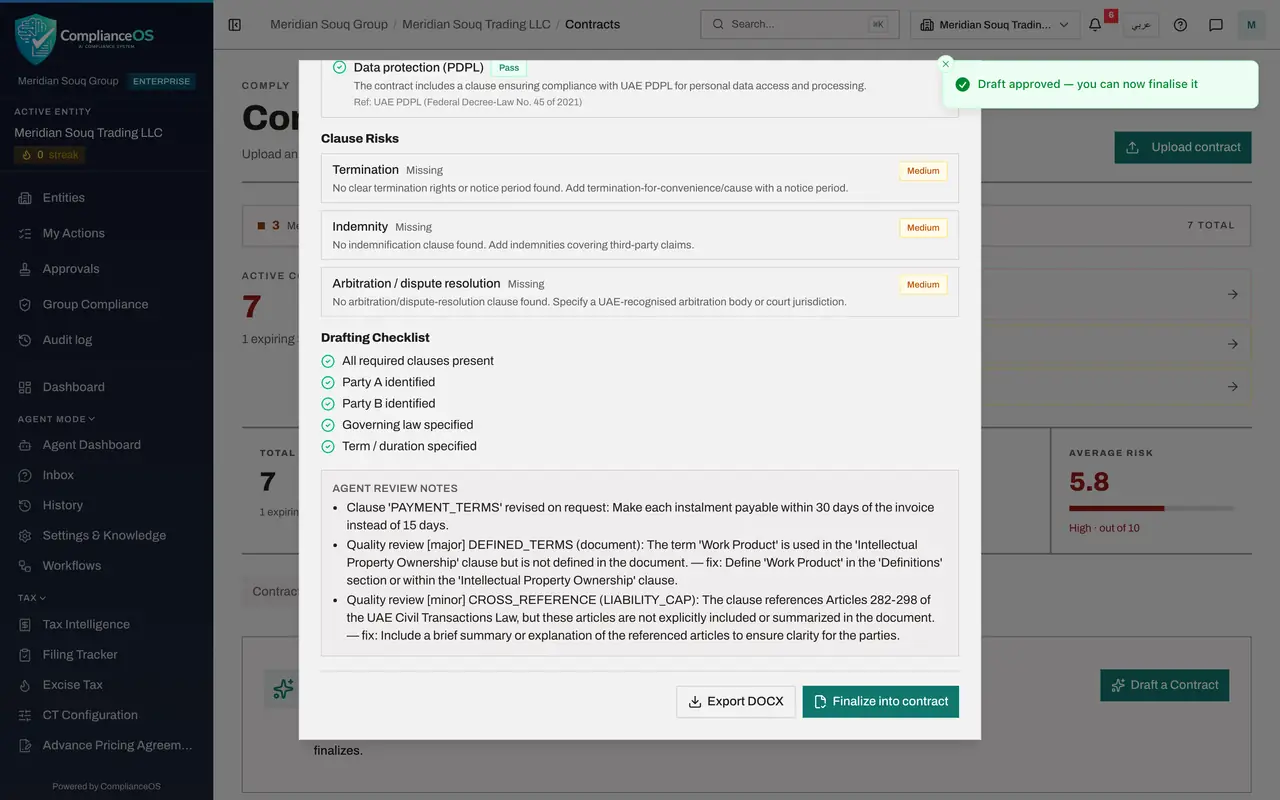
In Comment, say briefly what you checked. The comment is optional and is kept with your decision in the audit trail. Then select Approve draft. A message says Draft approved, you can now finalise it.
- Type Comment:
Clauses and checks read. Fee, dates and liability cap match the busine… - Select Approve draft
- Type Comment:
- 5
See that the draft is approved
The review window stays open. At its foot, the Approve draft button has been replaced by Finalize into contract. Under Contract Drafts, behind the window, the status of the draft now reads Approved.
- 6
Select Finalize into contract
Select Finalize into contract. A line asks you to confirm: this creates a live contract from the approved draft.
- Select Finalize into contract
- 7
Select Confirm
Select Confirm. The contract is created and a message confirms it. Under Contract Drafts the status of the draft changes to Finalized. A finalised draft can still be opened and exported, but no longer changed.
- Select Confirm
- 8
Find the new contract in the list
Select the Contracts tab and scroll to the list. The new contract is at the top, named after the type and the counterparty, Consulting contract, Noor Al Bahr Retail Consulting, with the type Consulting and the risk score the agent gave the draft. From here it is handled like any uploaded contract: review it, track its obligations and watch its expiry.
- Select Contracts
How to check it worked
the draft's status under Contract Drafts reads Finalized, and a new contract of the type Consulting is in the list on the Contracts tab.
Common mistakes
- Approving without reading. Your approval is recorded in the audit trail with your name and your comment.
- Revising a clause yourself and then trying to approve. Revising makes you an author of the draft, and an author cannot approve it. Send it back to the drafter instead.
- Thinking Finalize sends the contract for signature. It creates the contract record in ComplianceOS. Signing still happens outside the system.
Check your understanding
1. What does Finalize into contract do?
- A.Sends the draft to the counterparty by e-mail
- B.Creates a live contract record from the approved draft
- C.Deletes the draft
- D.Signs the contract electronically
Show answer
Answer: B. Creates a live contract record from the approved draft
Finalising turns the approved draft into a contract in the list, with its own analysis, checks and risk score.
2. Who may approve a contract draft?
- A.The person who wrote it
- B.Anyone who can view contracts
- C.Someone with approval rights for contract drafts who did not draft or revise it
- D.Only the counterparty
Show answer
Answer: C. Someone with approval rights for contract drafts who did not draft or revise it
Approval needs the approve right and a second pair of eyes: an author of the draft cannot be its approver.