Lesson 14 of 29
Link an amendment to its contract
What you will be able to do
This lesson is for the legal team. A contract and its amendments are uploaded as separate files. You will link an amendment to the agreement it changes, and read the chain of versions that results.
Before you start
- Both documents are on record and have finished processing: the packaging supply agreement with Zafaran Coast Packaging, and Amendment No. 1 to it, which extends the term to the end of 2027.
- You are signed in with the Legal counsel role, which may create links between contracts.
Steps
- 1
Open the original agreement
Open the packaging supply agreement, which is the contract being amended. Its Key details show the original term, ending on 31 December 2026.
- 2
Open Relationships
Scroll down to the tabs, select Deep Analysis, and then select Relationships. The section is headed Contract Relationships. It says there are no relationships yet.
- Select Deep Analysis
- Select Relationships
- 3
Select Link Contract
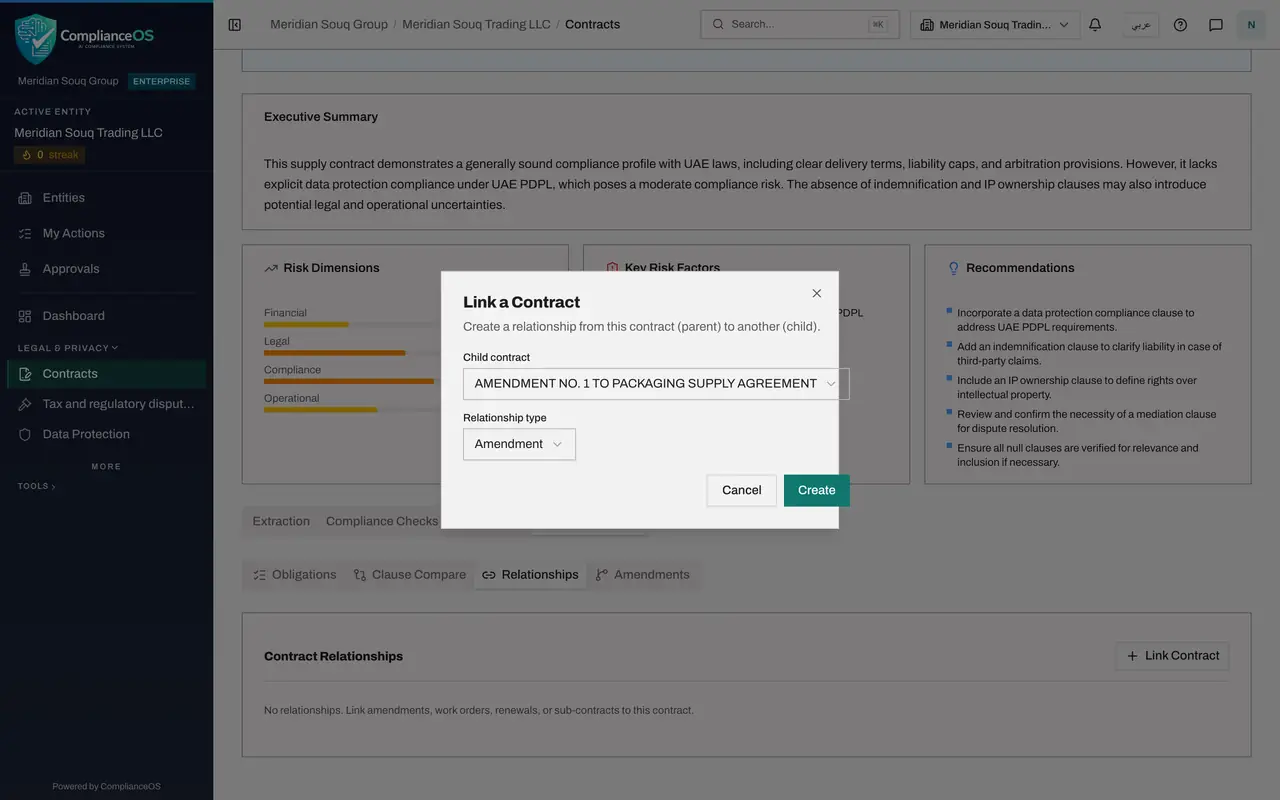
Select Link Contract. The form is headed Link a Contract. It creates a relationship from this contract, the parent, to another contract, the child.
- Select Link Contract
- 4
Choose the child contract
Open Child contract. Every other contract of the company is listed by its title. Choose Amendment No. 1 to Packaging Supply Agreement.
- Select Child contract
- Choose AMENDMENT NO. 1 TO PACKAGING SUPPLY AGREEMENT
- 5
Choose the relationship type
Open Relationship type. The choices are Amendment, Work order, Renewal, Supplement and Sub-contract,. An amendment changes the terms of the original. A renewal extends it on the same terms. A work order or a sub-contract is a separate piece of work under it. Choose Amendment.
- Select Amendment
- Choose Amendment
- 6
Select Create
Select Create. A message confirms that the relationship was created. The section now shows one line: the type, the words parent of, and the title of the amendment.
- Select Create
- 7
Read the amendment chain
Select Amendments, the last of the four sections. It lists the documents in the chain: the original agreement, marked Current because it is the page you are on, and the amendment, with the type, effective date and expiry date of each. The amendment's line also says which contract it amends.
- Select Amendments
- 8
See the link from the amendment's side
Now open the amendment itself and go to Deep Analysis, then Relationships. The same link is shown from the other side: Amendment, child of, followed by the title of the original agreement.
- Select Deep Analysis
- Select Relationships
How to check it worked
the Relationships section of the supply agreement shows one line that reads Amendment, parent of, followed by the amendment's title, and the Amendments section lists both documents.
Common mistakes
- Creating the link from the amendment's page. The contract you are on becomes the parent. Always start from the original agreement and choose the amendment as the child.
- Expecting the original contract's dates to change. Linking records the relationship only. The original still shows its own expiry date, so read the chain to see which document now governs.
- Linking the wrong pair. With the Legal counsel role you cannot remove a link, because removing needs the delete right. Check the names before you select Create, and ask an administrator if a link must be removed.
Check your understanding
1. You are linking an amendment to its original agreement. On which contract's page do you start?
- A.The amendment
- B.The original agreement
- C.Either one
- D.Neither; use the list
Show answer
Answer: B. The original agreement
The contract you are on is the parent of the link, and the one you choose in the form is the child.
2. Which relationship types can you choose when linking two contracts?
- A.Amendment only
- B.Amendment, work order, renewal, supplement and sub-contract
- C.Parent and child only
- D.Draft and final
Show answer
Answer: B. Amendment, work order, renewal, supplement and sub-contract
The form offers those five types, so that a work order or a renewal can be tied to its master agreement in the same way.