Lesson 23 of 29
Escalate a dispute to the next level
What you will be able to do
This lesson is for the legal and tax teams. You will escalate a dispute, see how the level, the phase and the deadline change, read the escalation history, and see why a small tax dispute cannot be taken to the Tax Disputes Resolution Committee while a large one can.
Before you start
- Two more disputes have been filed with the File Dispute form since lesson 22: an administrative penalty of 12,000 dirhams, and a VAT assessment on exports of 96,300 dirhams. This lesson works on those two. Other rows in the table may show any status.
- You are signed in with the Legal counsel role, which may edit disputes.
- You know why the dispute is being escalated. The reason is kept in the dispute's history.
Steps
- 1
Choose Escalate on the penalty dispute
The authority has turned down the first objection to the penalty of 12,000 dirhams for late notification. On the row of that dispute, select the three dots and choose Escalate. The form is headed Escalate Dispute. It moves the dispute to the next level in the review chain.
- Select Actions
- Select Escalate
- 2
Give the reason and escalate
In Reason for Escalation, say why the dispute is going up a level. The box is optional. Then select Escalate Dispute. A message confirms that the dispute was escalated.
- Type Why is this dispute being escalated?:
First objection rejected on 12 October 2026 without considering the po… - Select Escalate Dispute
- Type Why is this dispute being escalated?:
- 3
Read the row after the escalation
The status of the dispute is now Escalated, with a Level 1 tag under it. The phase deadline has been set again: a fresh forty business days counted from today.
- 4
Read the escalation history
Select the row to open its detail panel and scroll to Escalation History. Each escalation is one entry: the level it moved from and to, the date, the reason you gave and, where the organisation has set up an escalation chain, who it was passed to.
- Select Details of dispute PEN-2026-MST-1107
- 5
Try to escalate the same dispute again
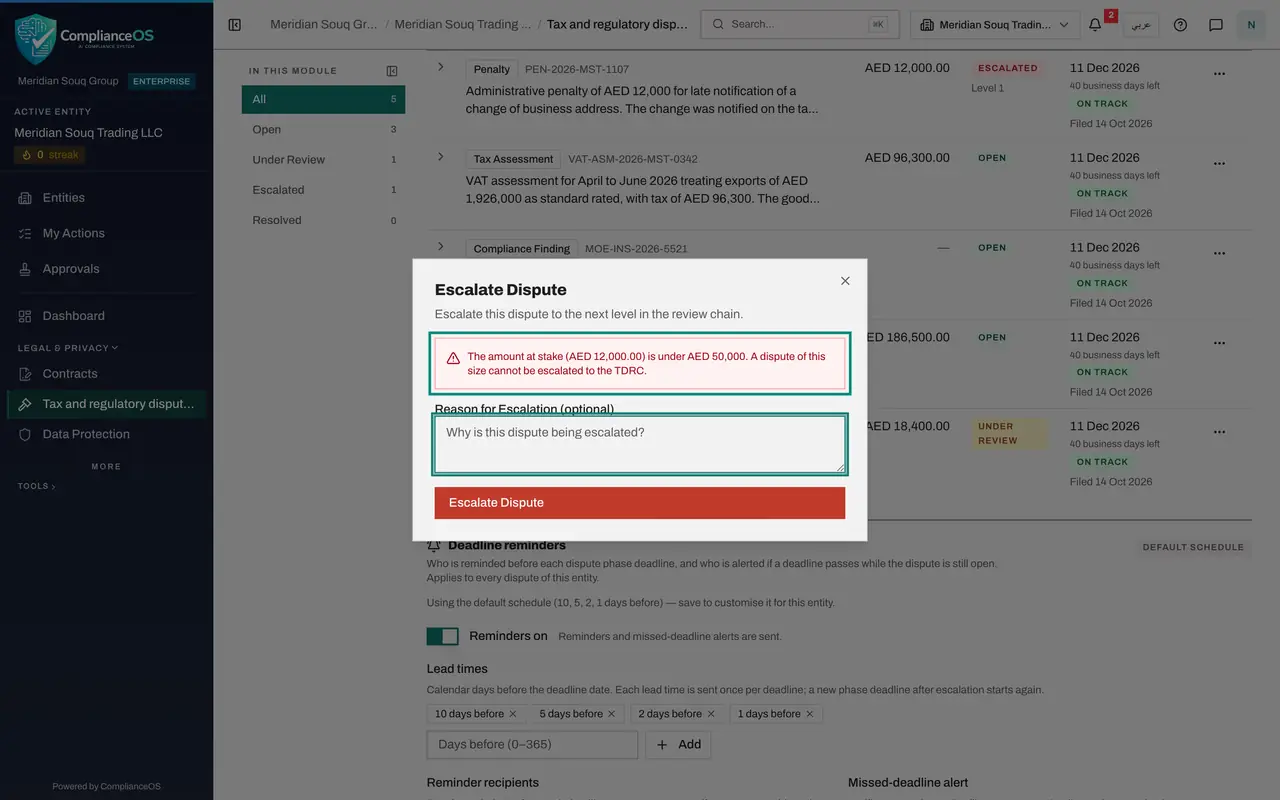
Open the three-dot menu on the penalty dispute and choose Escalate once more. The next level for a tax dispute is the Tax Disputes Resolution Committee, or TDRC. A red warning says the amount at stake is under 50,000 dirhams and that a dispute of this size cannot be escalated to the TDRC. If you selected Escalate Dispute anyway, it would be refused.
- Select Details of dispute PEN-2026-MST-1107
- Select Actions
- Select Escalate
- 6
Close the form without escalating
Select the cross at the top right of the form to close it. The penalty dispute stays at Level 1.
- Select Close
- 7
Escalate the VAT assessment
Now take the VAT assessment on exports, which is for 96,300 dirhams. Choose Escalate from its three-dot menu, give the reason, and select Escalate Dispute. It moves to Level 1, the reconsideration phase.
- Select Actions
- Select Escalate
- Type Why is this dispute being escalated?:
Assessment issued without reviewing the export declarations. Reconside… - Select Escalate Dispute
- 8
Escalate it again, to the committee
The reconsideration has been refused as well. Choose Escalate on the VAT assessment a second time. There is no warning now, because the amount is above 50,000 dirhams. Give the reason and select Escalate Dispute.
- Select Actions
- Select Escalate
- Type Why is this dispute being escalated?:
Reconsideration refused. Filing with the Tax Disputes Resolution Commi… - Select Escalate Dispute
- 9
Check the new phase
The row shows Level 2. Select it to open the detail panel. Phase deadline now reads TDRC, with a new deadline forty business days from today, and Escalation History lists both steps.
- Select Details of dispute VAT-ASM-2026-MST-0342
- 10
List the escalated disputes
In the list on the left, select Escalated. The table keeps the disputes that are escalated, including the two from this lesson. The Escalated figure above the table shows the same count in red.
- Select Escalated2 (2)
How to check it worked
the penalty of 12,000 dirhams shows the status Escalated with a Level 1 tag, and the VAT assessment of 96,300 dirhams shows Level 2 with the phase TDRC in its detail panel.
Common mistakes
- Escalating to move things along. Each escalation starts a new phase with a new forty business day deadline, and tells the people responsible for that level. Escalate when the authority's decision at the current level has gone against you.
- Trying to take a small tax dispute to the committee. Below 50,000 dirhams the escalation is refused. The red warning in the form tells you before you try.
- Escalating without a reason. The reason box is optional, but the history is what a colleague or an auditor reads to understand the case.
Check your understanding
1. What happens to the phase deadline when a dispute is escalated?
- A.It stays the same
- B.A new deadline of forty business days starts from the day of the escalation
- C.It is removed
- D.It moves to the end of the year
Show answer
Answer: B. A new deadline of forty business days starts from the day of the escalation
Each escalation starts a new phase, and every phase has its own forty business day deadline.
2. A tax dispute of 12,000 dirhams has already been escalated once. Can it be escalated again, to the Tax Disputes Resolution Committee?
- A.Yes, always
- B.No; a dispute under 50,000 dirhams cannot go to the committee
- C.Only on a Monday
- D.Only if it has evidence
Show answer
Answer: B. No; a dispute under 50,000 dirhams cannot go to the committee
The committee only hears disputes of 50,000 dirhams or more, and ComplianceOS refuses the escalation below that amount.