Lesson 15 of 29
Read the portfolio analytics
What you will be able to do
This lesson is for the legal team and for managers who want the overall picture. You will open the Analytics tab and read each figure and chart: the totals, the risk distribution, the mix of contract types, the expiry timeline and the review backlog.
Before you start
- Several contracts are on record and have finished processing.
- You may view contracts. Everyone who can open the Contracts screen can open Analytics.
Steps
- 1
Open the Analytics tab
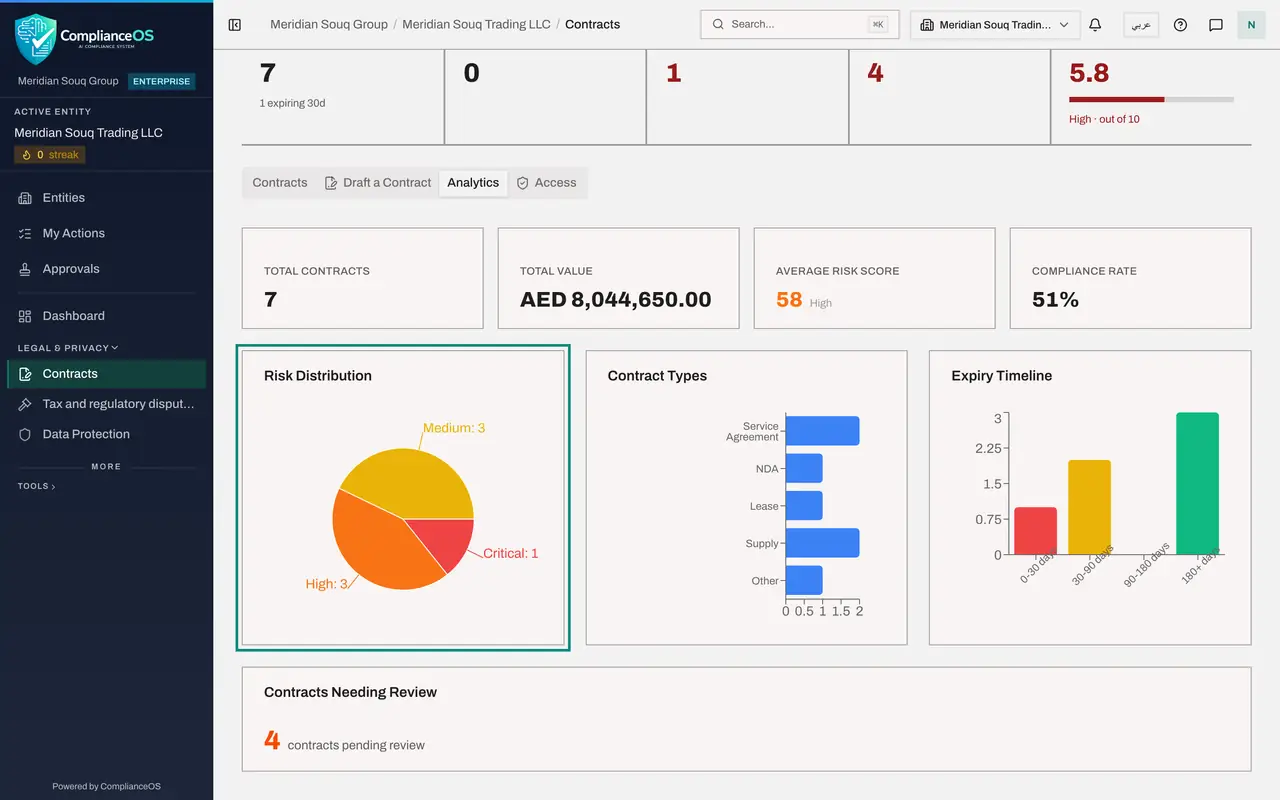
On the Contracts screen, select the Analytics tab. It summarises every contract of this company. Nothing here can be edited: the figures come from the contracts themselves.
- Select Analytics
- 2
Read the four totals
The first row has four figures. Total Contracts is the number on record. Total Value adds up their values in dirhams. Average Risk Score is the average of the risk scores out of one hundred, with its level. Compliance Rate is the share of all compliance checks that passed.
- 3
Read the Risk Distribution
Risk Distribution counts the contracts at each risk level: low, medium, high and critical. Use it to see how many contracts need a close look, not just the average.
- 4
Read the Contract Types
Contract Types shows how the portfolio splits by type, such as service agreements, supply agreements, leases and non-disclosure agreements. Point at a slice or a bar to see its count.
- 5
Read the Expiry Timeline
This chart groups the contracts by the time left before they end. The first bar counts those ending within thirty days, the second those ending within ninety days, the third those ending within one hundred and eighty days, and the last those with longer to run. The first bar is the one to act on now.
- 6
Read Contracts Needing Review
The last panel, Contracts Needing Review, counts the contracts that still carry the Review tag. It is the legal team's backlog. Lesson 10 shows how to clear it.
How to check it worked
you can say how many contracts the company has, what they are worth in total, how many are high risk, and how many end in the next thirty days.
Common mistakes
- Quoting Total Value as money owed. It adds up the contract values on record, whether the company pays or receives them, and leaves out contracts with no value.
- Reading the average risk score as good news. An average hides the one critical contract. Look at the Risk Distribution chart as well.
- Forgetting that the charts cover this company only. Another company in the group has its own Contracts screen and its own figures.
Check your understanding
1. Which chart shows how many contracts end in the next thirty days?
- A.Risk Distribution
- B.Contract Types
- C.Expiry Timeline
- D.Contracts Needing Review
Show answer
Answer: C. Expiry Timeline
Expiry Timeline groups contracts by how far away their expiry date is, starting with zero to thirty days.
2. What does Compliance Rate show?
- A.The share of compliance checks across all contracts that passed
- B.The share of contracts that have been signed
- C.The share of contracts uploaded this year
- D.The share of invoices paid on time
Show answer
Answer: A. The share of compliance checks across all contracts that passed
It is the pass rate of the clause checks over the whole portfolio, so a low figure means many missing or weak clauses.