Lesson 21 of 29
Record a dispute with an authority
What you will be able to do
This lesson is for the legal and tax teams. You will open the Tax and regulatory disputes screen, learn what it shows while it is still empty, and record a dispute against a late payment penalty, filling in every field of the form.
Before you start
- You are signed in with the Legal counsel role, which may create and edit disputes.
- You have the authority's notice to hand, with its reference number and the amount in dispute.
- This screen is for disputes with tax and regulatory authorities: assessments, penalties, inspection findings and regulatory actions. It is not for disputes with suppliers or customers.
Steps
- 1
Open Tax and regulatory disputes
In the left menu, under Legal and Privacy, select Tax and regulatory disputes. The screen records disputes with tax and regulatory authorities: assessments, penalties, objections and appeals.
- Select Tax and regulatory disputes
- 2
Read the status list
On the left, under In this module, is a list of statuses: All, Open, Under Review, Escalated and Resolved, each with a count. Selecting one filters the table to disputes in that status. Everything is zero for now.
- 3
Read the figures
The figures in the middle sum up the caseload: the total number of disputes, how many are open, escalated and resolved, the overturn rate, which is the share of resolved disputes decided in your favour, the average number of days to resolve one, and the total amount at stake in disputes that are not yet resolved.
- 4
See the empty table
Below the figures is the table of disputes, with columns for the dispute, the amount at stake, the status, the phase deadline and the actions. It says No disputes found.
- 5
Select File Dispute
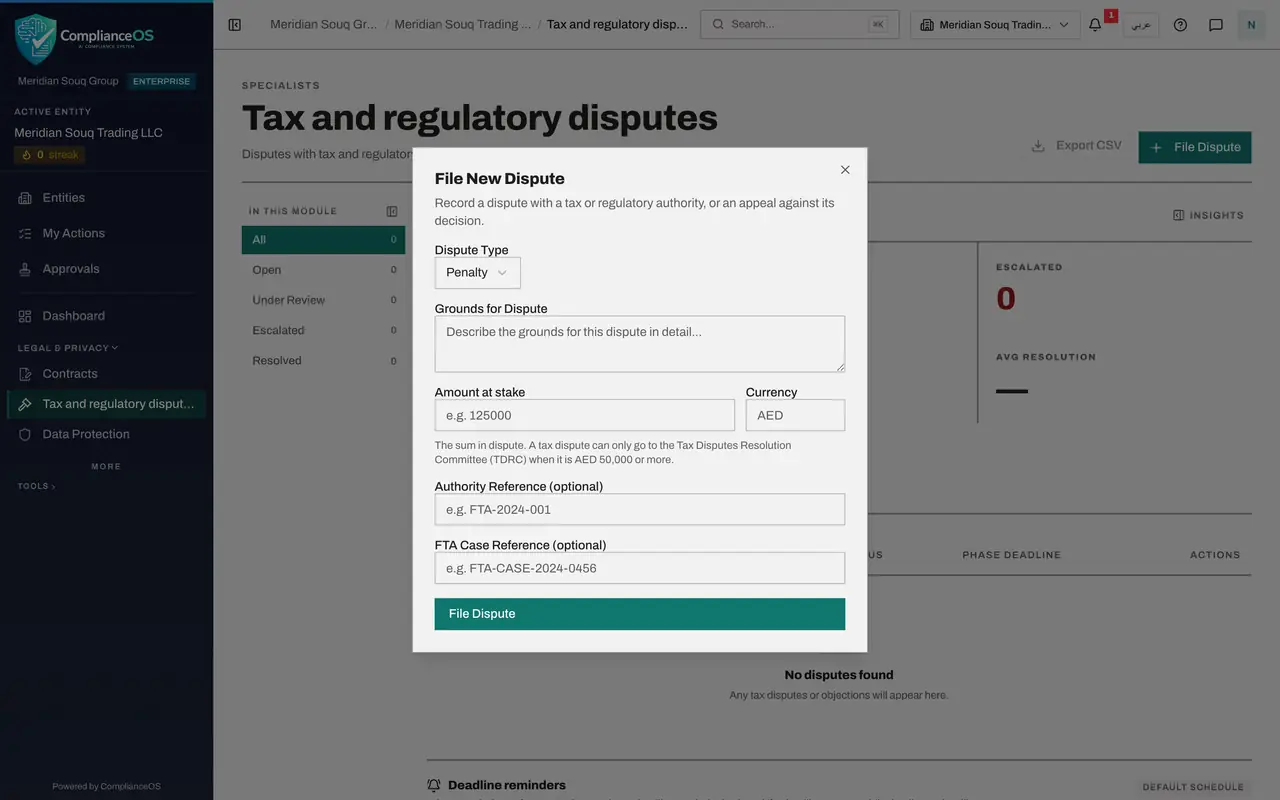
At the top right, select File Dispute. The form is headed File New Dispute and has six fields.
- Select File Dispute
- 6
Choose the dispute type
Open Dispute Type. Tax Assessment is a decision that more tax is due. Penalty is a fine. Compliance Finding is the result of an inspection or audit. Regulatory Action is an order or sanction from a regulator. The type is required. Here the tax authority has charged a late payment penalty, so choose Penalty.
- Select Select type
- Choose Penalty
- 7
Write the grounds
In Grounds for Dispute, describe the case in full: what the authority decided, why you disagree, the evidence you hold and what you are asking for. This field is required.
- Type Describe the grounds for this dispute in detail...:
Late payment penalty of AED 18,400 on the VAT return for April to June…
- Type Describe the grounds for this dispute in detail...:
- 8
Enter the amount at stake
In Amount at stake, type the sum in dispute as a number without commas, here 18400. Currency is the three-letter code. Leave it empty to use dirhams. A tax dispute can only go to the Tax Disputes Resolution Committee, or TDRC, when it is 50,000 dirhams or more, so the amount decides how far the dispute can be taken.
- Type Amount at stake:
18400
- Type Amount at stake:
- 9
Enter the authority's reference
Authority Reference is the number on the authority's notice. It is optional, but it is how the dispute is named in the list, in the calendar and in reminders, so always enter it when you have one.
- Type e.g. FTA-2024-001:
PEN-2026-MST-0931
- Type e.g. FTA-2024-001:
- 10
Leave the case reference for later
FTA Case Reference is the number the Federal Tax Authority, or FTA, gives your objection once you have submitted it on its portal. You do not have it yet, so leave the box empty. Lesson 22 adds it.
- 11
Select File Dispute
Select File Dispute at the foot of the form. A message says Dispute filed and the form closes.
- Select File Dispute
- 12
Read the new row
The dispute is in the table. The row shows the type and the authority's reference, the first lines of the grounds, the amount at stake and the status Open. Phase deadline gives the date by which this phase must be dealt with, the number of business days left, an On track tag and the filing date.
How to check it worked
the dispute is in the list with the status Open, its amount at stake, and a phase deadline forty business days after today.
Common mistakes
- Leaving Amount at stake empty for a tax dispute. Without an amount, ComplianceOS cannot tell whether the dispute is large enough to go to the Tax Disputes Resolution Committee.
- Writing one line of grounds. The grounds are the heart of the record. State what the authority decided, why it is wrong, and what you are asking for.
- Thinking that filing here files the dispute with the authority. This is your internal record and deadline tracker. The objection itself is still submitted through the authority's own portal.
Check your understanding
1. Which kinds of dispute belong on this screen?
- A.Disputes with suppliers about late deliveries
- B.Disputes with tax and regulatory authorities
- C.Disputes between employees
- D.Customer complaints
Show answer
Answer: B. Disputes with tax and regulatory authorities
The four types are tax assessment, penalty, compliance finding and regulatory action, all against an authority.
2. A new dispute shows a phase deadline. How is it worked out?
- A.Thirty calendar days from filing
- B.Forty UAE business days from the day the phase starts
- C.The end of the tax period
- D.You type it in
Show answer
Answer: B. Forty UAE business days from the day the phase starts
Each phase runs forty UAE business days, leaving out weekends and public holidays, counted from the day the phase starts.