Lesson 29 of 29
How this connects: dispute deadlines, alerts and the calendar
What you will be able to do
This lesson is for the Compliance officer and for managers who are told about escalated disputes. You are Mariam Aziz. You will follow a dispute from the disputes screen to your notifications, the Compliance Calendar and the Risk Register.
Before you start
- Disputes have been filed, escalated and resolved, as in lessons 21 to 24.
- You are signed in with the Compliance officer role, which may view disputes, the calendar and the Risk Register.
Steps
- 1
Start from a dispute
In the left menu, select Tax and regulatory disputes. The VAT assessment on exports is at Level 2, and its phase deadline column gives the date by which this phase must be dealt with. Remember that date.
- Select Tax and regulatory disputes
- 2
See who the escalation went to
Select the row of that VAT assessment, anywhere on its text, to open its detail panel, and scroll to Escalation History. The second entry, from level one to level two, gives the reason and says who the escalation was passed to. The people responsible for that level are notified.
- Select Details of dispute VAT-ASM-2026-MST-0342
- 3
Open your notifications
Select the bell at the top right. A notification about the escalation names the dispute and gives the reason Legal counsel typed when she escalated. The reminders set in lesson 25 arrive here in the same way as each deadline comes closer.
- Select 7 unread notifications
- 4
Open the Compliance Calendar
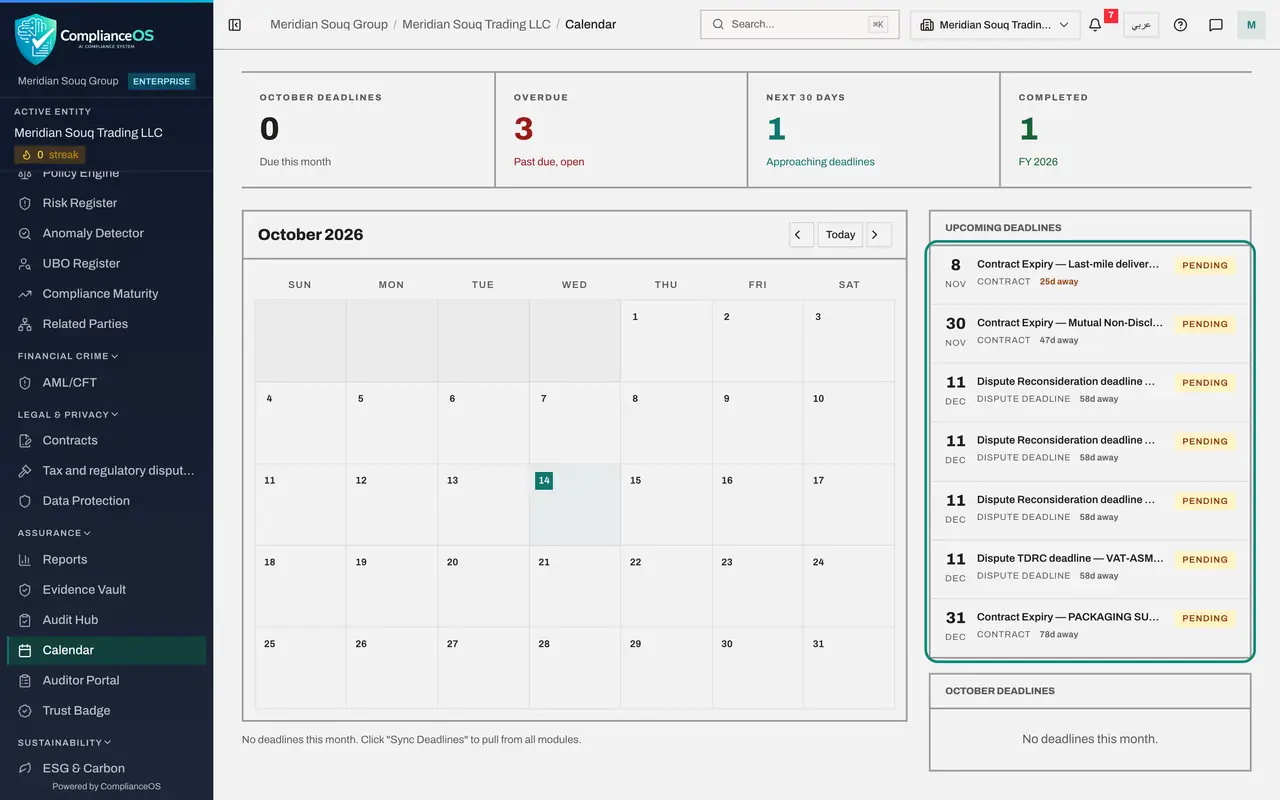
Close the notifications and select Calendar in the left menu. Under Upcoming Deadlines, each running dispute has an entry named after its phase and its reference, such as Dispute TDRC deadline, followed by the reference. Nobody had to sync these: they were added when the disputes were filed and escalated.
- Select Calendar
- 5
Find the deadline in December
Scroll up and select Next month until you reach the month of the deadline. The day carries a dispute marker, and the list under the month names each deadline.
- Select Next month
- Select Next month
- 6
See the resolved disputes counted as completed
Scroll back to the tiles at the top. Completed counts the deadlines that are done for the year. A resolved dispute is counted here, because resolving a dispute completes its calendar entry and stops its reminders.
- 7
Sync the Risk Register
In the left menu, select Risk Register, then select Sync Modules. Each dispute that is still running and has an amount at stake becomes a risk, named Dispute, followed by its reference and the amount at risk, with Disputes as its source. A dispute with no amount, like the inspection finding, does not. When a dispute is resolved, its risk is closed.
- Select Risk Register
- Select Sync Modules
How to check it worked
the calendar lists a dispute deadline for each dispute that is still running, your notifications include the escalation of the VAT assessment to level two, and the Risk Register lists a risk for each running dispute that has an amount at stake.
Common mistakes
- Expecting a dispute with no amount at stake in the Risk Register. Sync Modules only creates a risk for a running dispute that has an amount, so record the amount with Edit details on the dispute.
- Waiting for Sync Deadlines before trusting the calendar. A dispute's deadline is put on the calendar the moment the dispute is filed or escalated.
- Ignoring an escalation notification because the legal team is handling the case. You were told because the escalation chain names you for that level.
Check your understanding
1. When does a dispute's phase deadline appear on the Compliance Calendar?
- A.Only after someone selects Sync Deadlines
- B.As soon as the dispute is filed, and again with the new date when it is escalated
- C.Never
- D.On the day of the deadline
Show answer
Answer: B. As soon as the dispute is filed, and again with the new date when it is escalated
The calendar entry is created and updated with the dispute itself, and is marked completed when the dispute is resolved.
2. A dispute is escalated to level two. Who is told?
- A.Nobody
- B.The person the escalation chain names for that level, by a notification
- C.The tax authority
- D.Every employee
Show answer
Answer: B. The person the escalation chain names for that level, by a notification
Each escalation notifies the person responsible for the new level, and the dispute's history records who that was.