Lesson 24 of 28
What someone without privacy access sees
What you will be able to do
Recognise what a colleague outside the privacy team sees when they try to open requests, consent or complaints, so you can tell a missing permission from a fault and know who to ask.
Before you start
- You are signed in as someone whose roles do not include Data Protection. This example uses the tax manager.
- A colleague has sent you a link to a request in Data Protection.
Steps
- 1
Look at the main menu
This is the tax manager's dashboard. Her main menu lists the tax modules, reports and tools that her role allows. There is no Legal and Privacy group and no Data Protection, because her roles do not include it.
- 2
Open a link to Data Protection
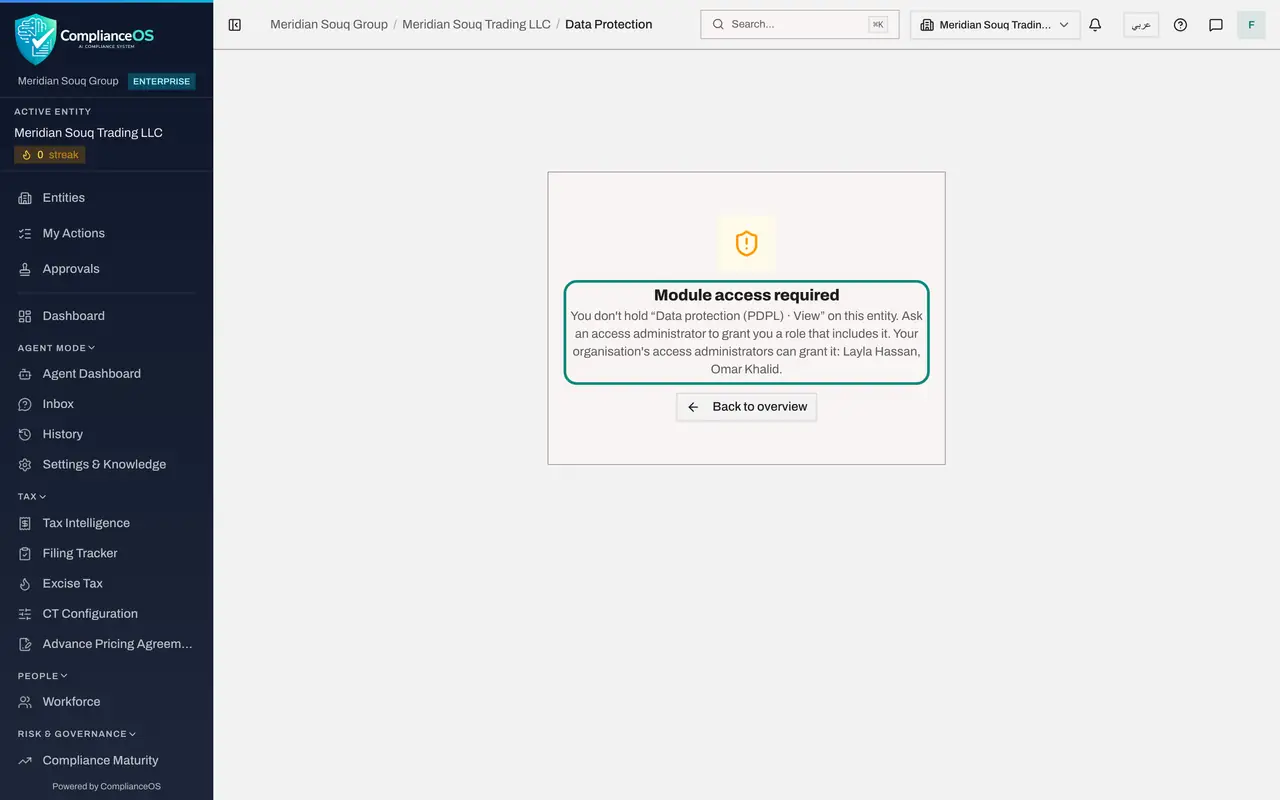
A colleague in the privacy team sends her a link to a request. Opening it does not show the request. The page says Module access required, and names the permission that is missing: the right to view Data Protection for this entity.
- 3
Read who can grant access
Under the message, ComplianceOS names your organisation's access administrators who can grant the role, here Layla Hassan and Omar Khalid. Ask one of them, and say which entity and which work you need.
- 4
Go back to your own work
Select Back to overview, or choose any item in your main menu, to return to your own modules. Nothing was changed, and the privacy team's records stay private.
- Select Back to overview
How to check it worked
Opening the link shows the message Module access required, naming the permission that is missing, and Data Protection is not in your main menu.
Common mistakes
- Reporting Module access required as a system error. It means your roles do not include the module; nothing is broken.
- Forwarding requesters' personal details by email to a colleague who has no access, to get round the message. Ask an access administrator to grant the role instead.
- Asking the privacy team to grant the access. Only an access administrator can, and the message names them.
Check your understanding
1. You open a link to Data Protection and see Module access required. What does it mean?
- A.The request was deleted
- B.Your roles do not include permission to view Data Protection for this entity
- C.The system is down
- D.The link has expired
Show answer
Answer: B. Your roles do not include permission to view Data Protection for this entity
The message names the missing permission. An access administrator can grant a role that includes it.
2. Why is Data Protection missing from this person's main menu?
- A.The menu only lists the modules their roles allow
- B.It is hidden on small screens
- C.It is only shown on Mondays
- D.It has been switched off for the whole company
Show answer
Answer: A. The menu only lists the modules their roles allow
The main menu is built from your roles. A tax manager sees the tax modules, not Legal and Privacy.