Lesson 16 of 28
Use the legal-hold register: add a hold for one person and release it
What you will be able to do
Add a legal hold from the register without an erasure request in front of you, choosing what it applies to and picking the person from the searchable list of requests, then open a hold, release it when it is no longer needed, and find released holds again.
Before you start
- You are signed in with the Data Protection Officer role for the entity.
- A regulator, a court or an investigation has told you which records must be kept, and until when.
Steps
- 1
Open Erasure and find the Legal-hold register
In Data Protection, select Erasure and scroll to the Legal-hold register. The hold placed for the refund dispute is listed as In force. The Show box beside Add hold filters the list, and starts on Active.
- Select Erasure
- 2
Select Add hold and open Applies to
A hold can also be added here, without an erasure request in front of you. Select Add hold and open Applies to. The four choices keep everything in this entity, one system, one table, or one data subject's records.
- Select Add hold
- Select Everything in this entity
- 3
Choose One data subject and pick the request
Choose One data subject. A new box appears, Data subject request. Open it, type part of the person's name to search, and choose their request. The records of the person who made that request will be kept.
- Choose One data subject
- Select Choose a request…
- Type Search by name, email or type…:
Omar - Choose Omar Al Suwaidi — Portability
- 4
Give the title and the type
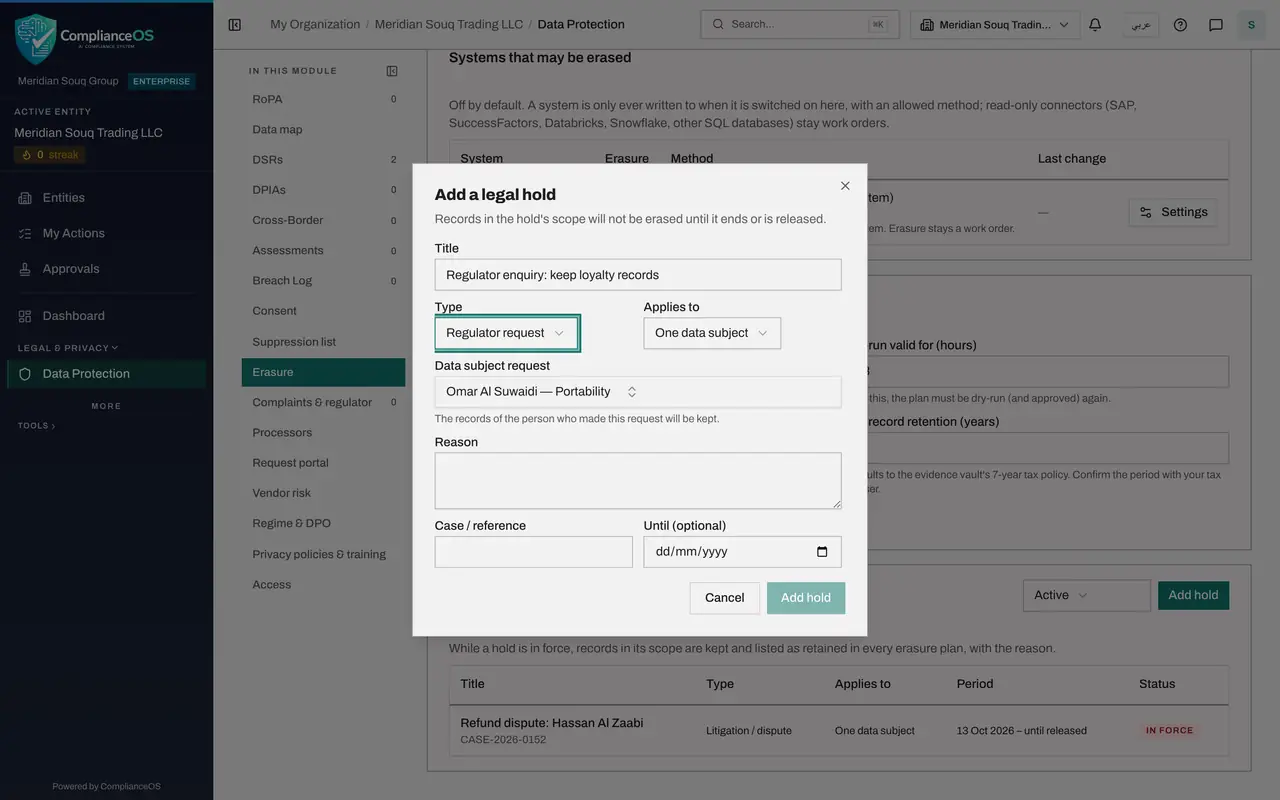
The regulator has asked the company to keep this customer's loyalty records while it looks into a complaint. Type a Title that says so, then open Type and choose Regulator request.
- Type Title:
Regulator enquiry: keep loyalty records - Select Litigation / dispute
- Choose Regulator request
- Type Title:
- 5
Give the reason, the reference and the end date
In Reason, say why the records are kept, and in Case or reference enter the regulator's reference. In Until, enter the date the regulator gave, about three months from now; when that date passes the hold ends by itself. Then select Add hold.
- Type Reason:
The regulator asked us to keep this customer's loyalty records while i… - Type Case / reference:
DPO/ENQ/2026/0381 - Type Until (optional):
2027-01-11 - Select Add hold
- Type Reason:
- 6
Select the hold's title to open it
Select the title of a hold to open it. The record shows the type, what it applies to, the reference, the period and the reason. This is where you look when a requester asks why their records are being kept.
- Select Regulator enquiry: keep loyalty records
- 7
Give the reason for release and select Release hold
Suppose the regulator has now closed its enquiry. Type a Reason for release and select Release hold. A released hold is never deleted: it stays on record with who released it and why.
- Type Reason for release:
The regulator confirmed in writing that its enquiry is closed. - Select Release hold
- Type Reason for release:
- 8
Filter the register to Released
The register shows Active holds as standard, so the released hold has left the list. Open the Show box beside Add hold and choose Released to see it, with the status Released. Choose All to see every hold together.
- Select Show
- Choose Released
How to check it worked
The Legal-hold register lists the hold for the refund dispute as In force, and the regulator hold appears with the status Released when you choose Released in the Show box.
Common mistakes
- Choosing Everything in this entity when one person is concerned. That keeps every record of the entity from erasure; choose One data subject and pick the request.
- Releasing a hold because the requester is pressing for deletion. Release it only when the dispute or investigation is over, and record the reason.
- Thinking a released hold has been deleted because it left the list. The register shows Active holds as standard; choose Released or All to see the rest.
Check your understanding
1. You add a hold from the register for one person. How do you say which person?
- A.Type their passport number
- B.Choose One data subject and pick their request from the searchable list
- C.Choose A table
- D.Email the administrator
Show answer
Answer: B. Choose One data subject and pick their request from the searchable list
With the scope One data subject, the form shows a list of requests you can search by name, email or type. The records of the person who made that request are kept.
2. What happens to a hold when you release it?
- A.It is deleted
- B.It stays on record as Released, with the reason, and no longer stops erasure
- C.It becomes a complaint
- D.It is emailed to the requester
Show answer
Answer: B. It stays on record as Released, with the reason, and no longer stops erasure
A released hold is kept as a record of what was held and why it ended. Records in its scope can be erased again.