Lesson 18 of 28
Record a person's consent: every field, then find it again
What you will be able to do
Record one person's consent against a purpose, field by field, so that you can prove later what they agreed to, when and how. Then read the record, and find it again with the status filter, the search and the download.
Before you start
- At least one consent purpose is defined (see the lesson Define what you ask consent for).
- You have the evidence of where this person agreed, for example a signed form, and the identifier your marketing systems use for them.
Steps
- 1
Open Consent and select Record consent
In Data Protection, select Consent, then select Record consent. A form opens for one person and one purpose.
- Select Consent
- Select Record consent
- 2
Enter the data subject identifier
In Data subject identifier, enter the email address, phone number or customer number that your systems use for this person. A data subject is the person the data is about. It is required, and it is stored encrypted.
- Type Data subject identifier *:
mona.saeed@example.com
- Type Data subject identifier *:
- 3
Check the data subject's age
Open Data subject's age. The choices are Adult, Minor from thirteen to seventeen, and Child under thirteen. For anyone under eighteen, a parent or guardian consents, and the form asks who that was. This customer is an adult, so choose Adult.
- Select Adult
- Choose Adult
- 4
Choose the purpose
Open Purpose and choose marketing_emails. Only active purposes are offered. The wording that will be recorded appears underneath, with its version, so you can check it is the text on the form the customer signed.
- Select Select a defined purpose
- Choose marketing_emails
- 5
Choose how consent was given
Open Source and choose how the person agreed: Web form, API for a consent sent by another system, Paper or Verbal. This customer signed a paper form in a store, so choose Paper.
- Select Web form
- Choose Paper
- 6
Check the lawful basis
Open Lawful basis. The first choice, Consent, is the usual one for this register. The others are the cases the law allows without consent, such as a contract with the person or a legal obligation. Keep Consent.
- Select Consent — Art. 6
- Choose Consent — Art. 6
- 7
Set when consent was given and when it expires
Consent given at is filled with the current time. The form was signed three days ago, so set it to then. In Expiry date, enter the date after which you will ask again; here, two years from now. Leave it empty if your policy sets no end date.
- Type Consent given at:
2026-10-10T11:20 - Type Expiry date (optional):
2028-10-12
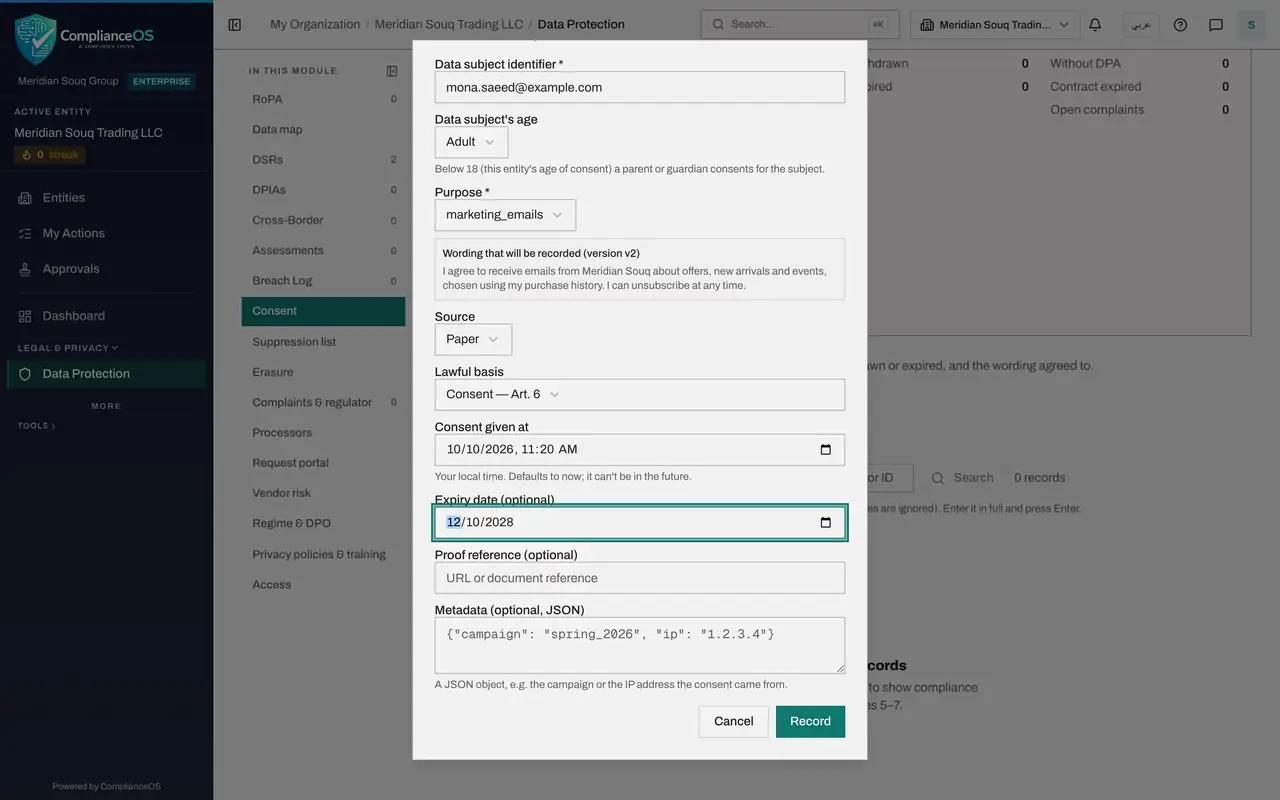
- Type Consent given at:
- 8
Add the proof reference and extra details
In Proof reference, say where the evidence is kept, such as the form number and the store. Metadata is optional. It takes extra details in a structured form, in curly brackets, such as the campaign the consent came from.
- Type Proof reference (optional):
Loyalty sign-up form LF-2026-00418, Dubai Mall store - Type Metadata (optional, JSON):
{"campaign": "Dubai Mall loyalty sign-up"}
- Type Proof reference (optional):
- 9
Select Record
Select Record. A message confirms Consent recorded, the form closes and the consent is added to the register with the status Active.
- Select Record
- 10
Select View to read the record
Select View on the record. It shows everything you entered: the purpose, the lawful basis, the wording version, the source, when it was given and recorded, the expiry, the proof reference, the wording the person agreed to and the extra details. Select Close when you have read it.
- Select View
- 11
Filter the register by status
Above the list, the three tiles count Active, Withdrawn and Expired records. Open the Status box and choose Active to list only consents you can still rely on.
- Select All statuses
- Choose Active
- 12
Search for one person
In the Data subject box, type the person's complete identifier and select Search. Identifiers are stored encrypted, so only an exact, complete identifier is found. Capital letters and spaces do not matter.
- Type Data subject:
mona.saeed@example.com - Select Search
- Type Data subject:
- 13
Download the register
Select Download and choose CSV to save the consent register as a file that opens in Excel, or JSON for the full export. Use it when an auditor or the regulator asks for proof of consent.
- Select Download
- Select CSV (Excel, all rows)
How to check it worked
The consent is listed for the person and the purpose with the status Active, and opening View shows the wording version, the source, the dates, the proof reference and the wording they agreed to.
Common mistakes
- Typing a short name or nickname as the identifier. Use the same email address, phone number or customer number your marketing systems use, in full, because searches and suppression checks match the exact identifier only.
- Leaving Consent given at as now when the form was signed days ago. Set it to when the person actually agreed; it cannot be in the future.
- Typing free text in Metadata. It must be a small piece of structured text in curly brackets, or the record is not saved. Leave it empty if you have nothing to add.
Check your understanding
1. You search the Consent list for "mona" and get no results, although her full email address has a record. Why?
- A.The record was deleted
- B.Identifiers are stored encrypted, so only the complete identifier matches
- C.Search only works on purposes
- D.You need administrator rights to search
Show answer
Answer: B. Identifiers are stored encrypted, so only the complete identifier matches
Because identifiers are encrypted, partial matches are not possible. Enter the full email, phone number or ID.
2. What does Proof reference record?
- A.The person's password
- B.Where the evidence of the consent is kept, such as a form number
- C.The marketing budget
- D.The date the consent expires
Show answer
Answer: B. Where the evidence of the consent is kept, such as a form number
The proof reference points to the evidence: a signed form, a sign-up page or a call recording. It is what you show if the consent is ever questioned.