Lesson 20 of 28
Record a withdrawal of consent: one person, and several at once
What you will be able to do
Record that a person has withdrawn their consent, withdraw several consents in one go, and confirm that each person was added to the suppression list so they are not contacted again.
Before you start
- The people have Active consent records (see the lesson Record a person's consent).
- You have each person's full identifier exactly as recorded, for example their email address.
Steps
- 1
Open Consent and search for the person
In Data Protection, select Consent. This customer emailed to say she no longer wants promotional emails. In the Data subject box, type her full identifier and select Search.
- Select Consent
- Type Data subject:
mona.saeed@example.com - Select Search
- 2
Select Withdraw on the Active consent
Find the record with the status Active for the purpose she is withdrawing from, and select Withdraw at the end of the row. A box opens showing the data subject and the purpose, so you can check you have the right record.
- Select Withdraw
- 3
Add the reason
A person can withdraw at any time without saying why, so the reason is optional. Note how you were told. The line at the bottom reminds you that the person will be added to the suppression list for this purpose.
- Type Reason for withdrawal (optional):
Customer asked by email on 12 October to stop promotional emails.
- Type Reason for withdrawal (optional):
- 4
Select Withdraw to confirm
Select Withdraw. The record's status changes to Withdrawn, and the Withdraw button has gone from the row. The record stays in the register as evidence of when consent was given and when it ended.
- Select Withdraw
- 5
Select View to see the withdrawal on the record
Select View. The record shows when the consent was withdrawn and the reason, together with the wording originally agreed to. Select Close when you have checked it.
- Select View
- 6
Select Clear to list every record again
Select Clear beside the Search button. The search is removed and the whole register is listed again.
- Select Clear
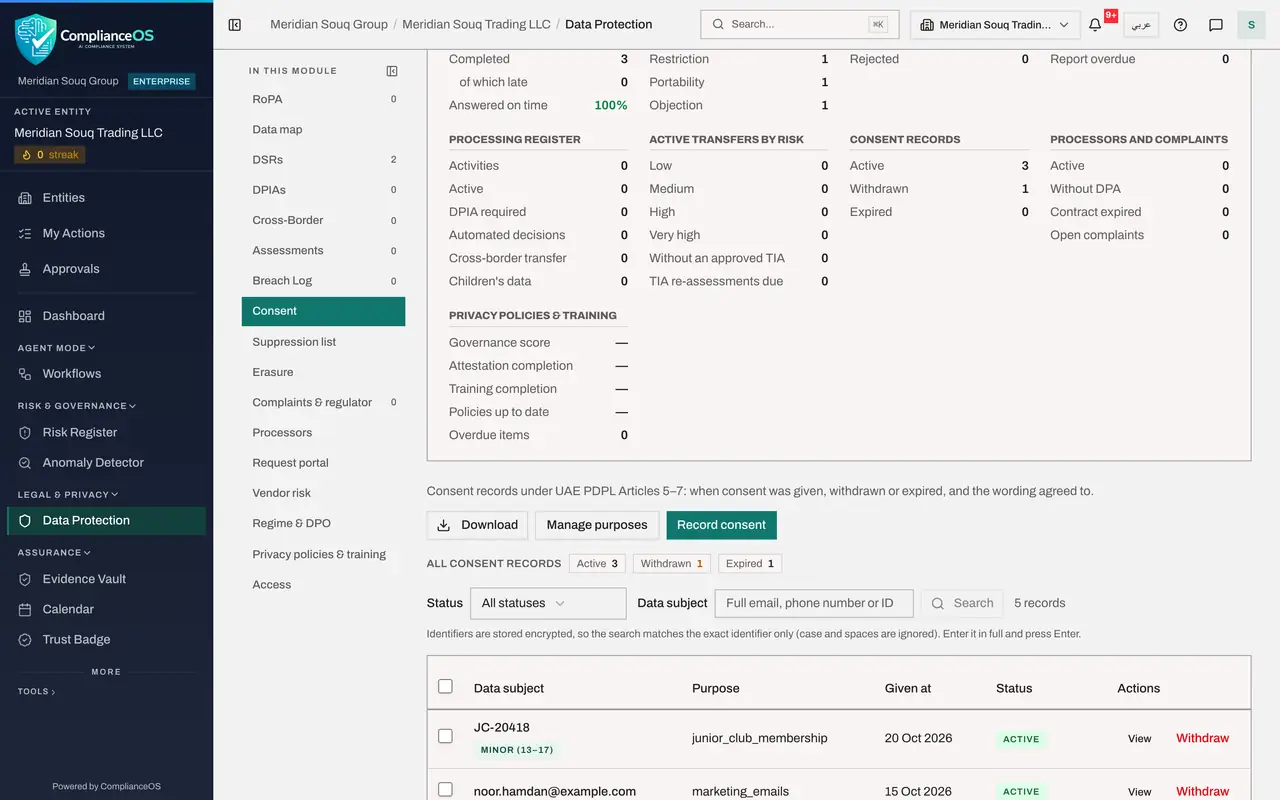
- 7
Tick the consents to withdraw together
Two customers who signed up online last week have both replied to a campaign asking to be removed. Tick the box at the start of each of their rows. Only Active records have a tick box. A new button appears above the list: Withdraw selected, with the number ticked.
- 8
Select Withdraw selected and give the reason
Select Withdraw selected. The box says how many records will be withdrawn. Here the reason is required, because you are acting on a list. Type it.
- Select Withdraw selected (2)
- Type Reason for withdrawal *:
Both customers replied to the October campaign asking to be removed fr…
- 9
Select Withdraw 2
Select Withdraw 2. A message confirms that two consents were withdrawn, and both rows now show Withdrawn, with no tick box and no Withdraw button. The counts in the tiles above the list change at the same time.
- Select Withdraw 2
- 10
Open Suppression list to confirm they are blocked
Select Suppression list. Each of the three people has been added automatically, with the source Consent withdrawn and the status Suppressed. Each has two entries: one for the specific purpose, and one for Direct marketing as a whole, because that purpose is marked as direct marketing.
- Select Suppression list
- 11
Select View on an entry
Select View on one of her entries. The record explains that it was added automatically when the person withdrew consent, and shows the scope, the purpose and when it was added. From now on a check of this identifier shows she must not be contacted.
- Select View
How to check it worked
The consent records show the status Withdrawn, and the Suppression list has entries for the same identifiers with the source Consent withdrawn: one for the purpose and, because the purpose is direct marketing, one for Direct marketing.
Common mistakes
- Searching with part of the email address. The search matches the complete identifier only.
- Delaying the withdrawal until the next campaign has gone out. Record it as soon as you are told, so the person is suppressed before the next send.
- Trying to undo a withdrawal by editing the record. A withdrawal stays on record; if the person agrees again, record a new consent.
Check your understanding
1. What happens automatically when you withdraw a consent?
- A.The person's data is deleted from all systems
- B.The person is added to the suppression list for that purpose
- C.A complaint is logged
- D.The consent purpose is deactivated
Show answer
Answer: B. The person is added to the suppression list for that purpose
Withdrawn data subjects are added to the suppression list, so campaign checks show they must not be contacted.
2. Is a reason required to withdraw consent?
- A.Yes, always
- B.No for a single withdrawal; yes when you withdraw several at once
- C.Only for paper consents
- D.Never
Show answer
Answer: B. No for a single withdrawal; yes when you withdraw several at once
A person may withdraw at any time without saying why, so the reason is optional for one record. Withdrawing several records together requires a reason, because it is your decision to act on a list.