Lesson 17 of 28
Define what you ask consent for: consent purposes
What you will be able to do
Set up the purposes for which your organisation asks people's consent, each with the exact wording people agree to and its version, mark the ones that are direct marketing or need explicit consent, change the wording of a purpose properly, and switch off a purpose you no longer use.
Before you start
- You are signed in with the Data Protection Officer role for the entity.
- You have the exact consent wording shown to customers for each purpose, as printed on your forms and sign-up pages.
Steps
- 1
Open Data Protection and select Consent
In Data Protection, select Consent. Consent means a person has freely agreed to a specific use of their data. This register records when each person agreed, to what, and whether that consent is still active. Before you can record a consent you need at least one purpose.
- Select Consent
- 2
Select Manage purposes
Select Manage purposes. A purpose is one specific thing you ask consent for. The box says No purposes defined yet, and below it is the form for a new purpose.
- Select Manage purposes
- 3
Give the purpose a key and a description
In Purpose key, type a short name without spaces. It is required, and it is what appears in the register and in the suppression list. In Description, say in plain words what the consent covers.
- Type Purpose key *:
marketing_emails - Type Description (optional):
Promotional emails about offers and new arrivals
- Type Purpose key *:
- 4
Enter the consent wording and its version
In Consent wording shown to the data subject, type or paste the exact text people agree to. In Wording version, give it a version, such as v1. The wording and version are kept with every consent recorded for this purpose.
- Type Consent wording shown to the data subject:
I agree to receive emails from Meridian Souq about offers, new arrival… - Type Wording version *:
v1
- Type Consent wording shown to the data subject:
- 5
Tick Used for direct marketing and select Add purpose
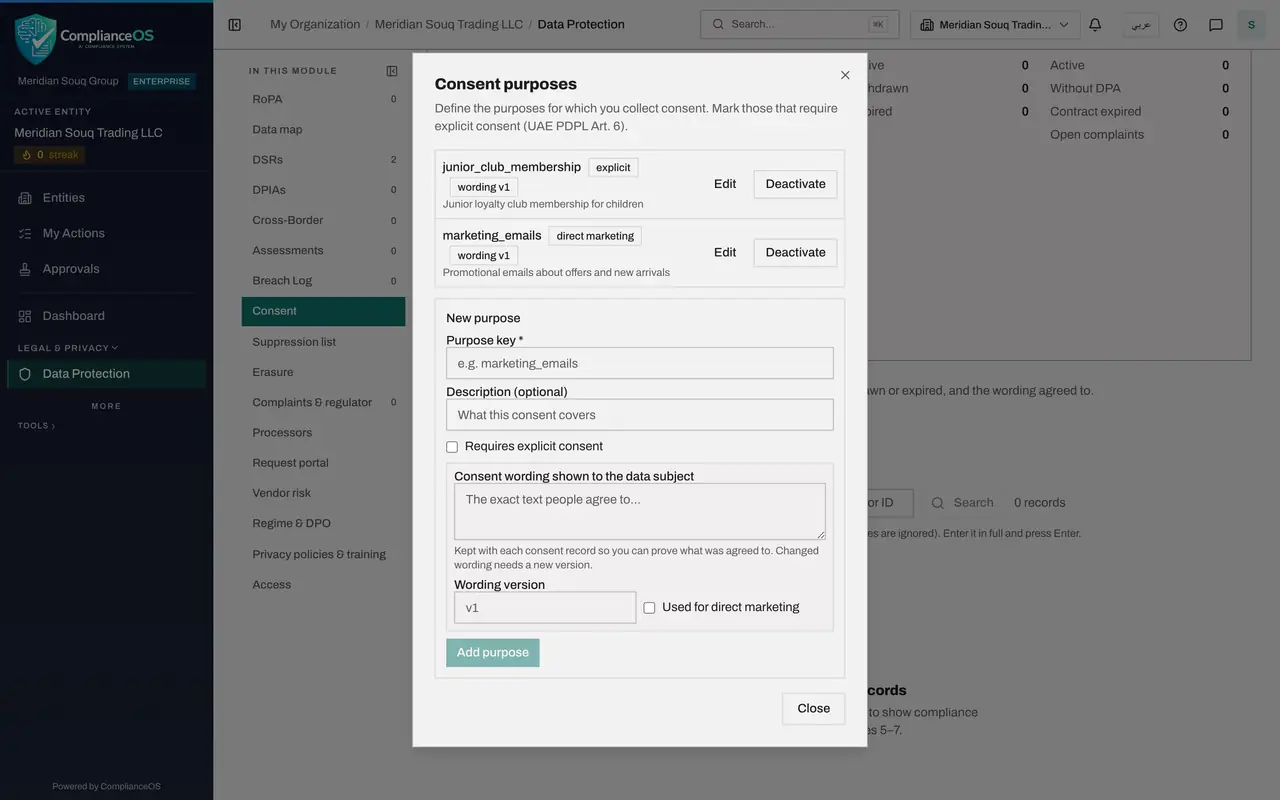
This purpose is promotional, so tick Used for direct marketing. Anyone who later withdraws is then blocked from all direct marketing, not only from this purpose. Leave Requires explicit consent unticked here. Select Add purpose, and the purpose appears at the top of the box with its tags.
- Select Used for direct marketing
- Select Add purpose
- 6
Add a purpose that needs explicit consent
Add a second purpose for the junior loyalty club, which holds children's details. Type its key and description, and tick Requires explicit consent. Explicit consent means a clear, separate yes, such as a signed form, and is expected for sensitive data and for children.
- Type Purpose key *:
junior_club_membership - Type Description (optional):
Junior loyalty club membership for children - Select Requires explicit consent
- Type Purpose key *:
- 7
Enter its wording and select Add purpose
Type the wording a parent signs and its version. Leave Used for direct marketing unticked, because club membership is not promotion. Select Add purpose.
- Type Consent wording shown to the data subject:
I am the parent or guardian of this child and I agree that Meridian So… - Type Wording version *:
v1 - Select Add purpose
- Type Consent wording shown to the data subject:
- 8
Start a third purpose
Add one more purpose, for offers sent to people who sign in to the in-store wifi. Type its key and description. This purpose is switched off again in a moment, to show how that works.
- Type Purpose key *:
store_wifi_offers - Type Description (optional):
Offers sent after signing in to store wifi
- Type Purpose key *:
- 9
Complete the third purpose and select Add purpose
Type the wording and its version, tick Used for direct marketing, and select Add purpose. Three purposes are now listed, newest first.
- Type Consent wording shown to the data subject:
I agree to receive offers from Meridian Souq at the email address I us… - Type Wording version *:
v1 - Select Used for direct marketing
- Select Add purpose
- Type Consent wording shown to the data subject:
- 10
Select Edit on the email purpose
The marketing team has reworded the email consent. Find marketing_emails in the list and select Edit. The purpose opens for editing. The key cannot be changed; the description, the two tick boxes, the wording and the version can.
- Select Edit
- 11
Change the wording, raise the version and select Save
Type the new wording and change Wording version to v2. The version is required when you edit. Select Save. Consents already recorded keep the wording and version they were given under; new consents get the new ones.
- Type Consent wording shown to the data subject:
I agree to receive emails from Meridian Souq about offers, new arrival… - Type Wording version *:
v2 - Select Save
- Type Consent wording shown to the data subject:
- 12
Select Deactivate on the wifi purpose
The store wifi offers have been stopped. Find store_wifi_offers and select Deactivate. The purpose shows the tag inactive and its button changes to Activate. It can no longer be chosen when recording a consent, but nothing recorded against it is lost.
- Select Deactivate
- 13
Select Close
Select Close to return to the register. The purposes are ready. The next lesson records a person's consent against one of them.
- Select Close
How to check it worked
The Consent purposes box lists marketing_emails with the tags direct marketing and wording v2, junior_club_membership with the tag explicit, and store_wifi_offers with the tag inactive.
Common mistakes
- Recording consent against a purpose that has no wording. The record then cannot show what the person agreed to; add the wording to the purpose first.
- Changing the wording of a purpose without entering a new version. Each consent record keeps the version the person agreed to, so new wording needs a new version.
- Forgetting to tick Used for direct marketing on a promotional purpose. Without it, a person who withdraws is suppressed for that one purpose only, not for direct marketing as a whole.
Check your understanding
1. Why should a consent purpose carry the exact wording shown to people?
- A.So the wording is kept with each consent record as proof of what was agreed
- B.Because the purpose key cannot be saved without it
- C.So the wording is emailed to the customer
- D.To make the list easier to sort
Show answer
Answer: A. So the wording is kept with each consent record as proof of what was agreed
The wording and its version are stored with every consent recorded for the purpose, so you can show exactly what the person agreed to.
2. You no longer run a campaign that a purpose was created for. What do you do with the purpose?
- A.Delete every consent recorded for it
- B.Select Deactivate: it is kept with its records but can no longer be chosen for new consents
- C.Rename it to something else
- D.Nothing can be done
Show answer
Answer: B. Select Deactivate: it is kept with its records but can no longer be chosen for new consents
A deactivated purpose shows the tag inactive and is not offered when recording consent. The consents already recorded stay as they are, and Activate brings it back.