Lesson 26 of 28
How this connects, part 2: the assignee's My Actions
What you will be able to do
See, from the side of the person who was given a request, how it arrives in My Actions with its deadline, how it sits beside work from other modules, and how to get from there to the request.
Before you start
- A colleague has assigned the open portability request to you (see part 1).
Steps
- 1
Select My Actions
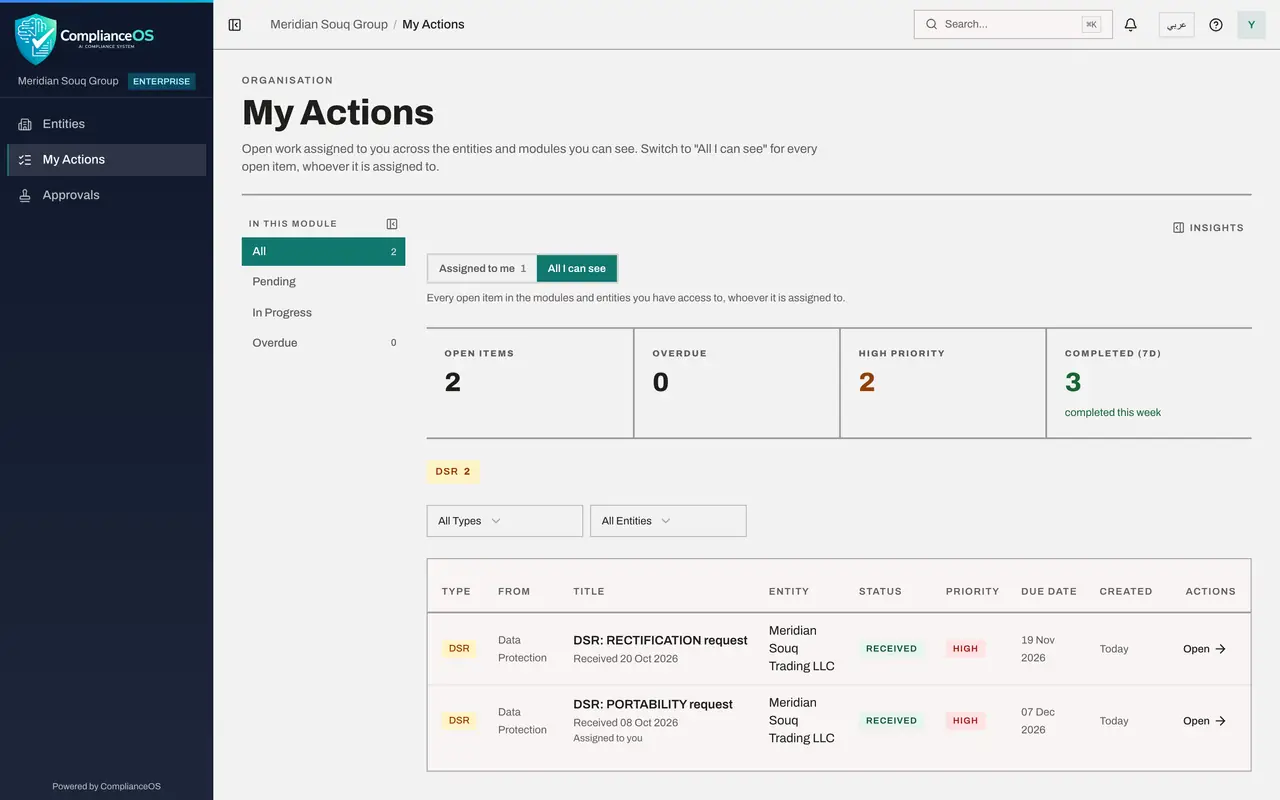
In the main menu, select My Actions. The request your colleague assigned a moment ago is already listed, with the type DSR, the entity, the status and the due date. The number beside My Actions in the menu counts your open items.
- Select My Actions
- 2
Read the due date
The due date on the line is the request's current deadline. This request was extended in an earlier lesson, so the date shown here is the extended one, about thirty days later than the others.
- 3
Select All I can see
Select All I can see. The list now holds every open item you are allowed to see for the entities you work on. Your own items say Assigned to you under the title; the others belong to a colleague or to nobody yet, so check the owner in Data Protection before you start on one.
- Select All I can see
- 4
Go back to Assigned to me and select Open
Select Assigned to me again, then select Open on your request. Data Protection opens on DSRs for the entity the request belongs to, with your request open in a window.
- Select Assigned to me
- Select Open
- 5
Work the request from here
The window shows the request with its extended due date, and Update at the bottom. From here you work it exactly as in the earlier lessons: update the status, respond and close.
How to check it worked
My Actions lists the request under Assigned to me with the status and the extended due date, and All I can see lists the other open requests of the entity with their owners.
Common mistakes
- Working only from the DSRs list and never opening My Actions. My Actions is the one list that brings together what you own across modules: requests, risk actions, contracts and audit requests.
- Reading the due date in My Actions as the original deadline. It is the current one: after an extension it shows the new date.
- Assuming a request in All I can see is yours to answer. Only the lines that say Assigned to you are yours; check the owner of the others in Data Protection.
Check your understanding
1. A request's deadline was extended by thirty days. Which date does My Actions show?
- A.The original due date
- B.The new due date
- C.The date it was received
- D.No date
Show answer
Answer: B. The new due date
My Actions shows the request's current due date, so an extension is reflected there at once.
2. What does the view All I can see add to Assigned to me?
- A.Closed requests
- B.Every open item you are allowed to see, whoever owns it, including unassigned ones
- C.Other companies' requests
- D.Deleted records
Show answer
Answer: B. Every open item you are allowed to see, whoever owns it, including unassigned ones
It is the team view of open work. Only the lines marked Assigned to you are your own.