Lesson 6 of 28
Log a request made by a parent for a child, with identity already checked
What you will be able to do
Record a request that a parent makes about their child's data, including how you checked the parent's identity and their relationship to the child, so the record shows you verified both before acting.
Before you start
- You are signed in with the Data Protection Officer role for the entity.
- You have checked the parent's identity, for example by seeing their Emirates ID, and their authority to act for the child.
Steps
- 1
Open the request list and start a new request
A mother came to the customer desk and asked for her son's junior loyalty club record to be corrected. In Data Protection, open the request list, then select the Log DSR button to open an empty form.
- Select DSRs
- Select Log DSR
- 2
Choose Rectification and enter the parent's details
In Request Type choose Rectification, which means correcting data. In Requester Name and Requester Email enter the parent's own name and email, not the child's.
- Select Select request type
- Choose Rectification
- Type Requester Name:
Mariam Al Shamsi - Type Requester Email:
mariam.alshamsi@example.com
- 3
Choose the channel In person
She asked at the desk a few minutes ago, so leave Received at as it is and choose In person under Channel.
- Select Not recorded
- Choose In person
- 4
Tick Identity verified
The desk has already seen her Emirates ID, so tick Identity verified. Two boxes appear: Identity verified at, filled with the current time, and Verification method.
- Select Identity verified
- 5
Record when and how identity was checked
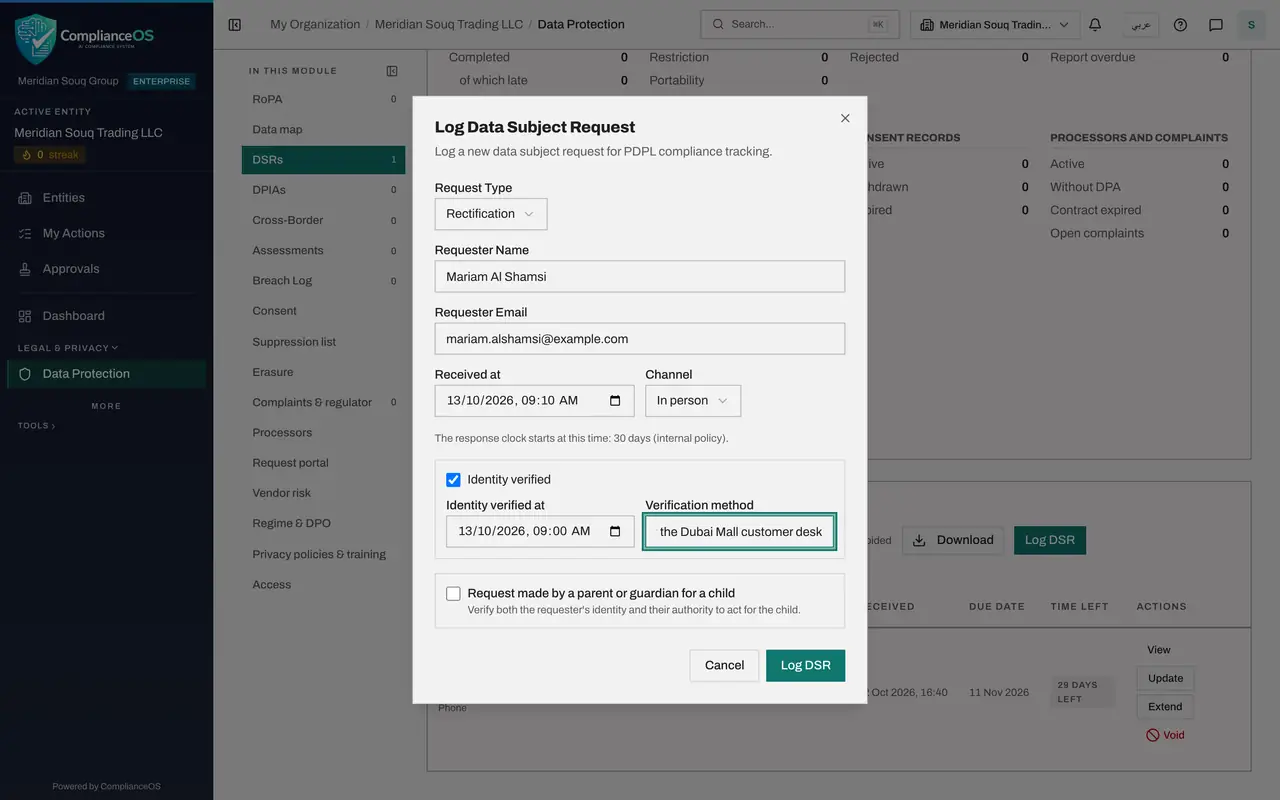
Set Identity verified at to the time of the check, ten minutes ago. In Verification method, say in a few words how you confirmed who the person is.
- Type Identity verified at:
2026-10-13T09:00 - Type Verification method:
Emirates ID seen at the Dubai Mall customer desk
- Type Identity verified at:
- 6
Tick Request made by a parent or guardian for a child
Tick Request made by a parent or guardian for a child. A new box appears, Requester's relationship to the child, marked as required.
- 7
Choose the relationship to the child
Open Requester's relationship to the child. The choices are Parent, Legal guardian and Other custodian. Choose Parent.
- Select Choose relationship
- Choose Parent
- 8
Save the request
Select the Log DSR button at the bottom of the form. A message confirms that the request was logged, the form closes, and the request is added to the list.
- Select Log DSR
- 9
Find the For a child tag in the list
The new request shows the channel In person and a tag, For a child, under the requester's name. The tag tells anyone working the list that the data belongs to a child.
- 10
Select View to check what was recorded
Select View on the request. The record shows On behalf of a child with the requester's relationship, and beside Identity the time and method of the check you entered. Select Close when you have read it.
- Select View: Mariam Al Shamsi
How to check it worked
The request is in the list with the tag For a child under the requester's name, and opening View shows On behalf of a child with the relationship, and the identity check with its time and method.
Common mistakes
- Typing the child's name as the requester. The requester is the parent or guardian; the tick box records that the request concerns the child's data.
- Ticking the child box but not choosing the relationship. The form cannot be saved until Requester's relationship to the child is chosen.
- Entering a time for Identity verified at that is later than now. A time in the future is refused.
Check your understanding
1. A father asks you to correct his daughter's loyalty club record. Whose name goes in Requester Name?
- A.The daughter's
- B.The father's
- C.The Data Protection Officer's
- D.It is left empty
Show answer
Answer: B. The father's
The requester is the parent or guardian. Ticking Request made by a parent or guardian for a child, and choosing the relationship, records that the request is about the child.
2. What must you verify before acting on a request made for a child?
- A.Only the child's age
- B.The requester's identity and their authority to act for the child
- C.Nothing, if the request came in person
- D.Only the email address
Show answer
Answer: B. The requester's identity and their authority to act for the child
The hint under the tick box says it: verify both the requester's identity and their authority to act for the child.