Lesson 15 of 28
Place a legal hold from an erasure request
What you will be able to do
Stop a person's records from being erased when a dispute requires them to be kept: place a legal hold from the erasure request, cancel the erasure plan, refuse the request with the reason, and find the hold in the legal-hold register.
Before you start
- An erasure request from Hassan Al Zaabi is in the DSRs list. He has an open dispute with the company about a refund.
- You know the case reference of the dispute, and why the records must be kept.
Steps
- 1
Open the erasure request and run the search
In Data Protection, select DSRs and select View on the erasure request from Hassan Al Zaabi. Under Find this person's data, select Search, then Search again in the form. A plan can only be built from a finished search.
- Select DSRs
- Select View: Hassan Al Zaabi
- Select Search
- Select Search
- 2
Select Create erasure plan
Select Create erasure plan. The plan appears as a Draft. Among its buttons is Place legal hold on this data subject.
- Select Create erasure plan
- 3
Select Place legal hold on this data subject
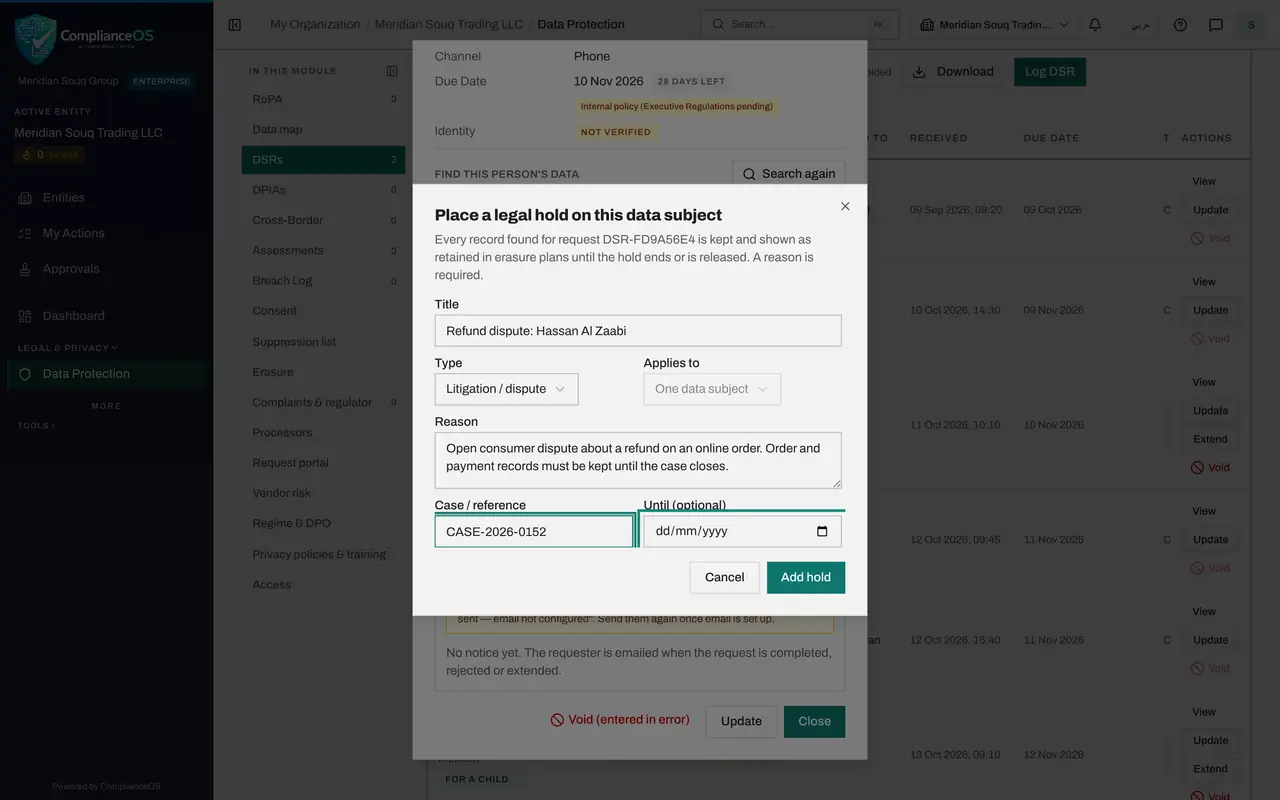
This customer has an open dispute about a refund, so his order and payment records must be kept for now. Select Place legal hold on this data subject. A legal hold is an instruction to keep records. The form says every record found for this request is kept, and shown as retained in erasure plans, until the hold ends or is released.
- Select Place legal hold on this data subject
- 4
Give the hold a title and choose its type
Type a Title that says what the hold is for. Open Type to see the five kinds: Litigation or dispute, Regulator request, Breach investigation, Tax audit and Other. Keep Litigation or dispute. Applies to is already set to One data subject.
- Type Title:
Refund dispute: Hassan Al Zaabi - Select Litigation / dispute
- Choose Litigation / dispute
- Type Title:
- 5
Give the reason and the case reference
In Reason, say why the records must be kept. This is the reason you give the requester. In Case or reference, enter your case number. Until is optional: leave it empty when you do not know when the dispute will end, and the hold stays until someone releases it.
- Type Reason:
Open consumer dispute about a refund on an online order. Order and pay… - Type Case / reference:
CASE-2026-0152
- Type Reason:
- 6
Select Add hold
Select Add hold. A message confirms Legal hold added, and from now on every record found for this request is kept. In a plan built with a connected system, each table found would show the action Retain, and a line Kept, and why, with the legal basis; in this company no connected system holds his records, so the plan lists none.
- Select Add hold
- 7
Select Cancel plan
Nothing may be erased for this customer while the hold is in force, so the plan should not go ahead. Select Cancel plan, give the reason, and select Cancel plan in the box. The plan shows Cancelled, and a new plan can be made from a later search once the hold is released.
- Select Cancel plan
- Type Reason (optional):
Legal hold placed for the refund dispute. - Select Cancel plan
- 8
Select Update and set the status to Rejected
The request cannot be carried out while the hold is in force, so it is refused for now. Select Update at the bottom of the record, open Status and choose Rejected.
- Select Update
- Select Received
- Choose Rejected
- 9
Give the rejection reason and save
In Rejection reason, tell the customer that his records are kept under a legal hold until the dispute closes, and that he can ask again afterwards. Then select Save Changes.
- Type Rejection reason:
Your records are needed for the refund dispute you opened and are kept… - Select Save Changes
- Type Rejection reason:
- 10
Open Erasure and find the Legal-hold register
Select Erasure and scroll to the Legal-hold register. It lists every hold with its type, what it applies to, its period and its status. The hold you placed shows In force, from today until released.
- Select Erasure
How to check it worked
The Legal-hold register on the Erasure section lists the hold for the dispute as In force, the erasure plan on the request shows Cancelled, and the request shows Rejected with the reason.
Common mistakes
- Erasing first and checking for disputes afterwards. Place the hold before any plan is approved; a record that has been erased cannot be brought back.
- Releasing a hold because the requester is pressing for deletion. Release it only when the dispute or investigation is over, and record the reason.
- Leaving the erasure plan open after placing the hold. Cancel the plan, so that nobody approves or executes it by mistake.
Check your understanding
1. What happens to records covered by a hold that is In force when an erasure plan is created?
- A.They are deleted first
- B.They are anonymised
- C.They are kept and listed as retained in the plan, with the reason
- D.The plan cannot be created
Show answer
Answer: C. They are kept and listed as retained in the plan, with the reason
While a hold is in force, records in its scope are kept and shown as retained in every erasure plan, with the reason, so you can explain it to the requester.
2. A customer asks for erasure while his refund dispute is still open. What do you do first?
- A.Approve the erasure quickly
- B.Place a legal hold on the data subject, so the records needed for the dispute are kept
- C.Void the request
- D.Extend the deadline twice
Show answer
Answer: B. Place a legal hold on the data subject, so the records needed for the dispute are kept
The hold comes first. Records in its scope are kept, and the reason is recorded so you can give it to the requester.