Lesson 19 of 28
Record consent given by a parent for a child, correct a record, and read expired consents
What you will be able to do
Record a consent that a parent or guardian gives for a child, with who they are and how you verified them, correct the age band on a record with a reason, and understand what Expired means in the register.
Before you start
- The purpose junior_club_membership is defined (see the lesson Define what you ask consent for).
- You have the signed form, and you have checked the parent's identity.
Steps
- 1
Open Consent and select Record consent
In Data Protection, select Consent, then select Record consent. A mother has signed the junior loyalty club form for her nine year old son. In Data subject identifier, type the child's club number: the consent is about the child, not the parent.
- Select Consent
- Select Record consent
- Type Data subject identifier *:
JC-20418
- 2
Choose the age band Child, under 13
Open Data subject's age and choose Child, under 13. A new block appears, Parent or guardian who consented, because below the age of consent a parent or guardian consents for the child.
- Select Adult
- Choose Child (under 13)
- 3
Enter who consented and their relationship
Type the parent's Name. Open Relationship to the child and choose Parent, Legal guardian or Other custodian. Here it is Parent.
- Type Name *:
Mariam Al Shamsi - Select Choose relationship
- Choose Parent
- Type Name *:
- 4
Record when and how the parent was verified
In Verified on, enter when you checked the parent's identity. In How they were verified, say how. Both are required for a minor.
- Type Verified on *:
2026-10-13T08:49 - Type How they were verified *:
Emirates ID seen, family book shown at the Dubai Mall desk
- Type Verified on *:
- 5
Choose the purpose and the source
In Purpose choose junior_club_membership. The wording the parent signed appears underneath. In Source choose Paper.
- Select Select a defined purpose
- Choose junior_club_membership (explicit consent)
- Select Web form
- Choose Paper
- 6
Add the proof reference and select Record
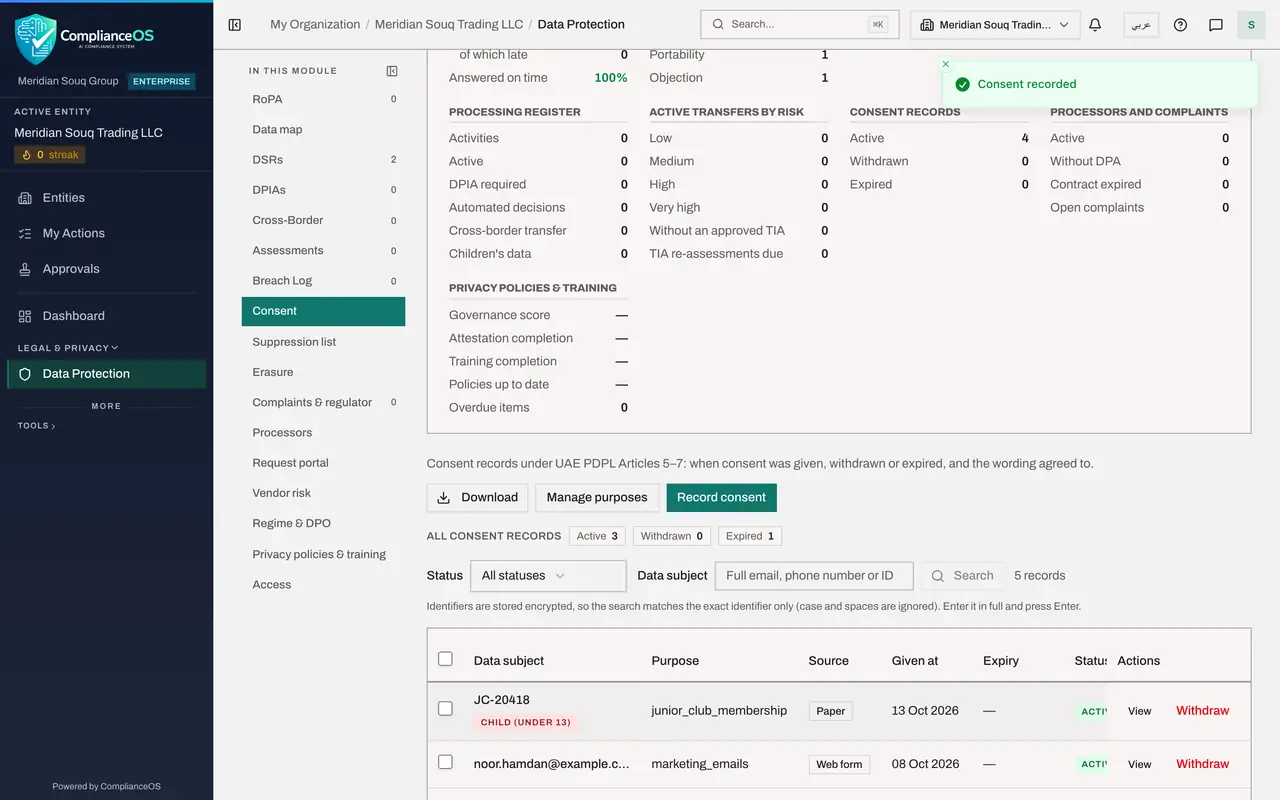
In Proof reference, enter the form number. Then select Record.
- Type Proof reference (optional):
Junior club form JC-2026-0077, Dubai Mall store - Select Record
- Type Proof reference (optional):
- 7
Find the age tag in the register
The record is listed with a tag under the identifier that reads Child, under 13. Anyone working the register sees at once that this consent is for a child.
- 8
Select View
Select View. As well as the usual details, the record shows Consent given by, with the parent's name and relationship, and Custodian verified, with when and how. At the bottom is the button Correct age band or custodian.
- Select View
- 9
Select Correct age band or custodian
The form shows the boy's date of birth: he turned thirteen last month. Select Correct age band or custodian. The box lets you change the age band and the parent's details, and asks for the reason.
- Select Correct age band / custodian
- 10
Change the age band, give the reason and save
Open Data subject's age and choose Minor, thirteen to seventeen. In Reason for the correction, say what the evidence shows. Select Save Changes. The correction and your reason are kept in the audit log.
- Select Child (under 13)
- Choose Minor (13–17)
- Type Reason for the correction *:
Date of birth on the signed form shows the child is 13. - Select Save Changes
- 11
Filter the register to Expired
Now look at expiry. Open the Status box above the list and choose Expired. One record is listed: a paper consent from last year whose Expiry date has passed. Its status changed to Expired by itself on that date.
- Select All statuses
- Choose Expired
- 12
Know what you can do with an expired consent
An expired consent has only a View button. It cannot be withdrawn, because it has already ended, and it is no longer counted as Active. If the person agrees again, select Record consent and record a new one. Set the Status box back to All statuses when you have finished.
- Select Expired
- Choose All statuses
How to check it worked
The child's consent is in the register with an age tag under the identifier, View shows who consented and how they were verified, and choosing Expired in the Status box lists the consent whose expiry date has passed.
Common mistakes
- Recording a child's consent as Adult. Below the age of consent, the consent comes from a parent or guardian; choose the right age band so the form asks who that was.
- Leaving Verified on empty. For a minor, the name, the relationship, when the parent or guardian was verified and how are all required.
- Relying on an Expired consent. Once the expiry date has passed, the consent no longer covers the purpose; ask the person again and record a new consent.
Check your understanding
1. You chose Child, under 13, by mistake for a fourteen year old. How do you fix the record?
- A.Delete it and start again
- B.Open View, select Correct age band or custodian, change it and give the reason
- C.Withdraw it
- D.It cannot be fixed
Show answer
Answer: B. Open View, select Correct age band or custodian, change it and give the reason
Correct age band or custodian changes the age band or the parent's details. The change and your reason are kept in the audit log.
2. A consent shows the status Expired. Can you still send that person marketing for that purpose?
- A.Yes, expiry is only a reminder
- B.No. The consent has ended; ask again and record a new consent
- C.Yes, for thirty more days
- D.Only by text message
Show answer
Answer: B. No. The consent has ended; ask again and record a new consent
Expired means the expiry date has passed. The record is kept as history, but it is no longer an active consent.