Lesson 27 of 28
What you see without ESG access
What you will be able to do
This lesson is for anyone who has been sent a link to ESG and Carbon and cannot open it. You will see what ComplianceOS shows a person whose role does not include ESG, and how to find out who can give you access.
Before you start
- You are signed in with the Employee role, which covers your own record and nothing in ESG.
- A colleague has sent you a link to the entity's ESG and Carbon page.
Steps
- 1
Look at the left menu
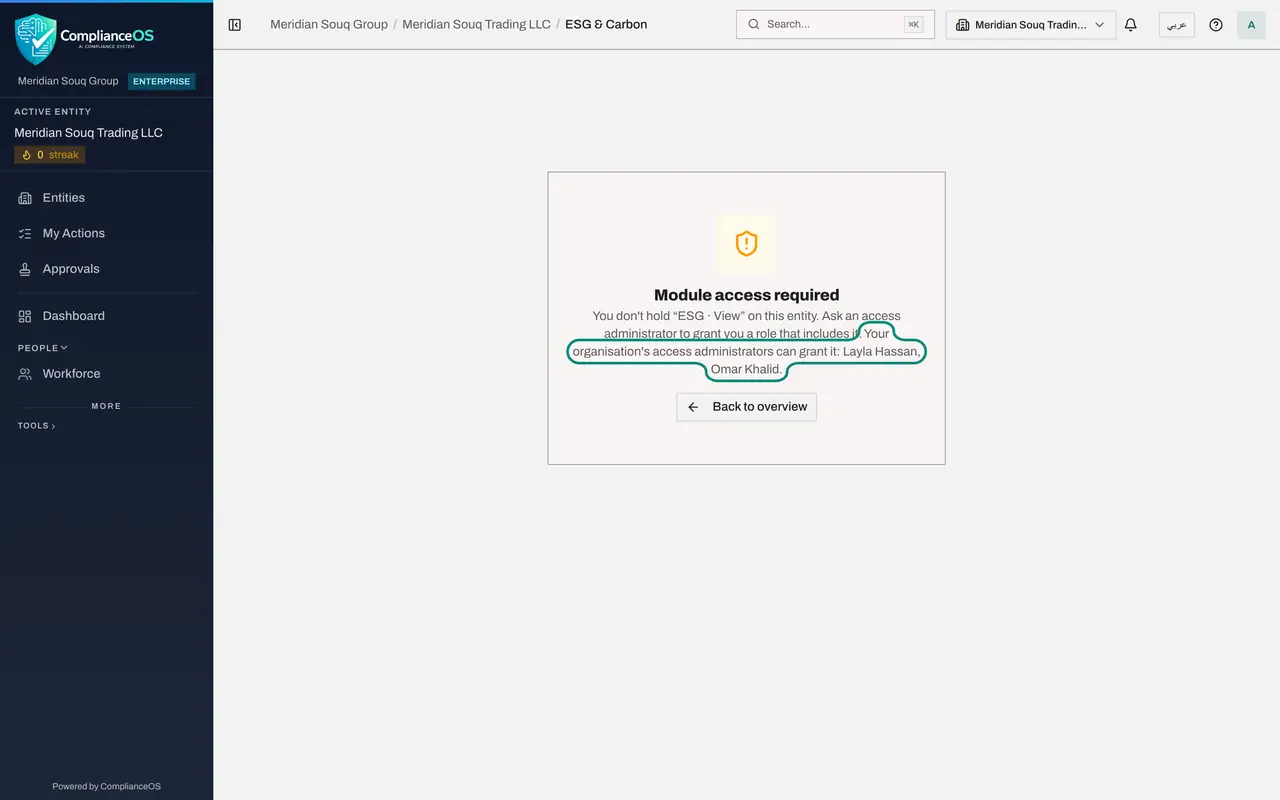
With the Employee role, the left menu is short: Entities, My Actions, Approvals, Dashboard and Workforce, with a few tools folded under Tools at the bottom. There is no Sustainability group and no ESG and Carbon, because your role does not include it.
- 2
Open the link you were sent
Open the link to ESG and Carbon that your colleague sent. Instead of the dashboard you see the message Module access required. It names the right you are missing, ESG View on this entity, and tells you to ask an access administrator for a role that includes it.
- 3
Read who can grant the access
The last sentence of the message names your organisation's access administrators, here Layla Hassan and Omar Khalid. Ask one of them, and say what you need to do: read only, or enter data.
- 4
Select Back to overview
Select Back to overview. You return to the entity's overview page, which your role does cover.
- Select Back to overview
- 5
Know what changes once access is granted
Your left menu stays as it was. When an administrator grants you a role that includes ESG, the Sustainability group appears in the menu the next time you sign in.
How to check it worked
You have seen the message Module access required, and you can name the administrators it tells you to ask.
Common mistakes
- Asking the colleague who sent the link to share their sign-in. Never share sign-ins; ask for a role instead, read-only if you only need to look.
- Thinking the module is broken. The left menu lists only what your role covers, so ESG and Carbon is simply not there.
- Asking for more than you need. If you only need to read a report, ask for read-only access, or for the PDF.
Check your understanding
1. Why is ESG and Carbon missing from your left menu?
- A.The module is switched off
- B.Your role does not include the right to view ESG for this entity
- C.It only appears at year end
- D.It is hidden on small screens
Show answer
Answer: B. Your role does not include the right to view ESG for this entity
The menu shows only the modules your role covers.
2. What does the page tell you to do when you open an ESG link without access?
- A.Sign in again
- B.Ask an access administrator to grant you a role that includes it
- C.Pay for an upgrade
- D.Wait a day
Show answer
Answer: B. Ask an access administrator to grant you a role that includes it
The message names the missing right and the administrators who can grant it.