Lesson 19 of 28
Attach evidence to a framework requirement
What you will be able to do
This lesson is for the person who answers for a reporting standard. An emission record carries a note and a metric carries a link, but the document itself is attached to the framework task that asks for it. You will submit a file and an explanation for the GRI energy requirement and find the sealed copy in the Evidence Vault.
Before you start
- You are signed in with the Compliance officer role for the entity.
- GRI Standards is assigned to the entity (lesson Choose the ESG frameworks that apply).
- The quarter's electricity is recorded in Emissions, and you have the summary of the bills as a file: electricity-summary-q3-2026.pdf in the course folder.
Steps
- 1
Open Frameworks and select Tasks
In the left menu choose Frameworks, under Risk and Governance, then select Tasks. Every assigned framework has a block here. Evidence to Provide lists the tasks that need proof from you, each with a Submit Evidence button and a Waive link.
- Select Frameworks
- Select Tasks16 (16)
- 2
Find the task GRI 302 Energy
In the GRI block find GRI 302 Energy. The line under the name says what the standard asks for: energy consumption inside and outside the organisation. Its type is Evidence and its status is Pending.
- 3
Select Submit Evidence
Select Submit Evidence on that line. A box opens with the task name at the top.
- Select Submit Evidence
- 4
Write the evidence note
In Evidence Notes say what you are providing, the period it covers and where the figure is recorded. A reviewer should understand the evidence without opening the file.
- Type Evidence Notes *:
Electricity use July to September 2026: 412,600 kWh across six stores…
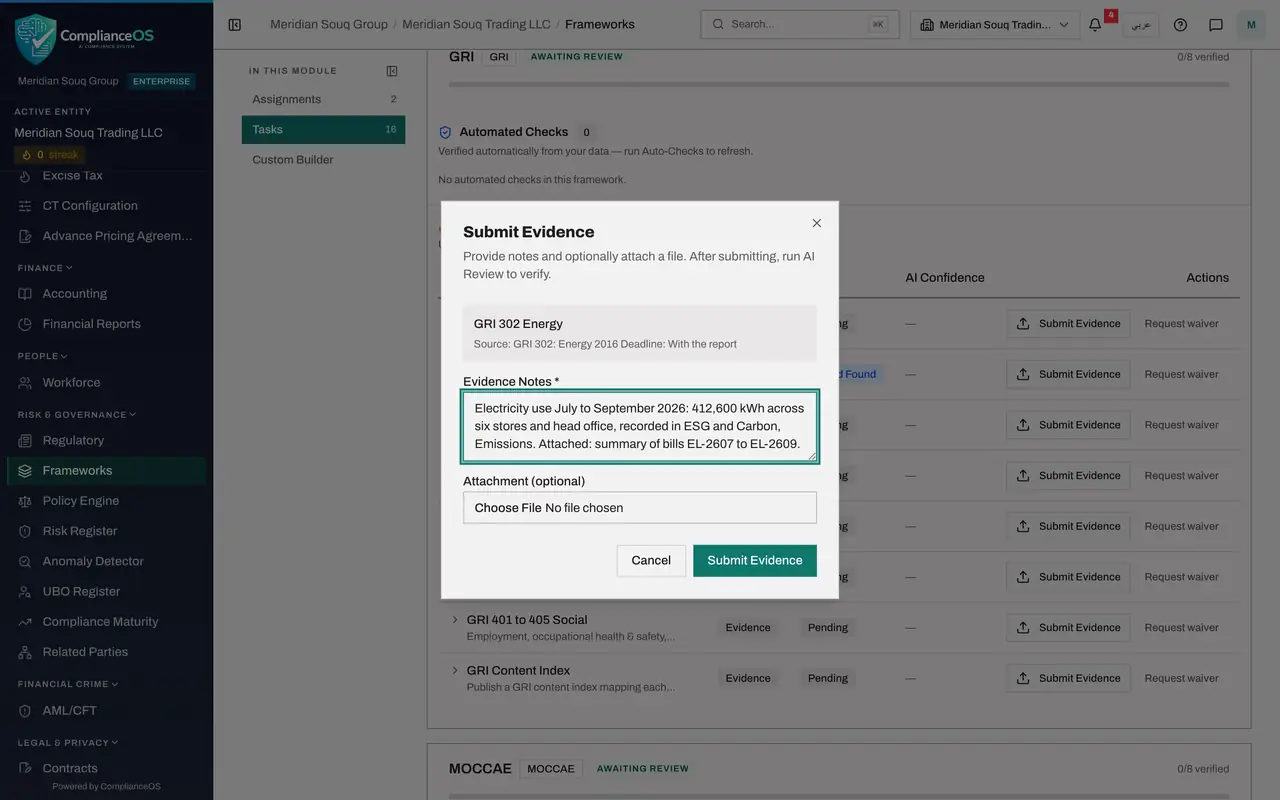
- Type Evidence Notes *:
- 5
Attach the file
Under Attachment, choose the document from your computer, here electricity-summary-q3-2026.pdf. The file name appears under the box.
- Upload Attachment (optional):
electricity-summary-q3-2026.pdf
- Upload Attachment (optional):
- 6
Select Submit Evidence in the box
Select Submit Evidence. The file is uploaded, the box closes and the task's status changes to Evidence Submitted. An AI Review button appears on the line: it asks the AI assistant to compare the evidence with the requirement before a person approves the task.
- Select Submit Evidence
- 7
Open the task's details
Select the small arrow at the start of the line. The details show the task's type and, under Evidence, your note and the attached file.
- Select Show details
- 8
Look for the file in the Evidence Vault
Now choose Evidence Vault in the left menu, under Assurance. The vault keeps sealed copies of evidence from across ComplianceOS, each with a fingerprint that proves it has not been altered. The file you just attached to the framework task is here too, sealed, with ESG as its source.
- Select Evidence Vault
How to check it worked
In Frameworks, Tasks, the task GRI 302 Energy shows the status Evidence Submitted, and opening its details shows your note and the attached file.
Common mistakes
- Writing a note such as see attached and nothing else. The note is what a reviewer reads first: say what the file is, what period it covers and where the figure is recorded.
- Selecting Waive because the evidence is not ready. Waive tells ComplianceOS the task does not need doing; it asks for a reason and takes the task off the open list.
- Expecting to change the evidence afterwards. Once a task is Evidence Submitted, check the file before you submit, because the Submit Evidence button is gone until a review sends the task back.
Check your understanding
1. Where do you attach a document to an ESG framework requirement?
- A.ESG and Carbon, Emissions, on the emission record
- B.Frameworks, Tasks, with Submit Evidence on the task
- C.ESG and Carbon, Reports
- D.My Actions
Show answer
Answer: B. Frameworks, Tasks, with Submit Evidence on the task
Files are attached to the framework task. Emission records carry a note, and metrics carry a link, but neither holds a file.
2. What is required before Submit Evidence can be selected in the box?
- A.A file
- B.Evidence Notes
- C.An approver's name
- D.Nothing
Show answer
Answer: B. Evidence Notes
Evidence Notes is the only required field. The attachment is optional, although a task is rarely convincing without one.