Lesson 5 of 28
Start the materiality assessment
What you will be able to do
This lesson is for the person who runs the yearly materiality assessment, which decides the ESG topics the company must report on. You will start the assessment for the year, tidy the list of topics, set up the stakeholder groups and their weights, check the thresholds and write down the method.
Before you start
- You are signed in with the Compliance officer role for the entity.
- You know which groups of people the company listens to, such as customers, employees and suppliers, and how you will collect their views.
Steps
- 1
Open Materiality
In ESG and Carbon select Materiality. A double materiality assessment rates each ESG topic twice: for its impact on people and the planet, and for its financial effect on the company. Nothing has been started yet, so the screen shows one button, Start assessment.
- Select Materiality
- 2
Select Start assessment
Select Start assessment. A box asks for the Year, already filled with 2026. The switch underneath copies the topics and stakeholder groups from last year's assessment when there is one; this is the first, so it has no effect.
- Select Start assessment
- 3
Confirm with Start assessment
Select Start assessment in the box. Version 1 is created with the status Draft. It comes with sixteen standard topics, taken from the GRI and European reporting standards, and six stakeholder groups.
- Select Start assessment
- 4
Read the Topics list
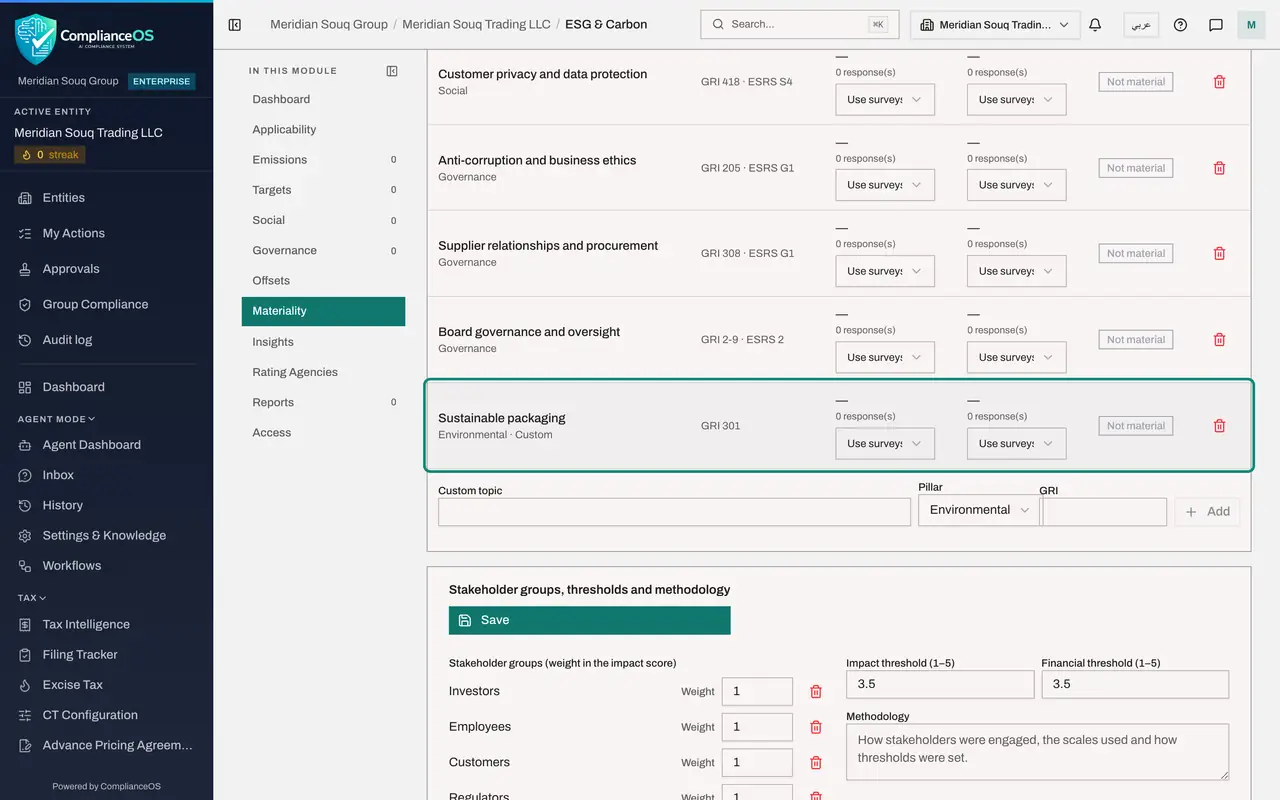
Scroll to Topics. Each line is a subject with its pillar, Environmental, Social or Governance, and its references in the GRI standards and the European standards, shown as ESRS. Impact and Financial are empty until ratings arrive, and Result says Not material for now.
- 5
Remove a topic that cannot apply
Meridian Souq trades from city shops and owns no land, so Biodiversity and ecosystems cannot apply. Select the bin icon, Remove, at the end of that line. The line disappears, and the change waits for Save.
- Select Remove
- 6
Add a topic of your own
Under the list, type Sustainable packaging in Custom topic. Open Pillar and choose Environmental. In GRI type the reference if there is one, here GRI 301, the standard on materials. Then select Add. The new topic joins the list, marked Custom.
- Type Custom topic:
Sustainable packaging - Select Pillar
- Choose Environmental
- Select Add
- Type Custom topic:
- 7
Save the topics
Scroll back to the top of the Topics box and select Save. A confirmation, Saved, appears. The heading still counts sixteen topics: one removed, one added.
- Select Save
- 8
Give the Customers group more weight
Scroll to Stakeholder groups, thresholds and methodology. Each group has a Weight, which is how much its ratings count in the impact score. All start at 1. A retailer lives by its customers, so change the weight beside Customers to 2.
- Type Weight:
2
- Type Weight:
- 9
Add a stakeholder group
Shopping centre owners set rules for energy and waste in their malls, so add them. Type Mall landlords in New group name and select the plus button beside it. The group appears with a weight of 1. The bin icon beside any group removes it.
- Type New group name:
Mall landlords - Select Add
- Type New group name:
- 10
Check the two thresholds
Impact threshold and Financial threshold are the scores, on a scale of 1 to 5, at which a topic counts as material. Both start at 3.5, a common choice. Leave them unless your method says otherwise, and never change them after seeing the results.
- 11
Describe the method
In Methodology write how you collected the ratings, the scale you used and how the thresholds were set. An auditor reads this to judge whether the assessment can be trusted.
- Type How stakeholders were engaged, the scales used and how thresholds were:
Online survey of the customer panel and an employee survey in Septembe…
- Type How stakeholders were engaged, the scales used and how thresholds were:
- 12
Save the groups, thresholds and methodology
Select Save at the top of this box. A confirmation, Saved, appears. The assessment is now ready for ratings, which the next lesson records.
- Select Save
- 13
Check the version and status
Scroll back to the top. Version shows the year, the version number and the status, Draft. The Materiality matrix says none of the sixteen topics is material yet, because no ratings have been entered. Mark complete stays for the end of the next lesson.
How to check it worked
Materiality shows version 1 for the year with the status Draft, your custom topic in the Topics list, your stakeholder groups with their weights, and your methodology text.
Common mistakes
- Removing a topic because it is uncomfortable. Remove a topic only when it truly cannot apply to the business; a low score is the right way to show a topic does not matter much.
- Forgetting Save. The Topics box and the Stakeholder groups box each have their own Save button, and changes in one are lost if you leave without selecting it.
- Changing the thresholds after seeing the scores. Decide the level at which a topic counts as material before you collect ratings, and record it in Methodology.
Check your understanding
1. What does double materiality mean?
- A.Every topic is rated twice by the same person
- B.A topic is judged both for its impact on people and the planet and for its financial effect on the company
- C.Two years of data are compared
- D.Two people must approve each topic
Show answer
Answer: B. A topic is judged both for its impact on people and the planet and for its financial effect on the company
Stakeholders rate the impact side and management rates the financial side. A topic that passes either threshold is a reporting priority.
2. You give the Customers group a weight of 2 and every other group a weight of 1. What changes?
- A.Customers must answer two surveys
- B.Customers' ratings count twice as much in each topic's impact score
- C.The financial score doubles
- D.Nothing; weights are for display only
Show answer
Answer: B. Customers' ratings count twice as much in each topic's impact score
The impact score is the weighted average of the groups' ratings, so a heavier group pulls the score towards its view.