Lesson 15 of 28
Record and retire carbon offsets
What you will be able to do
This lesson is for the person who keeps the company's carbon offset records. A carbon offset is a certificate for one tonne of CO2e removed or avoided by a project somewhere else. You will record two purchases with every field, read the summary tiles, and retire an offset once it has been used against the year's emissions.
Before you start
- You are signed in with the Compliance officer role for the entity.
- You have the purchase confirmation for each offset: project, registry, serial number, tonnes, cost and dates. The projects and numbers here are invented.
- This screen only keeps records. Buying and retiring offsets is done with the registry or broker; nothing is sent from ComplianceOS.
Steps
- 1
Open Offsets and select Add Offset
In ESG and Carbon select Offsets. The list is empty. Select Add Offset to record a purchase.
- Select Offsets
- Select Add Offset
- 2
Name the project and choose the registry
In Project Name type the project as it appears on the certificate. Open Registry, the body that issued the certificate. The choices are NRCC, the national register for carbon credits, Verra, Gold Standard and Other. Choose Verra.
- Type Project Name:
Liwa Coast Mangrove Restoration (demo) - Select Registry
- Choose Verra
- Type Project Name:
- 3
Enter the serial number and the type
Serial Number is the certificate's unique number from the registry; it is optional here but you should always record it. Offset Type is the kind of project, such as reforestation or renewable energy, and is required.
- Type Serial Number:
VCS-DEMO-2026-000184 - Type Offset Type:
Reforestation
- Type Serial Number:
- 4
Enter the tonnes and the purchase date
In CO2e type the tonnes the certificate covers: 120. In Purchase Date enter the date on the purchase confirmation.
- Type CO₂e (tonnes):
120 - Type Purchase Date:
2026-09-15
- Type CO₂e (tonnes):
- 5
Enter the cost and the expiry date
Cost is what was paid in dirhams, here 8400. Expiry Date is the last day the certificate can be used, if it has one. Both are optional.
- Type Cost (AED):
8400 - Type Expiry Date:
2031-09-14
- Type Cost (AED):
- 6
Check the status and add the certificate link
Open Status. Purchased means you own it and have not used it, Pending means the purchase is not yet complete, Retired means used, and Expired means it ran out. Keep Purchased. In Certificate URL paste the web address of the certificate on the registry, so a reviewer can look it up.
- Select Status
- Choose Purchased
- Type Certificate URL:
https://registry.example.com/certificates/VCS-DEMO-2026-000184
- 7
Add a note and select Create
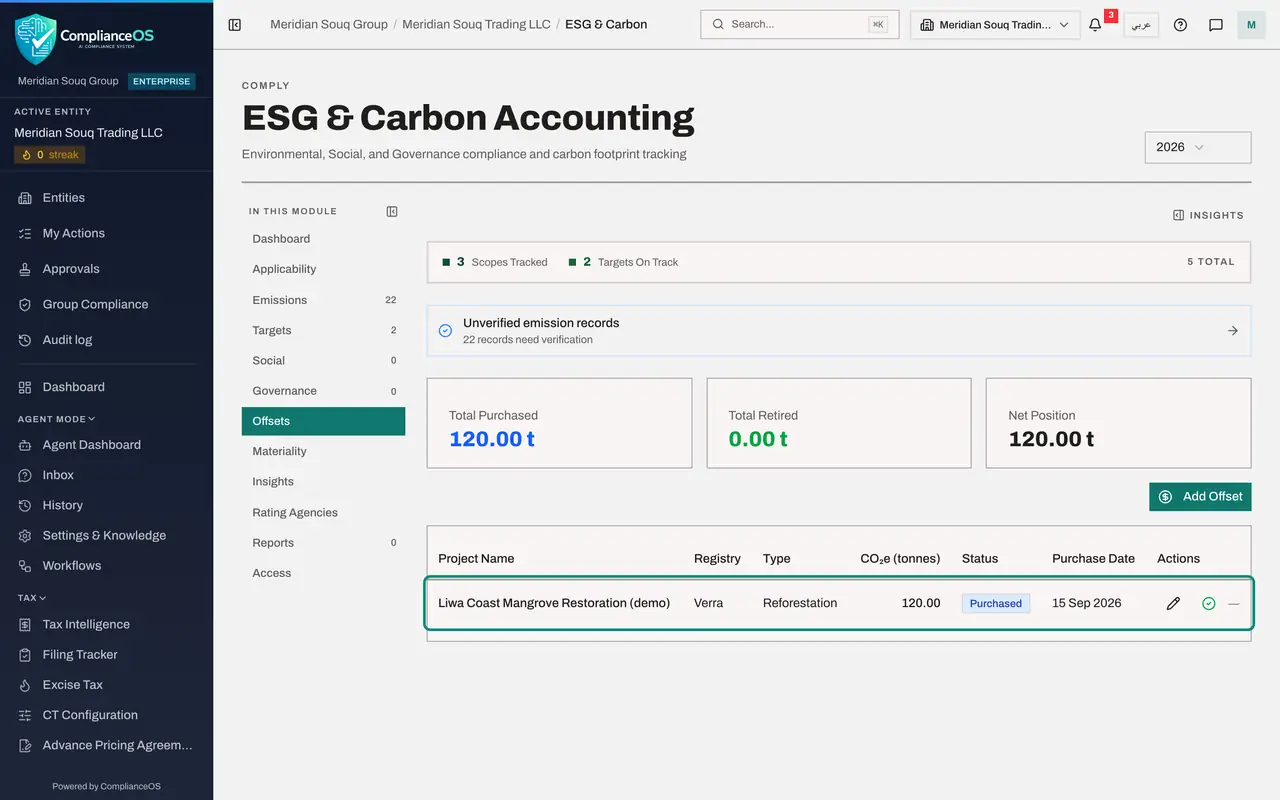
In Notes record who approved the purchase and the broker's reference, then select Create. The offset is listed, and three tiles appear above the list.
- Type Notes:
Approved by the finance manager on 10 September 2026. Broker reference… - Select Create
- Type Notes:
- 8
Record a purchase that is not complete yet
Select Add Offset again for a second purchase that the broker has not yet confirmed. Type the project name, choose the registry Gold Standard, and type the offset type Renewable Energy.
- Select Add Offset
- Type Project Name:
Hatta Rooftop Solar Credits (demo) - Select Registry
- Choose Gold Standard
- Type Offset Type:
Renewable Energy
- 9
Set it to Pending and select Create
Type 60 tonnes, set Status to Pending, and select Create. The serial number, dates and cost can be added when the broker's confirmation arrives.
- Type CO₂e (tonnes):
60 - Select Status
- Choose Pending
- Select Create
- Type CO₂e (tonnes):
- 10
Read the three tiles
Total Purchased adds up every offset on record: 180 tonnes. Total Retired counts the ones used so far: none. Net Position is what is still held, purchased or pending, and available to use.
- 11
Complete the pending offset with the pencil
The broker has now confirmed the solar credits. Select the pencil, Edit, on that line. Edit offset opens with every field. An offset can be corrected until it is retired, and each change goes to the audit log. Type the serial number and the cost, then select Save.
- Select Edit: Hatta Rooftop Solar Credits (demo)
- Type Serial Number:
GS-DEMO-2026-004417 - Type Cost (AED):
4500 - Select Save
- 12
Select Retire Offset on the mangrove offset
The registry has confirmed that the mangrove certificate was cancelled against this year's emissions. On its line, select the green tick, Retire Offset. A box asks you to confirm, and warns that retirement is permanent: the offset can no longer be edited or returned to Purchased.
- 13
Select Confirm
Select Confirm, but only after the registry has confirmed the retirement. The status changes to Retired with today's date, and the pencil disappears from that line.
- Select Confirm
- 14
Check the tiles again
Total Retired now shows 120 tonnes, and Net Position has dropped to the 60 tonnes still pending. The pending offset has no tick, because only a purchased offset can be retired. There is no bin icon for the Compliance officer: deleting an offset record needs the delete right.
How to check it worked
Offsets lists both purchases, one with the status Retired, and the three tiles at the top show the total purchased, the total retired and the net position.
Common mistakes
- Confirming a retirement before the registry has. Retirement records today's date and is permanent: the offset can no longer be edited.
- Leaving out the serial number. It is what proves the certificate is yours and has not been counted twice; add it with the pencil as soon as you have it, and always before retiring.
- Treating offsets as a substitute for reducing emissions. Reports show emissions and offsets separately.
Check your understanding
1. What does retiring an offset mean?
- A.Selling it to someone else
- B.Using it up against your emissions, so it can never be used or sold again
- C.Deleting the record
- D.Extending its expiry date
Show answer
Answer: B. Using it up against your emissions, so it can never be used or sold again
Only a retired offset counts against emissions. The registry cancels the certificate, and you record that here with the tick.
2. What does the Net Position tile show?
- A.Emissions minus offsets
- B.The tonnes still held: offsets that are purchased or pending and not yet retired
- C.The cost of all offsets
- D.The number of offset records
Show answer
Answer: B. The tonnes still held: offsets that are purchased or pending and not yet retired
Total Purchased counts every offset, Total Retired the ones used, and Net Position what is still available to use.