Lesson 2 of 28
Set up the ESG configuration
What you will be able to do
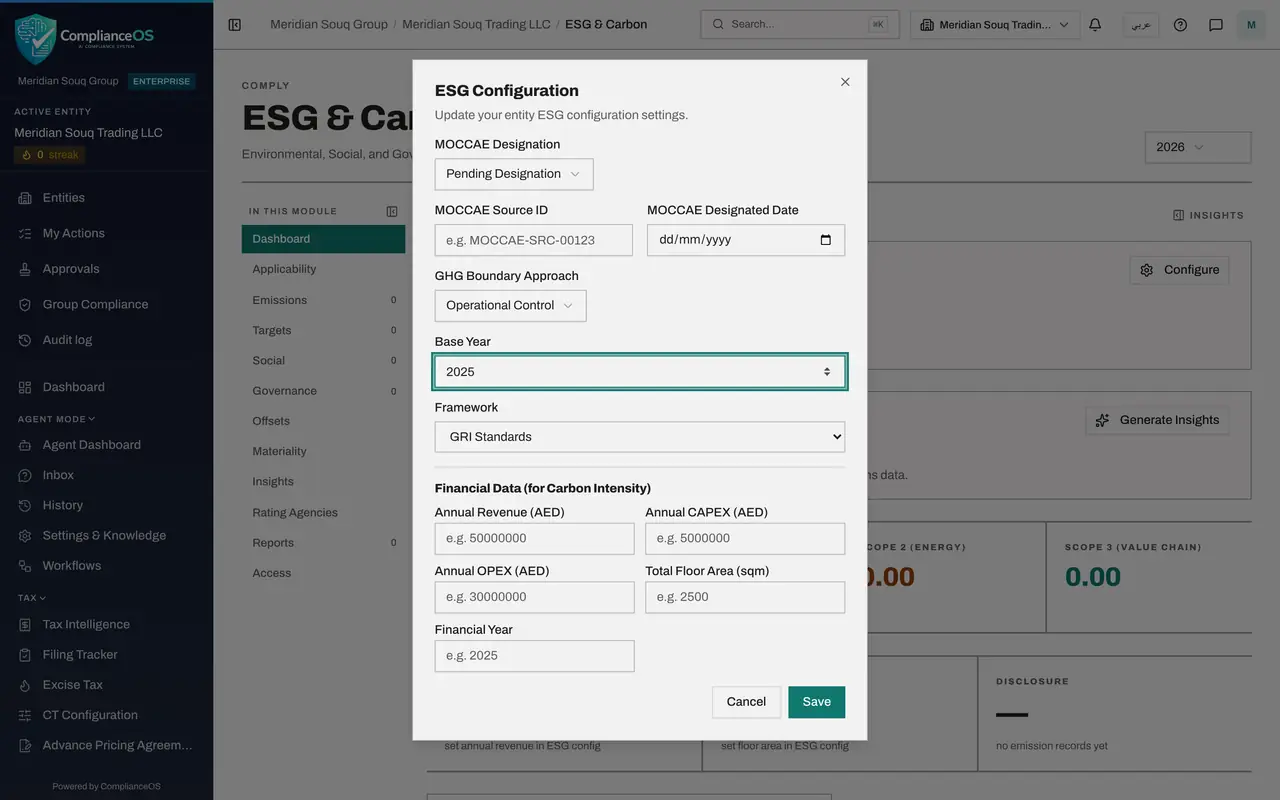
This lesson is for the person who sets up ESG reporting for an entity. You will open the ESG Configuration box and fill in every setting: the regulator's designation, the boundary rule, the base year, the main reporting framework, and the financial figures that the intensity ratios are worked out from.
Before you start
- You are signed in with the Compliance officer role for the entity.
- You have the entity's revenue, capital spending, operating costs and total floor area for the year, from the finance team. The figures used here are invented.
Steps
- 1
Select Configure
On the ESG and Carbon Dashboard, select Configure in the ESG Configuration box. A form opens with the entity's settings. Nothing is saved until you select Save at the bottom.
- Select Configure
- 2
Check MOCCAE Designation
MOCCAE is the Ministry of Climate Change and Environment. Open MOCCAE Designation to see the four choices. Not Applicable is for entities outside the climate law. Pending Designation means the law applies but the ministry has not yet named the company as a reporting source. Designated Source means it has. Exempt means the ministry has excused it. Keep Pending Designation.
- Select MOCCAE Designation
- Choose Pending Designation
- 3
Leave the source identifier and date empty
MOCCAE Source ID is the reference the ministry gives a designated company, and MOCCAE Designated Date is the date on its letter. Fill them only when the status is Designated Source. Left empty, nothing is shown for them.
- 4
Choose the GHG Boundary Approach
GHG means greenhouse gas. The boundary approach is the rule for whose emissions you count. Open the list: Equity Share counts by percentage owned, Financial Control follows who controls the money, and Operational Control counts every operation the company runs day to day. A retailer in leased stores uses Operational Control. Choose it.
- Select GHG Boundary Approach
- Choose Operational Control
- 5
Enter the base year
Base Year is the year you compare all later years with, normally the first year with complete data. Meridian Souq's first full year of records is 2025, so type 2025. Left empty, year on year comparisons still work but targets have no agreed starting point.
- Type Base Year:
2025
- Type Base Year:
- 6
Choose the main reporting framework
Framework is the reporting standard the company mainly follows. The list offers GRI Standards, ISSB, TCFD, MOCCAE Climate Law, DFM ESG, ADX ESG, CDP and CSRD. Meridian Souq writes its sustainability report to GRI, the Global Reporting Initiative, so choose GRI Standards. This is a label for the entity; assigning frameworks and their tasks comes in a later lesson.
- Choose Framework:
GRI Standards
- Choose Framework:
- 7
Enter annual revenue and the financial year
Under Financial Data, type the year's revenue in whole dirhams in Annual Revenue: 186400000, which is 186.4 million. In Financial Year type 2026, the year those figures belong to.
- Type Annual Revenue (AED):
186400000 - Type Financial Year:
2026
- Type Annual Revenue (AED):
- 8
Enter capital and operating spending
Annual CAPEX is capital expenditure, money spent on long-lived things such as shop fittings and vehicles: type 6200000. Annual OPEX is operating expenditure, the running costs of the year: type 148900000. Both are optional; they are used when Scope 3 emissions are estimated from spending.
- Type Annual CAPEX (AED):
6200000 - Type Annual OPEX (AED):
148900000
- Type Annual CAPEX (AED):
- 9
Enter the total floor area
Total Floor Area is every square metre the entity occupies: six stores, the head office and the warehouse. Type 14800. Left empty, the floor area intensity tile keeps showing a dash.
- Type Total Floor Area (sqm):
14800
- Type Total Floor Area (sqm):
- 10
Select Save
Select Save at the bottom of the form. The form closes and a confirmation, ESG configuration updated, appears for a moment.
- Select Save
- 11
Check the intensity tiles
Look at the row under the carbon tiles. Intensity by revenue and by floor area no longer ask for a setting. They read zero until emission records are entered, and then show tonnes of CO2e for each million dirhams and for each square metre.
How to check it worked
On the Dashboard, the two intensity tiles no longer ask you to set revenue or floor area, and opening Configure again shows the values you saved.
Common mistakes
- Typing revenue in thousands or millions. Annual Revenue is in whole dirhams; a figure a thousand times too small makes the intensity a thousand times too big.
- Choosing Designated Source before the ministry has actually written to the company. Leave Pending Designation until you hold the letter, then add the source identifier and the date from it.
- Changing the boundary approach from year to year. The rule you pick decides which sites and vehicles count, so changing it makes years impossible to compare.
Check your understanding
1. Why does ESG Configuration ask for annual revenue and floor area?
- A.To calculate tax
- B.To work out emissions intensity: tonnes for each million dirhams of revenue and for each square metre
- C.To decide which emission factor is used
- D.They are shown on the report cover only
Show answer
Answer: B. To work out emissions intensity: tonnes for each million dirhams of revenue and for each square metre
Intensity divides the year's total emissions by revenue and by floor area. Without them the tiles show a dash.
2. What does Operational Control mean as a boundary approach?
- A.You count emissions only from sites you own outright
- B.You count all emissions from operations the company runs day to day, whoever owns the building
- C.You count emissions in proportion to your shareholding
- D.You count only electricity
Show answer
Answer: B. You count all emissions from operations the company runs day to day, whoever owns the building
Under operational control, a leased store the company runs counts in full. Equity Share counts by percentage owned, and Financial Control follows who controls the finances.