Lesson 14 of 28
Set carbon reduction targets
What you will be able to do
This lesson is for the person who records the company's climate commitments. You will set an absolute reduction target for bought energy and an intensity target for the company's own fuel, read the target cards, and change a target after it has been saved.
Before you start
- You are signed in with the Compliance officer role for the entity.
- Management has agreed the targets: the scope, the baseline year and its emissions, and the year and level to be reached.
- Emission records for the year are entered, so the cards can show the actual figure.
Steps
- 1
Open Targets
In ESG and Carbon select Targets. A target is a promise to bring emissions for one scope down to a stated level by a stated year. None is set yet, so the screen says so and offers one button, Set Target.
- Select Targets0 (0)
- 2
Select Set Target and choose the scope
Select Set Target. In Scope choose which emissions the target covers. Electricity is the company's biggest source, so choose Scope 2 (Energy).
- Select Set Target
- Select Scope
- Choose Scope 2 (Energy)
- 3
Check the target type
Open Target Type. Absolute means a cap on total tonnes. Intensity means a cap on tonnes for each unit of something, such as revenue or headcount. Keep Absolute for this target.
- Select Target Type
- Choose Absolute (total tCO₂e)
- 4
Set the two years
Baseline Year is the year you measure from: type 2025, the base year in the configuration. Target Year is the year by which the target must be met: keep 2030.
- Type Baseline Year:
2025 - Type Target Year:
2030
- Type Baseline Year:
- 5
Enter the baseline and the target
In Baseline type the emissions for that scope in the baseline year: 760 tonnes of CO2e. In Target type the level to reach: 532, which is a cut of thirty percent.
- Type Baseline (tonnes CO₂e):
760 - Type Target (tonnes CO₂e):
532
- Type Baseline (tonnes CO₂e):
- 6
Select Create and read the card
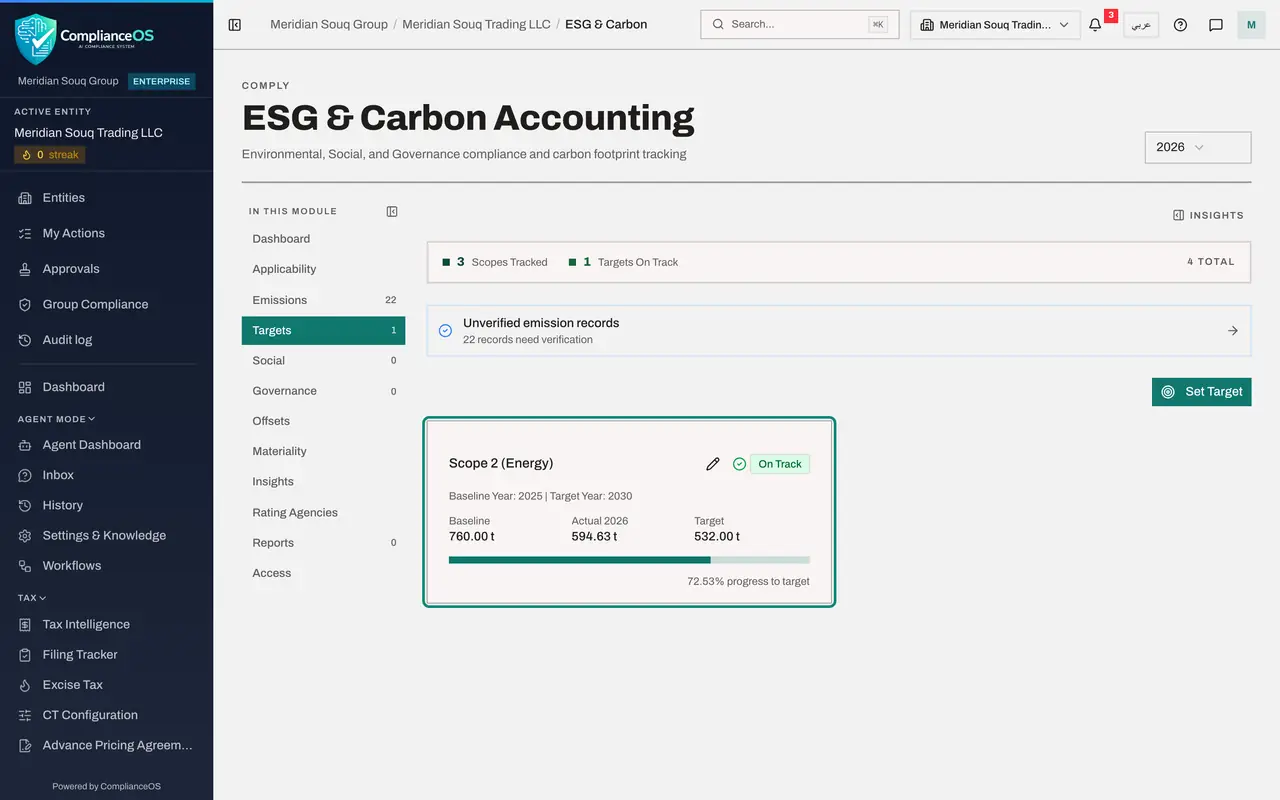
Select Create. The target appears as a card: the scope, the two years, then Baseline, Actual for 2026 and Target, all in tonnes. Actual is the scope's recorded emissions for the latest year after the baseline: 594.63 tonnes of electricity so far. The bar shows progress from baseline to target, here 72.53 percent, and the label says On Track, because the figure is on or below a straight line from baseline to target.
- Select Create
- 7
Start an intensity target
Select Set Target again. Choose Scope 1 (Direct), and in Target Type choose Intensity. A new box, Intensity Metric, appears: it is required for this type.
- Select Set Target
- Select Scope
- Choose Scope 1 (Direct)
- Select Target Type
- Choose Intensity (per unit)
- 8
Say what the intensity is measured against
In Intensity Metric type what the tonnes are divided by, here tonnes of CO2e for each million dirhams of revenue. Set Baseline Year to 2025 and keep the Target Year of 2030.
- Type Intensity Metric:
tCO2e per AED million revenue - Type Baseline Year:
2025
- Type Intensity Metric:
- 9
Enter the figures and select Create
Type the baseline, 0.82, and the target, 0.60, then select Create. A second card appears for Scope 1 (Direct). Its Actual is 0.54: 101 tonnes of Scope 1 divided by 186.4 million dirhams of revenue from the configuration. That is already below the target, so progress reads 100 percent, the most it can show. The line under the figures repeats the measure.
- Type Baseline (tonnes CO₂e):
0.82 - Type Target (tonnes CO₂e):
0.60 - Select Create
- Type Baseline (tonnes CO₂e):
- 10
Open a target with the pencil
Management has brought the electricity target forward. Select the pencil at the top of the Scope 2 card. Edit target opens with the scope, the type, the two years and the two figures, in tonnes as when the target was set.
- Select Edit
- 11
Change the target year and select Save
Change Target year from 2030 to 2029 and select Save. The card now shows Target Year 2029, and the change is written to the audit log. A target that no longer has emissions recorded after its baseline year would show Not enough data instead of a status.
- Type Target year:
2029 - Select Save
- Type Target year:
- 12
See the targets on the Dashboard
Select Dashboard. The strip at the top of the page counts the targets by status, and when a target is at risk a line appears under it naming the scope and year. The counter beside Targets in the In this module list now reads 2. The Compliance officer has no bin icon on the cards: deleting a target needs the delete right.
- Select Dashboard
How to check it worked
Targets shows two cards, each with its baseline, actual and target figures, a progress bar and a status, and the counter beside Targets reads 2.
Common mistakes
- Mixing up the two figures. Baseline is where you started; Target is the level you must be at or below in the target year, so for a reduction it is the smaller number.
- Choosing Intensity without saying per what. An intensity target needs its measure, such as tonnes for each million dirhams of revenue; the form refuses to save without it.
- Reading Not enough data as failure. It means no emissions are recorded for that scope after the baseline year yet, or, for an intensity target, the revenue, headcount or floor area is not on file.
Check your understanding
1. What is the difference between an absolute target and an intensity target?
- A.Absolute is for Scope 1 only
- B.Absolute caps total tonnes; intensity caps tonnes for each unit of activity, such as revenue
- C.Intensity targets are not tracked
- D.There is no difference
Show answer
Answer: B. Absolute caps total tonnes; intensity caps tonnes for each unit of activity, such as revenue
A growing company can cut intensity while its total still rises, so many companies set both kinds.
2. Who can delete a target in the demo company?
- A.The Compliance officer
- B.Anyone who can view ESG
- C.A person whose role includes the right to delete ESG records, here an administrator
- D.Nobody
Show answer
Answer: C. A person whose role includes the right to delete ESG records, here an administrator
The Compliance officer can create and edit targets but sees no bin icon. Deleting needs the delete right, which the administrators hold.