Lesson 9 of 28
Record fuel and refrigerant, choosing the factor yourself
What you will be able to do
This lesson is for whoever collects the environmental data. You will record two Scope 1 sources, diesel for the delivery vans and refrigerant gas topped up in the air conditioning, and learn what to do when ComplianceOS cannot choose the emission factor for you.
Before you start
- You are signed in with the Compliance officer role for the entity.
- You have the fuel card statement in litres and the air conditioning contractor's service report with the kilograms of gas added.
Steps
- 1
Open Emissions and select Manual Entry
In ESG and Carbon select Emissions, then Manual Entry. The first record is the diesel burned by the eight delivery vans from July to September.
- Select Emissions1 (1)
- Select Manual Entry
- 2
Choose Scope 1 and Fuel
In Scope choose Scope 1 (Direct), because the company burns this fuel in vehicles it runs. In Category choose Fuel.
- Select Scope
- Choose Scope 1 (Direct)
- Select Category
- Choose Fuel
- 3
Describe the fuel and enter the litres
In Subcategory type what it is and where it was used. In Unit type L for litres, and in Activity Data type 9750, the litres on the fuel card statement.
- Type Subcategory:
Diesel, delivery vans, Q3 - Type Unit:
L - Type Activity Data:
9750
- Type Subcategory:
- 4
Read the amber note
This time the note under Emission Factor is amber. It says several different activities fit this record, so the factor cannot be chosen automatically. There are many fuels, and ComplianceOS will not guess. The buttons in the note are the candidates.
- 5
Try Create without a factor
Fill Period Start and Period End, then select Create to see what happens. ComplianceOS refuses and shows a message in red: choose an emission factor before saving. A record is never saved with a guessed factor.
- Type Period Start:
2026-07-01 - Type Period End:
2026-09-30 - Select Create
- Type Period Start:
- 6
Choose the diesel factor from the buttons in the note
The vans fill up at the national oil company's stations. In the amber note, select the button ADNOC diesel for the United Arab Emirates, 2025, at 2.68 kilograms for each litre. Each button gives the fuel, who published the figure, where and when it applies, and the kilograms of CO2e for each unit. The note disappears, the Emission Factor box shows your choice, and a line underneath says the factor expects the activity in litres.
- Select ADNOC diesel — ADNOC · UAE 2025 · 2.68 kgCO2e/L
- 7
Set the source type and a note, then select Create
In Source Type choose Fuel Receipt, and in Notes name the statement. Select Create. The record is added: 9,750 litres at 2.68 gives 26,130 kilograms of CO2e.
- Select Source Type
- Choose Fuel Receipt
- Type Notes:
Fuel card statement FC-2026-Q3, eight delivery vans. - Select Create
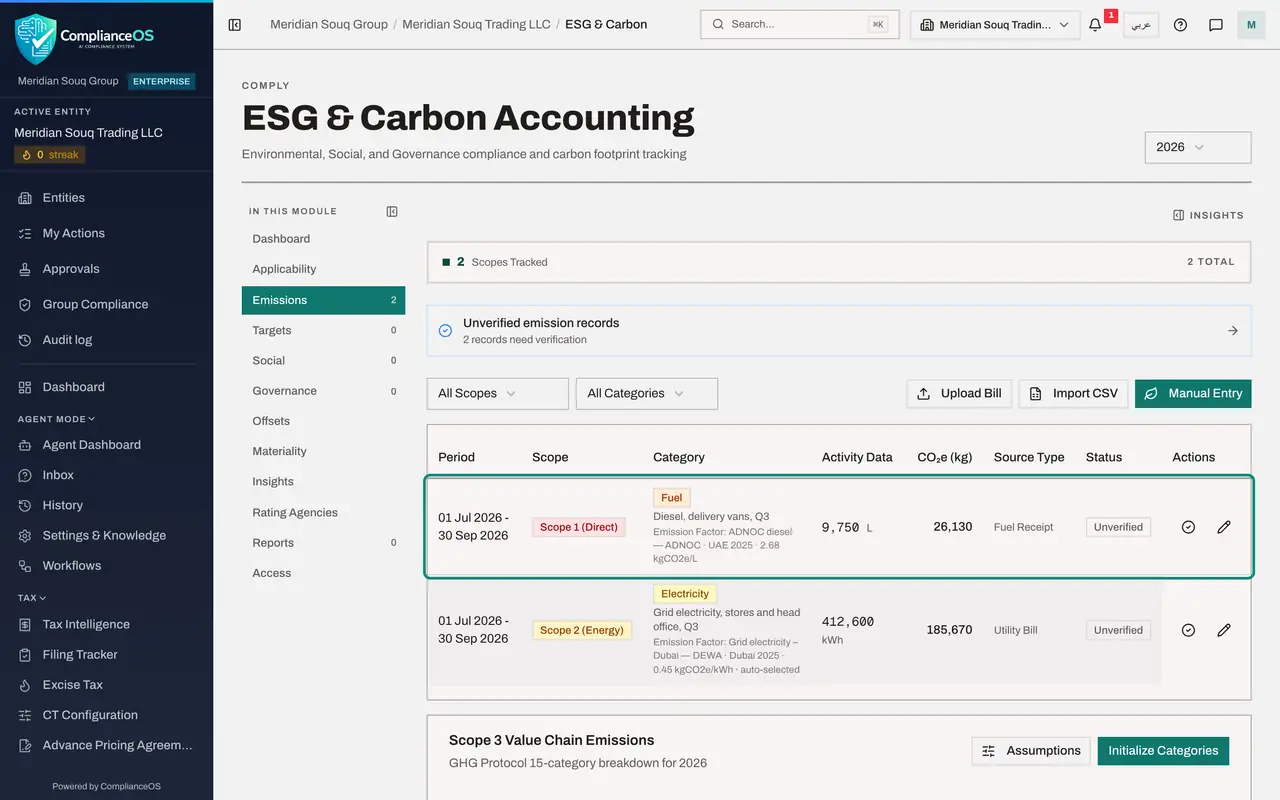
- 8
Start the refrigerant record
Select Manual Entry again. Refrigerant is the gas inside air conditioning and fridges. The form opens empty, so nothing from the diesel record is carried over. Choose Scope 1 (Direct) and the category Refrigerant.
- Select Manual Entry
- Select Scope
- Choose Scope 1 (Direct)
- Select Category
- Choose Refrigerant
- 9
Enter the gas and the kilograms added
In Subcategory type the gas and where it was added. In Unit type kg, and in Activity Data type 12, the kilograms on the contractor's service report. The amount topped up is taken as the amount that leaked.
- Type Subcategory:
R-410A top-up, store air conditioning - Type Unit:
kg - Type Activity Data:
12
- Type Subcategory:
- 10
Choose the refrigerant factor from the list
Again several gases fit, so the amber note asks you to choose. Open Emission Factor and choose R-410A for 2025. It is 2,088 kilograms of CO2e for each kilogram of gas, which is why small leaks matter. The line underneath says this factor expects kilograms, which matches the Unit box.
- Select Emission Factor
- Choose R-410A — IPCC · Global 2025 · 2088 kgCO2e/kg
- 11
Set the period and the source type
Set Period Start and Period End to the same quarter. Source Type starts at Manual Entry again; open it to check and keep Manual Entry, because this figure comes from a service report.
- Type Period Start:
2026-07-01 - Type Period End:
2026-09-30 - Select Source Type
- Choose Manual Entry
- Type Period Start:
- 12
Add a note and select Create
In Notes name the service report, then select Create. Twelve kilograms at 2,088 gives 25,056 kilograms of CO2e, and the line under the category shows the factor you chose.
- Type Notes:
Cool Breeze Technical service report SR-4471, 18 August 2026, three st… - Select Create
- Type Notes:
- 13
Check Scope 1 in the Insights panel
Select Insights at the top right. Carbon footprint now shows a figure beside Scope 1 (Direct): the diesel and the refrigerant together, a little over 51 tonnes. Close the panel with the cross when you have read it.
- Select Show insights panel
How to check it worked
Emissions lists the diesel record and the refrigerant record, each with a CO2e figure and the factor you chose, and the Scope 1 total is no longer zero.
Common mistakes
- Ignoring the line under Emission Factor. It says which unit the factor expects; a record entered in another unit is refused, so make Unit match it.
- Picking a factor with the wrong unit. A diesel factor for each kilometre is no use for litres; check that the unit at the end of the factor's name matches your Unit box.
- Leaving refrigerant out because the quantity is small. One kilogram of the gas R-410A warms the planet as much as about two tonnes of carbon dioxide, so small leaks matter.
Check your understanding
1. The note under Emission Factor turns amber and says several different activities fit this record. What do you do?
- A.Select Create anyway
- B.Choose the factor that matches your fuel and unit, from the list or from the buttons in the note
- C.Change the scope
- D.Leave the record for an administrator
Show answer
Answer: B. Choose the factor that matches your fuel and unit, from the list or from the buttons in the note
For fuel and refrigerant there are many factors and ComplianceOS will not guess. You choose, and the record is marked as chosen manually.
2. Why is topping up air conditioning gas a Scope 1 emission?
- A.Because the gas is bought from a supplier
- B.Because the gas added replaces gas that leaked from equipment the company runs
- C.Because it uses electricity
- D.It is not; it is Scope 3
Show answer
Answer: B. Because the gas added replaces gas that leaked from equipment the company runs
Scope 1 covers gases the company releases itself. The amount topped up is taken as the amount that escaped.