Lesson 16 of 28
Where the workforce figures come from
What you will be able to do
This lesson is for the HR team. The headcount figures in ESG reporting are not typed into ESG and Carbon; they are counted from the employee records in Workforce. You will register two employees, one of them a UAE national, and see the counts that ESG will read.
Before you start
- You are signed in with the HR director role for the entity.
- You have each person's name, nationality, job, start date, basic salary and employee number. Every person here is invented.
- Nine members of the team are already registered in the same way, plus one self-service employee.
Steps
- 1
Open Workforce and select Employees
In the left menu choose Workforce, under People, then select the Employees tab. The figures at the top count the active employees and give the Emiratization rate, the share of UAE nationals. These are the figures ESG reporting reads.
- Select Employees
- 2
Select Register Employee and enter the name and nationality
Select Register Employee. Type the person's full name as on the passport, and the nationality.
- Select Register Employee
- Type Full Name *:
Hessa Al Marri - Type Nationality:
UAE
- 3
Enter the job title and department
Type the job title and the department. Use the same wording for everyone in a team, because the list can be searched by both.
- Type Job Title:
Store Supervisor - Type Department:
Retail Operations
- Type Job Title:
- 4
Set the employment date and basic salary
Employment Date is the person's first day. Basic Salary is the monthly basic pay in dirhams, without allowances.
- Type Employment Date *:
2024-03-01 - Type Basic Salary (AED):
14000
- Type Employment Date *:
- 5
Enter the employee number and tick UAE National
Type the employee number, which must be unique in the entity. Hessa is a UAE citizen, so tick UAE National (Emirati). This tick is what ESG counts as an Emirati employee. WPS Enrolled is already ticked; WPS is the Wage Protection System through which salaries are paid.
- Type Employee Number:
MSQ-E1501 - Select UAE National (Emirati)
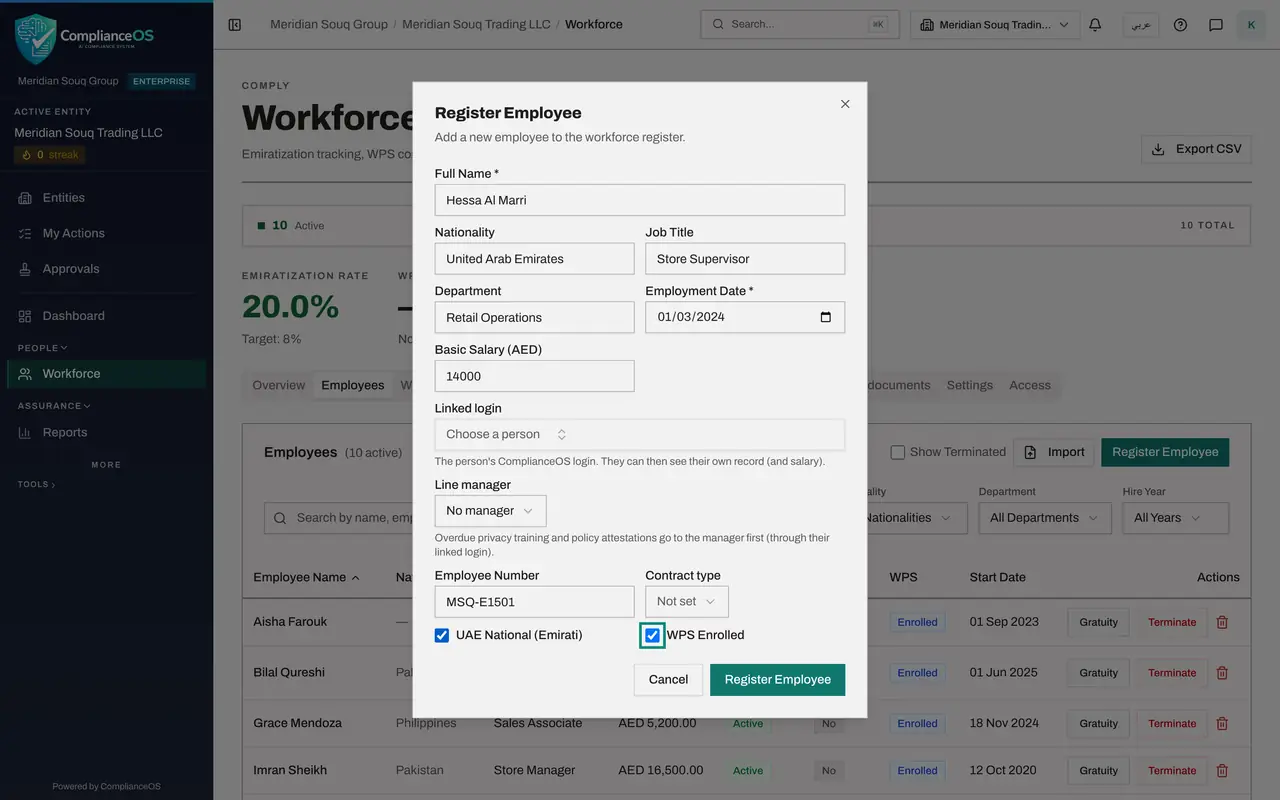
- Type Employee Number:
- 6
Select Register Employee
Select Register Employee at the bottom of the form. The form closes and the person joins the list as Active.
- Select Register Employee
- 7
Register a second person who is not a UAE national
Select Register Employee again and fill the form for Rohan Pillai in the same way: name, nationality, job title, department, employment date, basic salary and employee number. Leave UAE National unticked.
- Select Register Employee
- Type Full Name *:
Rohan Pillai - Type Nationality:
India - Type Job Title:
Payroll Officer - Type Department:
Finance - Type Employment Date *:
2022-08-15 - Type Basic Salary (AED):
9500 - Type Employee Number:
MSQ-E1502
- 8
Select Register Employee and check the list
Select Register Employee. Both people are now in the list with the status Active. Hessa shows Yes under Emirati.
- Select Register Employee
- Type Search by name, employee number, job title or department…:
MSQ-E150
- 9
Read the counts that ESG will use
Clear the search box and look at the top of the page. It shows the number of active employees and the Emiratization rate. When the sustainability team opens ESG and Carbon, Social, these counts arrive as Total Employees, Emirati Employees and Emiratization Ratio, and they are refreshed each time the figures are synced. The next lesson shows them arriving.
How to check it worked
Workforce shows 12 active employees, and the Emiratization rate at the top counts the UAE nationals among them.
Common mistakes
- Forgetting the UAE National box. ESG reads the number of Emirati employees and the Emiratization ratio from this tick, so a missed tick understates both.
- Registering a leaver as active. Only active employees are counted for ESG; record the end of employment so the person stops being counted.
- Correcting a headcount in ESG instead of here. ESG refreshes the counts from Workforce on each sync, so fix the employee records; a figure typed over in ESG is kept and no longer follows Workforce.
Check your understanding
1. Where does the Total Employees figure in ESG and Carbon come from?
- A.It is typed in ESG and Carbon, Social
- B.It is the count of active employee records in Workforce
- C.It comes from the payroll bank file
- D.It is the headcount on the trade licence
Show answer
Answer: B. It is the count of active employee records in Workforce
ESG counts the active employees registered in Workforce for the entity. Nobody types it.
2. Which tick on the Register Employee form affects the Emiratization ratio?
- A.WPS Enrolled
- B.UAE National (Emirati)
- C.Linked login
- D.Line manager
Show answer
Answer: B. UAE National (Emirati)
The ratio is the number of employees ticked as UAE nationals divided by all active employees.