Lesson 23 of 28
Use Insights to find gaps, compare with peers and plan reductions
What you will be able to do
This lesson is for the person who steers the ESG programme through the year. You will read the risk score, follow the open framework obligations, see where the emissions come from, add a peer figure to compare against, and ask the AI assistant for a phased reduction plan.
Before you start
- You are signed in with the Compliance officer role for the entity.
- The year's data is entered and the ESG frameworks are assigned (the earlier lessons).
- You have one published figure for a comparable company or group, with its source. The peer figure here is invented.
Steps
- 1
Open Insights and read the ESG risk score
In ESG and Carbon select Insights. ESG risk score gives each pillar a score from 0 to 100, where higher means more risk, and lists what adds to it, such as overdue obligations or missing data points. Composite combines the three and labels the result Low, Medium or High.
- Select Insights
- 2
Check progress for each framework
Scroll to Framework gap analysis. There is one bar for each assigned ESG framework, with the number of tasks done out of the total. The bar fills as tasks are closed.
- 3
Find the next obligation that is due
The table lists every open obligation, overdue ones first and then by due date. Each line names the framework and the task's status, the due date, and the rule it comes from. An orange note, Needs confirmation, means the legal reference has not been checked against the official text and should be confirmed with your legal adviser. To close a line, go to Frameworks, Tasks, and submit evidence for that task.
- 4
See where the emissions come from
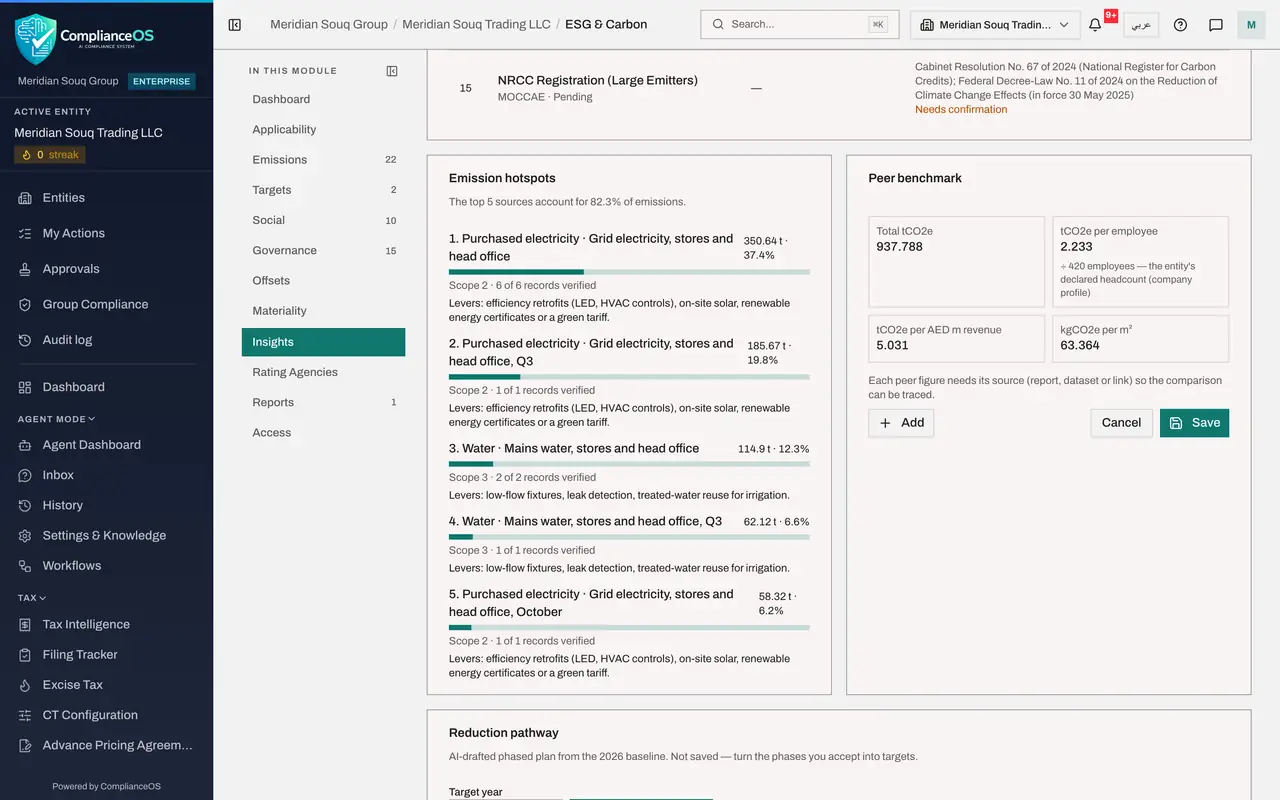
Scroll to Emission hotspots. It ranks the sources by their share of the year's emissions and shows how many of each source's records are verified. Under each source, Levers suggests ways to reduce it, such as efficiency work and solar power for electricity.
- 5
Read Peer benchmark and select Edit peers
Peer benchmark shows four ratios for this entity: total tonnes, tonnes for each employee, tonnes for each million dirhams of revenue and kilograms for each square metre. The note under the second one says which headcount was used. To compare with others, select Edit peers.
- Select Edit peers
- 6
Add a peer figure
Select Add. A line appears. The first box is the ratio being compared; keep tonnes of CO2e per employee. In Peer type who the figure is for, and in Peer value type the figure, 6.4.
- Select Add
- Type Peer:
Gulf retail peer group (demo) - Type Peer value:
6.4
- 7
Give the source and the year, then Save
In Source say where the figure was published, and in Year the year it refers to. A source is required so the comparison can be traced. Select Save.
- Type Source:
Regional retail sustainability survey 2025, table 4 - Type Year:
2025 - Select Save
- Type Source:
- 8
Read the comparison
The peer is now listed with its value, this entity's value and the difference in percent. A green label means this entity emits less than the peer for each employee; an orange one means more.
- 9
Set the year for a reduction pathway
Scroll to Reduction pathway. It asks the AI assistant for a phased plan to cut emissions from this year's baseline. Target year starts at 2050, the national net zero year. Change it to 2035 for a nearer plan.
- Type Target year:
2035
- Type Target year:
- 10
Select Generate pathway
Select Generate pathway and wait while the assistant works. It returns a summary, then phases with their years, a reduction percentage and a list of actions each, and the assumptions it made. The plan is not saved: turn the phases you accept into targets in the Targets section.
- Select Generate pathway
How to check it worked
Insights shows a risk score with its contributing factors, the open obligations by due date, the emission hotspots, your peer line with a difference in percent, and a reduction pathway in phases.
Common mistakes
- Reading a low composite score as a clean bill of health. Open each pillar and read the factors; a single overdue obligation can hide behind a low average.
- Adding a peer figure without its source. The form refuses a source shorter than three letters, because a comparison nobody can trace is worthless.
- Treating the reduction pathway as saved. It is a suggestion on screen only; turn the phases you accept into targets in the Targets section.
Check your understanding
1. In the ESG risk score, what does a higher number mean?
- A.Better performance
- B.More risk
- C.More data
- D.More employees
Show answer
Answer: B. More risk
Each pillar is scored from 0 to 100 and higher means more risk. The factors under each score say what adds to it.
2. Which headcount is used for emissions per employee in Peer benchmark?
- A.Always the Workforce count
- B.The entity's declared headcount from the company profile, and the Workforce count only if none is declared
- C.The number of users
- D.You type it each time
Show answer
Answer: B. The entity's declared headcount from the company profile, and the Workforce count only if none is declared
The note under the figure says which headcount was used, so you can judge the comparison.