Lesson 8 of 28
Record electricity use by hand
What you will be able to do
This lesson is for whoever collects the environmental data. You will record a quarter's electricity as one emission record with Manual Entry, going through every field, and see how ComplianceOS chooses the emission factor and works out the carbon figure.
Before you start
- You are signed in with the Compliance officer role for the entity.
- You have the electricity bills for the period and have added up the kilowatt hours. The figures here are invented.
Steps
- 1
Open Emissions
In ESG and Carbon select Emissions. This list holds every activity that causes greenhouse gas emissions. There are three ways to add records: Upload Bill reads a bill using AI, Import CSV loads a spreadsheet, and Manual Entry lets you type one record. This lesson uses Manual Entry.
- Select Emissions0 (0)
- 2
Select Manual Entry
Select Manual Entry. A form opens. Scope, Category, Unit, Activity Data and the two period dates are required; the form will not save without them.
- Select Manual Entry
- 3
Choose the scope
Open Scope and choose Scope 2 (Energy), which is energy the company buys. Scope 1 (Direct) is for fuel and gases it burns or releases itself, and Scope 3 (Value Chain) is for everything else, such as water, waste and travel.
- Select Scope
- Choose Scope 2 (Energy)
- 4
Choose the category
Open Category. The nine choices are Electricity, Fuel, Travel, Waste, Water, Refrigerant, District Cooling, Biogenic and Other. Choose Electricity. The category decides which emission factors are offered.
- Select Category
- Choose Electricity
- 5
Describe the source and the unit
In Subcategory say what the record covers, so you can find it later and so the right factor is matched. In Unit type the unit of the quantity, here kWh for kilowatt hours.
- Type Subcategory:
Grid electricity, stores and head office, Q3 - Type Unit:
kWh
- Type Subcategory:
- 6
Enter the amount used
In Activity Data type the total quantity from the bills: 412600 kilowatt hours for July to September, across six stores and the head office.
- Type Activity Data:
412600
- Type Activity Data:
- 7
Read which emission factor will be used
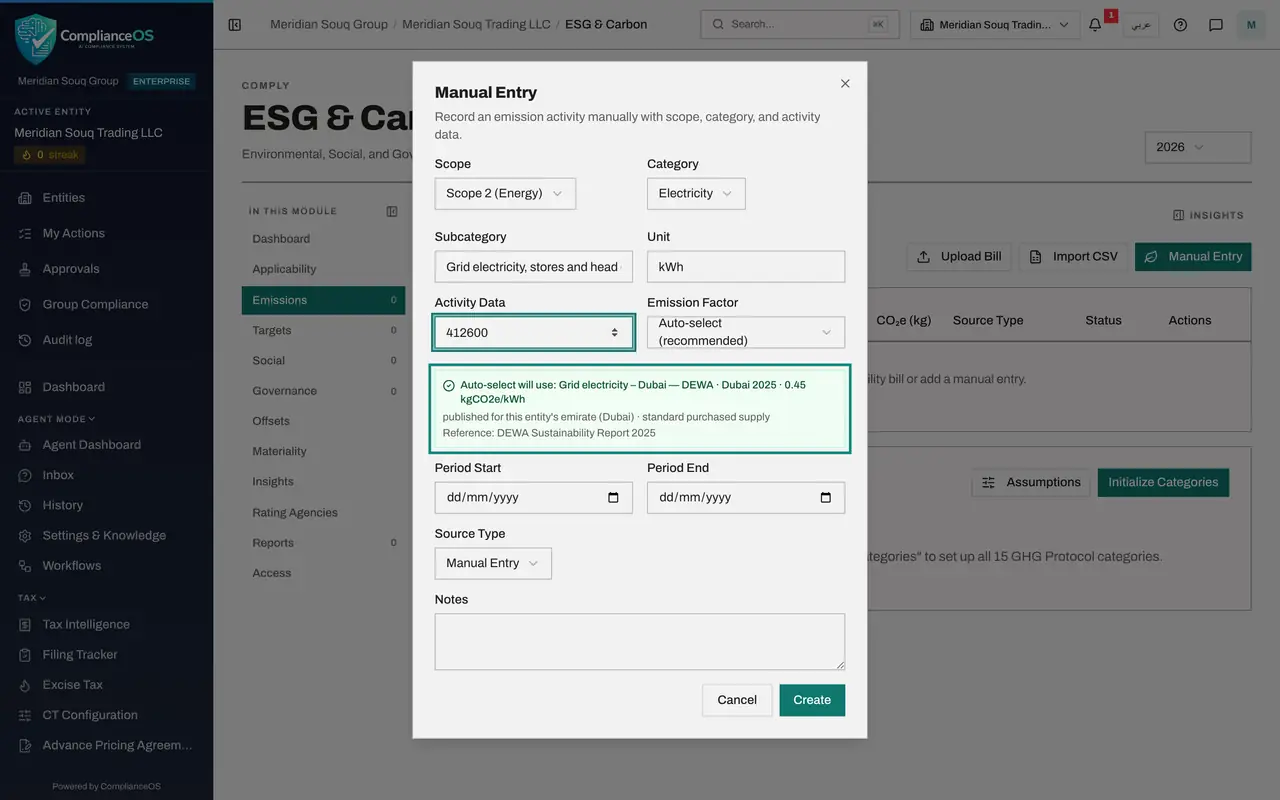
Emission Factor is set to Auto-select, the recommended choice. The green note underneath names the factor it will use, the Dubai grid electricity factor of 0.45 kilograms for each kilowatt hour, and why: it is published for this entity's emirate, and it is the latest published before the reporting year. Reference names the source document.
- 8
Set the period
Period Start and Period End are the first and last day the bills cover: the first of July and the thirtieth of September 2026. The record counts towards the reporting year these dates fall in.
- Type Period Start:
2026-07-01 - Type Period End:
2026-09-30
- Type Period Start:
- 9
Choose the source type
Source Type says where the figure came from. The choices are Utility Bill, Fuel Receipt, Travel Record, Manual Entry and ERP Sync, which is a feed from the accounting system. Choose Utility Bill.
- Select Source Type
- Choose Utility Bill
- 10
Add a note for the reviewer
In Notes record which documents the figure came from, so the person who verifies the record can trace it. Notes is optional, but a record without one is hard to check.
- Type Notes:
Electricity bills July to September 2026, six stores and head office.…
- Type Notes:
- 11
Select Create
Select Create. The form closes and the record appears in the list. ComplianceOS multiplied 412,600 kilowatt hours by 0.45 and shows 185,670 under CO2e in kilograms. Under the category you can read the factor that was used, marked auto-selected.
- Select Create
- 12
Read the status and the actions
At the end of the line, Status says Unverified: nobody has checked the record against the bills yet. Under Actions, the tick verifies a record and the pencil edits it. Verifying is for a second person, as a later lesson shows.
- 13
Check the total in the Insights panel
Select Insights at the top right. Carbon footprint now shows the electricity under Scope 2 (Energy) in tonnes: 185,670 kilograms is 185.67 tonnes. Emissions intensity divides the total by the revenue and floor area from the configuration. Close the panel with the cross at its top corner when you have read it.
- Select Show insights panel
How to check it worked
Emissions lists the record with 412,600 kilowatt hours, a figure under CO2e in kilograms, the name of the emission factor used, and the status Unverified.
Common mistakes
- Typing the amount of the bill in dirhams. Activity Data is the quantity used, here kilowatt hours, never the cost.
- Choosing a factor from another emirate or country. Leave Emission Factor on Auto-select and read the green note: it names the factor for the entity's own emirate.
- Entering one record for the whole year. Record each quarter or month separately, so a reviewer can match each record to its bills.
Check your understanding
1. What is an emission factor?
- A.The price of a tonne of carbon
- B.The kilograms of CO2e released for each unit of an activity, such as each kilowatt hour
- C.The share of records that are verified
- D.A discount for renewable energy
Show answer
Answer: B. The kilograms of CO2e released for each unit of an activity, such as each kilowatt hour
ComplianceOS multiplies the activity data by the factor: kilowatt hours times kilograms per kilowatt hour gives kilograms of CO2e.
2. Bought electricity belongs to which scope?
- A.Scope 1 (Direct)
- B.Scope 2 (Energy)
- C.Scope 3 (Value Chain)
- D.It has no scope
Show answer
Answer: B. Scope 2 (Energy)
Scope 2 is energy the company buys: electricity and district cooling. Scope 1 is what it burns or releases itself.