Lesson 3 of 28
Check which ESG rules apply to the entity
What you will be able to do
This lesson is for the person responsible for knowing the entity's ESG obligations. You will read the Applicability section, tell ComplianceOS the facts about the entity that decide which United Arab Emirates rules apply, and read the list of obligations with what to do about each.
Before you start
- You are signed in with the Compliance officer role for the entity.
- The ESG configuration is saved (lesson Set up the ESG configuration).
- You know whether the entity is listed on a stock exchange, incorporated in Abu Dhabi Global Market, or a bank or insurer licensed by the Central Bank.
Steps
- 1
Open Applicability
In ESG and Carbon select Applicability. The first box, Regulatory Applicability Triage for 2026, sums up the position in one sentence: how many obligations are active, how many to prepare for, and how many cannot be judged because data is missing.
- Select Applicability
- 2
Read the emission figures and the threshold bar
Under the sentence are Scope 1, Scope 2 and the two combined, in tonnes of CO2e. The bar labelled HCEE Threshold Usage shows how close the combined figure is to half a million tonnes a year. Above that level a company counts as a large emitter and must register with the national carbon register. For now everything reads zero, because no records have been entered.
- 3
Read Data Gaps
The amber Data Gaps box lists what stops a rule from being tested. Here it says there are no emission records for the reporting year, so the large emitter threshold and the Abu Dhabi facility rule cannot be checked. It disappears when the data arrives.
- 4
Switch on Listed PJSC to see what it adds
Regulatory Profile holds the facts that decide which rules apply. Select the switch Listed PJSC, which stands for a public joint stock company listed on the Dubai Financial Market or the Abu Dhabi Securities Exchange. A Listing Exchange box appears beside Annual Revenue.
- Select Listed PJSC (DFM / ADX)
- 5
Open Listing Exchange
Open Listing Exchange to see the three choices: DFM, the Dubai Financial Market; ADX, the Abu Dhabi Securities Exchange; and Nasdaq Dubai. A listed company picks its exchange here, because each exchange has its own disclosure guide.
- Select Listing Exchange
- 6
Close the list and switch Listed PJSC off
Meridian Souq Trading is a limited liability company and is not listed. Press the Escape key to close the list without choosing, then select the Listed PJSC switch again to turn it off. The Listing Exchange box goes away.
- Select Listed PJSC (DFM / ADX)
- 7
Switch on ADGM-incorporated to see what it adds
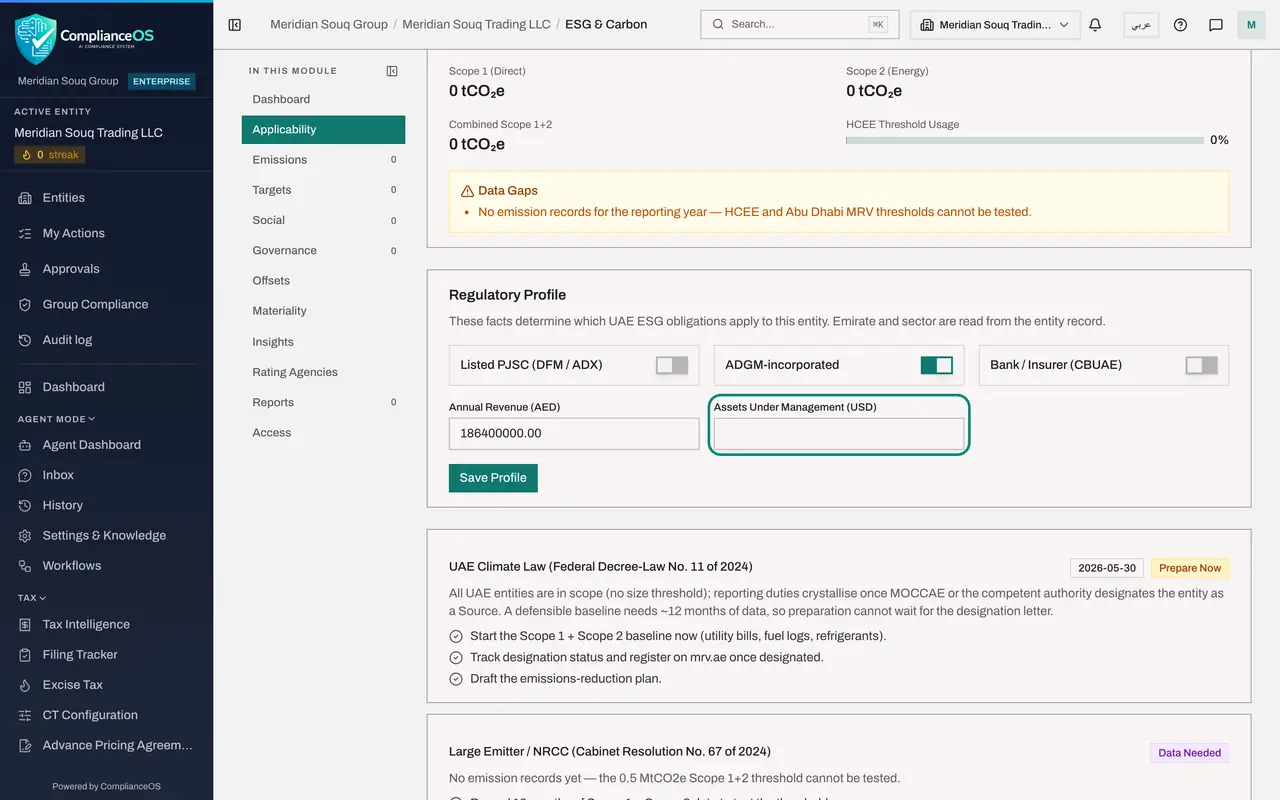
Select the switch ADGM-incorporated. ADGM is Abu Dhabi Global Market, a financial free zone. An Assets Under Management box appears, in United States dollars, because the ADGM disclosure rules depend on how much money a firm manages.
- Select ADGM-incorporated
- 8
Switch ADGM off, leave Bank or Insurer off, and check revenue
This entity is in Dubai, so select the ADGM switch again to turn it off. The third switch, Bank / Insurer (CBUAE), is for firms licensed by the Central Bank of the United Arab Emirates; leave it off. Annual Revenue already shows the figure you saved in the configuration. It is the same setting, shown in both places.
- Select ADGM-incorporated
- 9
Select Save Profile
Select Save Profile. ComplianceOS saves the facts and works out the obligations again. With all three switches off, nothing changes for this entity.
- Select Save Profile
- 10
Read the climate law card
Below the profile, each rule has a card with a status, a reason and a list of actions. UAE Climate Law is marked Prepare Now with the date of the yearly disclosure. Every entity is in scope; reporting starts once the ministry designates it. The actions tell you to start the Scope 1 and Scope 2 baseline, watch for the designation, and draft a reduction plan.
- 11
Read the large emitter card
Large Emitter is marked Data Needed. The rule applies above half a million tonnes of Scope 1 and Scope 2 emissions, and with no records the test cannot be run. The action is to record twelve months of data.
- 12
Read the Monitor card
Indirect pressure is marked Monitor. No law forces it, but large customers, banks and government tenders increasingly ask suppliers for ESG data, so keep the emission inventory current.
- 13
See what does not apply, and why
The faded cards are Not Applicable, each with its reason: the Abu Dhabi facility rule covers only certain industries in Abu Dhabi, the securities regulator's yearly sustainability report is for listed companies, the ADGM framework is for ADGM firms, and the Central Bank climate risk rule is for banks and insurers. Had you left a switch on, its card would have become an obligation.
How to check it worked
Applicability shows your saved profile, and each obligation card carries one of the statuses Active Obligation, Prepare Now, Monitor, Data Needed or Not Applicable.
Common mistakes
- Switching Listed PJSC on for a limited liability company. A wrong profile adds obligations that do not exist and hides the ones that do.
- Reading Data Needed as Not Applicable. Data Needed means the rule cannot be tested yet; record twelve months of Scope 1 and Scope 2 emissions and look again.
- Forgetting Save Profile. The switches change the screen at once but the obligations are only worked out again after you save.
Check your understanding
1. An obligation card says Prepare Now. What does that mean?
- A.A filing is overdue
- B.The rule covers the entity, the duty to report has not started yet, and the groundwork should begin
- C.The rule does not apply
- D.ComplianceOS has filed the report
Show answer
Answer: B. The rule covers the entity, the duty to report has not started yet, and the groundwork should begin
Prepare Now is used for the climate law: every entity is in scope, but reporting starts once the ministry designates it, and a baseline needs about twelve months of data.
2. Where do the emirate and the sector used on this screen come from?
- A.You type them in Regulatory Profile
- B.The entity record
- C.The emission records
- D.The reporting framework
Show answer
Answer: B. The entity record
The note under Regulatory Profile says so: emirate and sector are read from the entity record, so correct them there.