Lesson 18 of 28
Record the governance figures
What you will be able to do
This lesson is for the person who gathers the governance facts for the sustainability report: how the company is directed and controlled. You will read the figures that arrive from other modules, fill in the board and policy facts, and add a governance metric of your own.
Before you start
- You are signed in with the Compliance officer role for the entity.
- You have the facts from the company secretary: the size and make-up of the board, the policies in force and the name of the external auditor. The facts here are invented.
Steps
- 1
Open Governance and read the synced figures
In ESG and Carbon select Governance. The first box, Auto-Synced from Other Modules, shows figures counted elsewhere in ComplianceOS, each with its source: whether the owners are registered comes from the UBO Register, data breaches, request response rate and processing records come from Data Protection, and sanctions screenings come from the anti money laundering module. A dash means that module has nothing recorded yet.
- Select Governance3 (3)
- 2
Enter board independence and board gender diversity
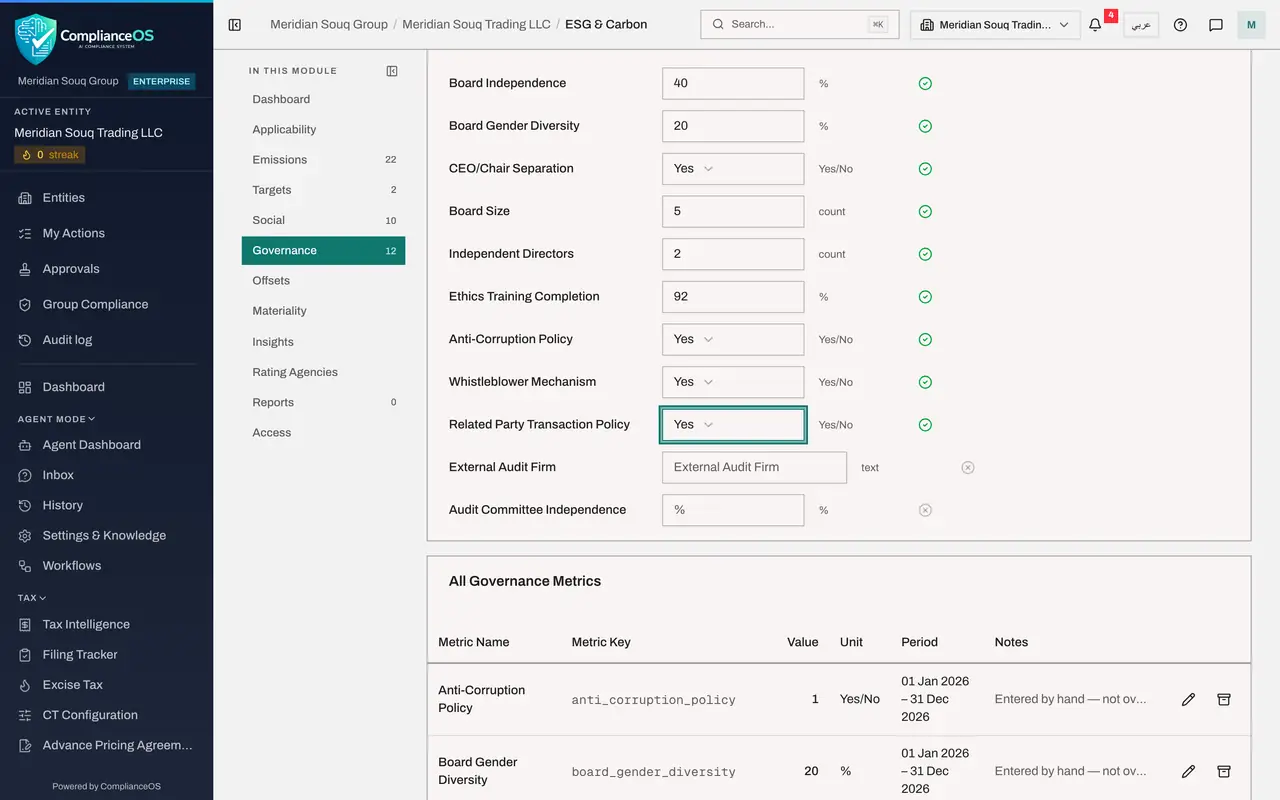
Under Manual Entry Required, click the box beside Board Independence, type 40 and press Tab. That is the share of directors with no other tie to the company. Then Board Gender Diversity, the share of women on the board: type 20 and press Tab. Each box saves as you leave it.
- Type Board Independence (%):
40 - Type Board Gender Diversity (%):
20
- Type Board Independence (%):
- 3
Answer CEO and Chair Separation
CEO/Chair Separation asks whether the chief executive and the chair of the board are different people. Open the box and choose Yes. A Yes or No answer is saved as soon as you choose it.
- Select CEO/Chair Separation — yes or no
- Choose Yes
- 4
Enter the board size and the independent directors
Board Size is the number of directors: type 5. Independent Directors is how many of them are independent: type 2. These two counts are the working behind the forty percent above.
- Type Board Size (count):
5 - Type Independent Directors (count):
2
- Type Board Size (count):
- 5
Enter ethics training completion
Ethics Training Completion is the share of staff who finished the yearly ethics course: type 92 and press Tab.
- Type Ethics Training Completion (%):
92
- Type Ethics Training Completion (%):
- 6
Answer the three policy questions
The next three lines ask whether a written policy exists. Choose Yes for Anti-Corruption Policy, Yes for Whistleblower Mechanism, which is a safe way for staff to report wrongdoing, and Yes for Related Party Transaction Policy, the rules for deals with owners and directors.
- Select Anti-Corruption Policy — yes or no
- Choose Yes
- Select Whistleblower Mechanism — yes or no
- Choose Yes
- Select Related Party Transaction Policy — yes or no
- Choose Yes
- 7
Name the external auditor and the audit committee's independence
External Audit Firm is a text box: type the firm's name and press Tab. Audit Committee Independence is the share of that committee's members who are independent: type 67.
- Type External Audit Firm:
Al Noor Demo Auditors LLP - Type Audit Committee Independence (%):
67
- Type External Audit Firm:
- 8
Select Add Governance Metric
For a governance figure that is not in the list, scroll to the top and select Add Governance Metric. The form is the same as for a social metric. Type a Metric Key that will stay the same each year, and a Metric Name.
- Select Add Governance Metric
- Type Metric Key:
policies_reviewed_pct - Type Metric Name:
Policies reviewed in the year
- 9
Enter the value, unit and period
Type the Value, 88, and the Unit, the percent sign. Set Period Start and Period End to the year the figure covers.
- Type Value:
88 - Type Unit:
% - Type Period Start:
2026-01-01 - Type Period End:
2026-12-31
- Type Value:
- 10
Add the evidence link and select Create
In Evidence Document URL paste the address of the policy register that proves the figure, then select Create.
- Type Evidence Document URL:
https://intranet.example.com/compliance/policy-register-2026.xlsx - Select Create
- Type Evidence Document URL:
- 11
Read All Governance Metrics
Scroll to All Governance Metrics. Every figure is listed with its key, value, unit and period. A Yes answer is stored as 1 and a No as 0. Your own metric carries an Evidence link under its name, and each line has the pencil to correct it and Archive to retire it.
- 12
Check Data Completeness on the Dashboard
Select Dashboard and scroll to Data Completeness. The bars for Social and Governance have moved up, and the list of missing critical fields is shorter. Use this box as the quick check of how close the year's data is to complete.
- Select Dashboard
How to check it worked
Governance shows a green tick beside every line you filled in, and the Dashboard's Data Completeness bar for Governance has moved up from zero.
Common mistakes
- Guessing a Yes. Choose Yes for a policy only if an approved, written policy exists; a rating agency may ask to see it.
- Typing the number of independent directors into Board Independence. Board Independence is a percentage; the count goes in Independent Directors.
- Leaving the synced figures unexplained. A dash beside a synced figure means the source module has no data yet, which is itself worth following up.
Check your understanding
1. The board has five members and two are independent. What is Board Independence?
- A.2
- B.5
- C.40 percent
- D.60 percent
Show answer
Answer: C. 40 percent
Two out of five is forty percent. The count of two goes in Independent Directors and five in Board Size.
2. Where does the Data Breaches figure in Governance come from?
- A.You type it
- B.It is counted from the breach log in Data Protection
- C.The IT help desk
- D.The external auditor
Show answer
Answer: B. It is counted from the breach log in Data Protection
The box Auto-Synced from Other Modules names the source of each figure. Data breaches, request response rate and processing records come from Data Protection.