Lesson 4 of 28
Choose the ESG frameworks that apply
What you will be able to do
This lesson is for the person who decides which standards the entity reports against. You will assign the United Arab Emirates climate law and the GRI Standards to the entity, see the tasks each one creates, and find those tasks again from inside ESG and Carbon.
Before you start
- You are signed in with the Compliance officer role for the entity.
- You have read Applicability and know which rules matter (lesson Check which ESG rules apply to the entity).
Steps
- 1
Open Insights and find Framework gap analysis
In ESG and Carbon select Insights, and scroll to Framework gap analysis. A framework is a set of rules or a reporting standard. This box lists the open tasks of the ESG frameworks assigned to the entity. None is assigned yet, so it shows the link Assign ESG frameworks.
- Select Insights
- 2
Select Assign ESG frameworks
Select the link Assign ESG frameworks. It takes you to Frameworks, which is also in the left menu under Risk and Governance. This screen lists every framework assigned to the entity, for ESG and for everything else.
- Select Assign ESG frameworks
- 3
Select Assign Framework
Select Assign Framework. The Framework Library opens. Each entry shows its name, a short code, what it covers, how many tasks it creates and where it applies.
- Select Assign Framework
- 4
Assign UAE Climate Law (MOCCAE)
Scroll to UAE Climate Law (MOCCAE) and select Assign on its card. This is the federal law on measuring and reporting greenhouse gas emissions. The library closes and the framework is added to the list.
- Select Assign
- 5
Open the library again and assign GRI Standards
Select Assign Framework again, find GRI Standards and select Assign. GRI, the Global Reporting Initiative, is the standard Meridian Souq uses for its sustainability report.
- Select Assign Framework
- Select Assign
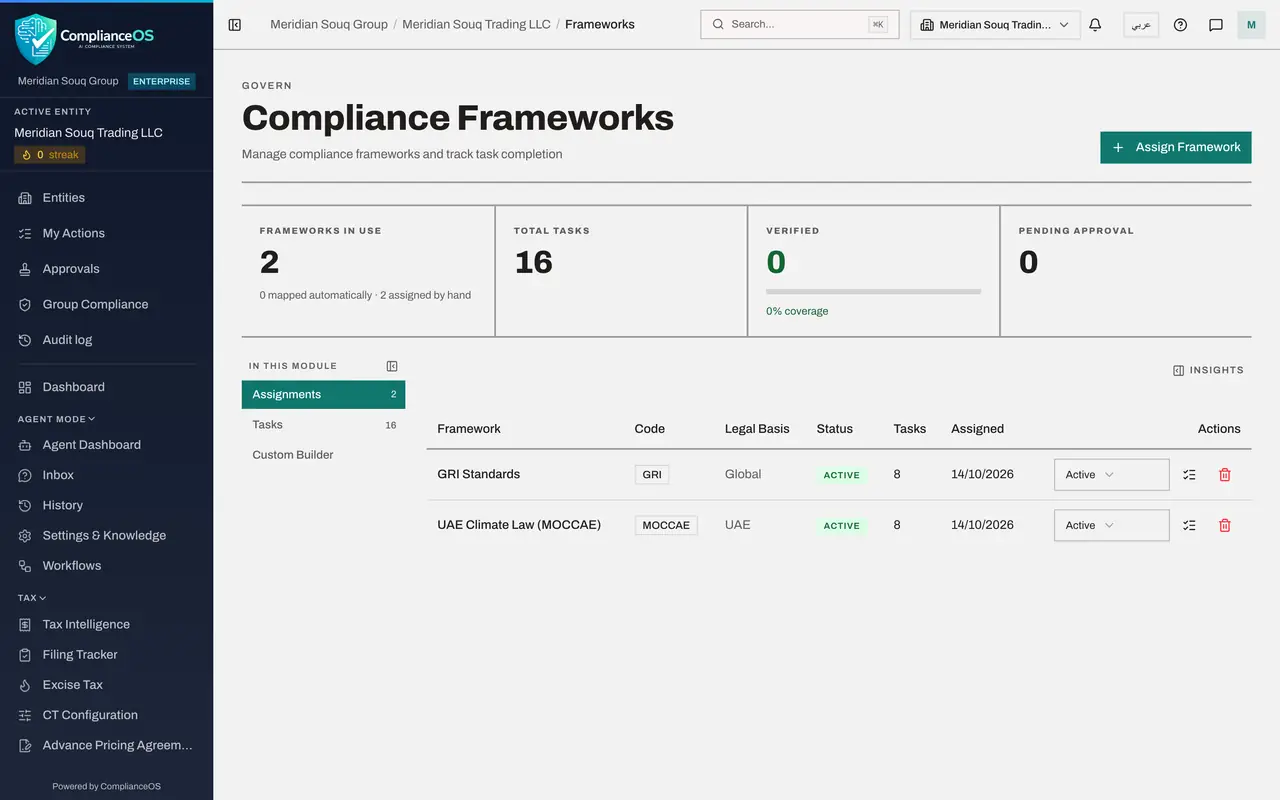
- 6
Check the two assignments
Both frameworks are now listed with the status ACTIVE. The Tasks column shows how many tasks each one created for the entity, and Assigned shows today's date.
- 7
Look at what a framework asks for
At the end of the UAE Climate Law row, select the list icon, View task definitions. A box shows each task the framework sets, how often it falls due and its category.
- Select View task definitions
- 8
Close the box and open Tasks
Close the box with the cross at its top corner, then select Tasks in the In this module list. Each assigned framework has a block here with its tasks, their due dates and their status. This is where evidence is attached; a later lesson does that.
- Select Close
- Select Tasks16 (16)
- 9
Return to ESG and Carbon, Insights
Go back to ESG and Carbon and select Insights. Framework gap analysis now shows a progress bar for each framework and, underneath, every open task with the nearest deadline first. Each line names the framework, the task's status, the due date and the rule it comes from.
- Select ESG & Carbon
- Select Insights
How to check it worked
Frameworks lists UAE Climate Law (MOCCAE) and GRI Standards as ACTIVE, and ESG and Carbon, Insights, shows their open tasks under Framework gap analysis.
Common mistakes
- Assigning every ESG framework in the library to be safe. Each one creates tasks with due dates; assign only the ones the entity really reports against.
- Expecting ESG and Carbon to hold the tasks. The tasks live in Frameworks, on the Tasks section; ESG and Carbon only reports on them.
- Assigning a framework to the wrong entity. Check the entity name at the top of the left menu first, because assignments are made one entity at a time.
Check your understanding
1. Where do you assign an ESG framework to an entity?
- A.ESG and Carbon, Reports
- B.Frameworks, with Assign Framework
- C.ESG and Carbon, Applicability
- D.Policy Engine
Show answer
Answer: B. Frameworks, with Assign Framework
Frameworks of every kind, ESG included, are assigned on the Frameworks screen. ESG and Carbon, Insights, links to it.
2. What happens when you assign a framework?
- A.A report is sent to the regulator
- B.Nothing until the end of the year
- C.ComplianceOS creates the framework's tasks for the entity, each with its own deadline
- D.All emission records are verified
Show answer
Answer: C. ComplianceOS creates the framework's tasks for the entity, each with its own deadline
An assignment creates the tasks that track each disclosure the framework asks for. You then give evidence for each task.