Lesson 21 of 29
Correct a filed return with a voluntary disclosure
What you will be able to do
This lesson is for the compliance officer. A mistake has been found in a return that is already filed and locked. You will record a voluntary disclosure, which is the Federal Tax Authority's Form 211, with the figure as filed and the corrected figure, read the penalty preview, and see how the disclosure is submitted.
Before you start
- You are signed in with the Compliance officer role for Meridian Souq Trading LLC. Creating and submitting voluntary disclosures needs this role or an administrator; the tax manager can only read them.
- The 2025 corporate tax return is filed and locked with tax payable of AED 942,750 (lessons 17 to 19).
- After filing, the finance team found a rent invoice of AED 150,000 for 2025 that was left out. The extra deduction lowers the tax by AED 13,500, to AED 929,250.
Steps
- 1
Open Tax Intelligence, select More, then Voluntary Disclosures
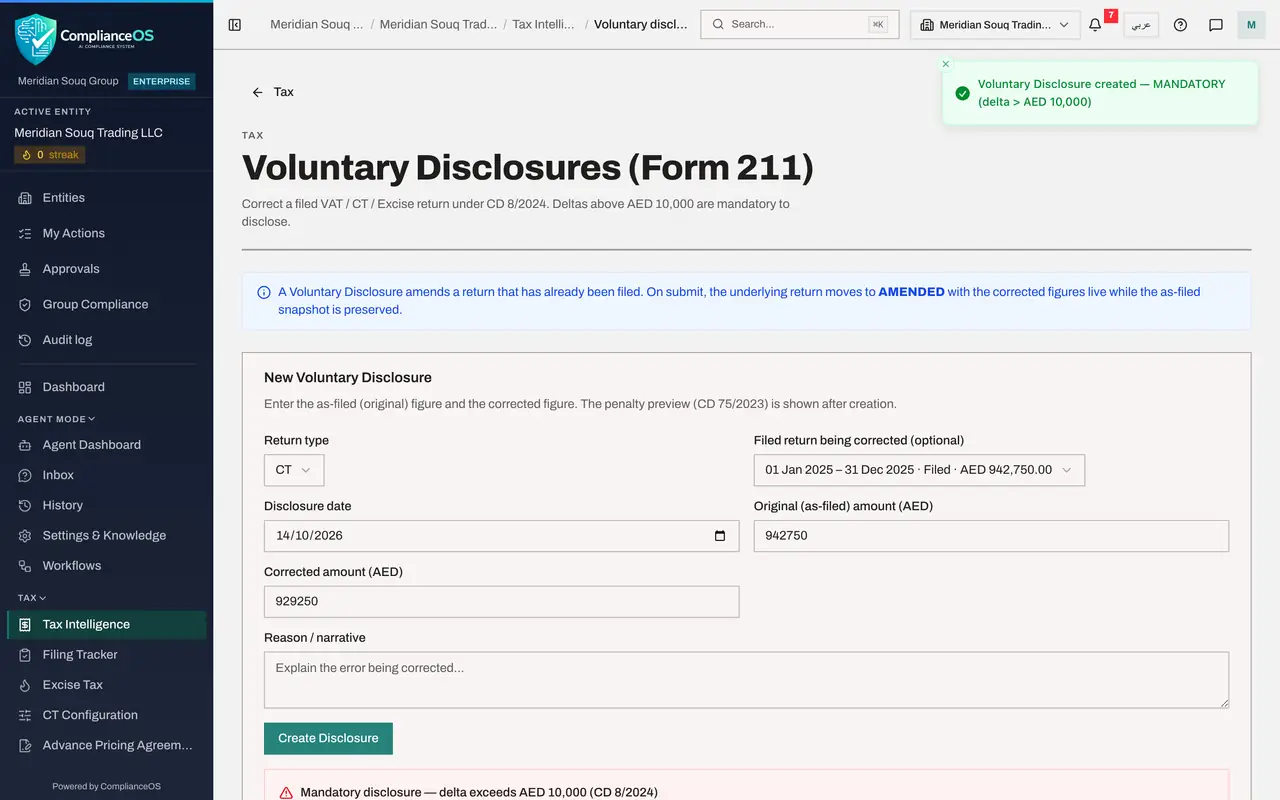
In the left menu choose Tax Intelligence and select More. Under Filing, corrections and sign-off, select Voluntary Disclosures. The blue note explains what one does: it amends a return that has already been filed; on submission the return moves to Amended with the corrected figures, and the figures as filed are kept.
- 2
Choose the return type
The form New Voluntary Disclosure is on the page itself. Open Return type and choose the tax being corrected: CT for corporate tax. The list also offers VAT and excise.
- Select Return type
- Choose CT
- 3
Choose the filed return being corrected
Filed return being corrected lists the filed corporate tax returns. Open it and choose 1 January to 31 December 2025, filed, 942,750 dirhams. Linking the return means that submitting the disclosure marks that return Amended, and it fills in the amount as filed. Disclosure date is filled with today's date; change it if the disclosure was made on another day.
- Select Not linked to a return
- 4
Enter the amount as filed and the corrected amount
Original, as-filed, amount now shows 942750, the tax on the return as it was filed. In Corrected amount, type what the tax should have been: 929250.
- Type Corrected amount (AED):
929250
- Type Corrected amount (AED):
- 5
Explain the error and select Create Disclosure
In Reason, explain what was wrong and how it was found. This text supports the form you lodge with the authority. Then select Create Disclosure.
- Type Reason / narrative:
A rent invoice of AED 150,000 for December 2025 was omitted from the r… - Select Create Disclosure
- Type Reason / narrative:
- 6
Read the result under the form
A summary appears under the form. It says the disclosure is mandatory, because the difference is above 10,000 dirhams, shows the difference of 13,500, and gives a penalty preview of 135 dirhams with its working: 1 percent for each month of the tax difference, here one month between the due date and today, and the decision it is based on.
- 7
Find the disclosure in the list and select View
The Disclosures list below shows the date, the return type, the difference, the penalty, the status Draft and the Form 211 reference, which is empty for now. Select View on the row.
- Select View
- 8
Read the detail and close it
The detail sets the original and corrected figures side by side, with the difference, the penalty of 135, your reason, the linked return and the Form 211 reference, which reads Not submitted. The green button at the bottom, Submit, sets return to Amended, is the same Submit as on the row. Select the cross to close the detail.
- Select Close
- 9
Know what Submit does
Submit, at the end of the row, is used after Form 211 has been lodged on the authority's portal. It asks for the Form 211 reference in a small browser prompt and then records the submission as a sign-off under the same approval policy as filing a return. Leave this disclosure as a draft until the form has really been lodged.
How to check it worked
The Disclosures list shows a corporate tax disclosure dated today, linked to the 2025 return, with a difference of AED 13,500, and you know what the Submit button asks for.
Common mistakes
- Entering the taxable income instead of the tax. Both amount boxes take the tax figure of the return: the amount as filed and the amount it should have been.
- Submitting here before Form 211 has been lodged on the authority's portal. Submit asks for the Form 211 reference, which you only have after lodging it.
- Treating a small difference as optional without checking. A difference above AED 10,000 must be disclosed; the screen marks it Mandatory.
Check your understanding
1. The return was filed with tax of AED 942,750 and should have been AED 929,250. How does the screen treat the disclosure?
- A.Voluntary, because the tax went down
- B.Mandatory, because the difference of AED 13,500 is above AED 10,000
- C.It refuses it
- D.It deletes the filed return
Show answer
Answer: B. Mandatory, because the difference of AED 13,500 is above AED 10,000
The test is the size of the difference, not its direction. Above AED 10,000 the disclosure is mandatory.
2. What happens to the filed return when a disclosure linked to it is submitted?
- A.Nothing
- B.It moves to Amended with the corrected figures, and the figures as filed are kept as a snapshot
- C.It is unlocked for editing
- D.It is deleted
Show answer
Answer: B. It moves to Amended with the corrected figures, and the figures as filed are kept as a snapshot
The blue note on the page says so. The original filing is never overwritten.