Lesson 5 of 29
Record connected persons and their pay
What you will be able to do
This lesson is for the tax manager. You will record an owner, director or officer who is paid by the entity, with a market benchmark, so that any pay above the market rate is identified as not deductible for corporate tax. You will also view, correct and delete a record.
Before you start
- You are signed in with the Tax manager role for Meridian Souq Trading LLC.
- You know the person's total yearly pay from the entity and have a market benchmark for the same job, with its source.
- Record connected persons before the year's transactions are classified. The classifier then recognises payments to them and sends those payments for review.
Steps
- 1
Open Tax Intelligence and select More
In the left menu choose Tax Intelligence, then select More in the row of groups. All tax tools lists the specialist screens that are not in the left menu, in four groups: Corporate tax structure, Elections and opening balances, Filing, corrections and sign-off, and Data and learning.
- Select More
- 2
Select Connected Persons
Select Connected Persons. A connected person is someone close to the business: an owner, a director, an officer, or a relative of one. The law lets the entity deduct what it pays them only up to the market rate for the work, so each one is recorded here with a benchmark. The list is empty to begin with.
- 3
Select Add Person
Select Add Person at the top right. The Add Connected Person form opens.
- Select Add Person
- 4
Type the name and choose the relationship
In Person Name, type the name exactly as it appears as the supplier on the payments. In Relationship Type choose how the person is connected to the entity: Owner, Director, Officer or Relative. Saeed Al Marri is the managing director, so choose Director.
- Type e.g. John Smith:
Saeed Al Marri - Select Select relationship...
- Choose Director
- Type e.g. John Smith:
- 5
Enter the yearly pay and the market benchmark
In Annual Compensation, type everything the entity pays the person in a year, in dirhams: 780000. In Market Rate Benchmark, type what an unconnected person would be paid for the same job: 600000. Both boxes are required.
- Type e.g. 600000:
780000 - Type e.g. 450000:
600000
- Type e.g. 600000:
- 6
Give the source of the benchmark and the year
In Benchmark Source, say where the benchmark comes from, so you can show it in an audit. It is optional, but a benchmark with no source is hard to defend. Fiscal Year is filled with the current year; change it to the year the pay belongs to, here 2025.
- Type e.g. Mercer UAE Salary Survey 2025:
Retail sector executive pay survey 2025, managing director band
- Type e.g. Mercer UAE Salary Survey 2025:
- 7
Add a note and select Add Connected Person
Notes is optional. Use it for anything a reviewer should know, such as the board approval. Then select Add Connected Person. The form closes and the person is added to the list.
- Type Additional notes...:
Remuneration approved by the board on 12 February 2025. - Select Add Connected Person
- Type Additional notes...:
- 8
Read the excess in the list
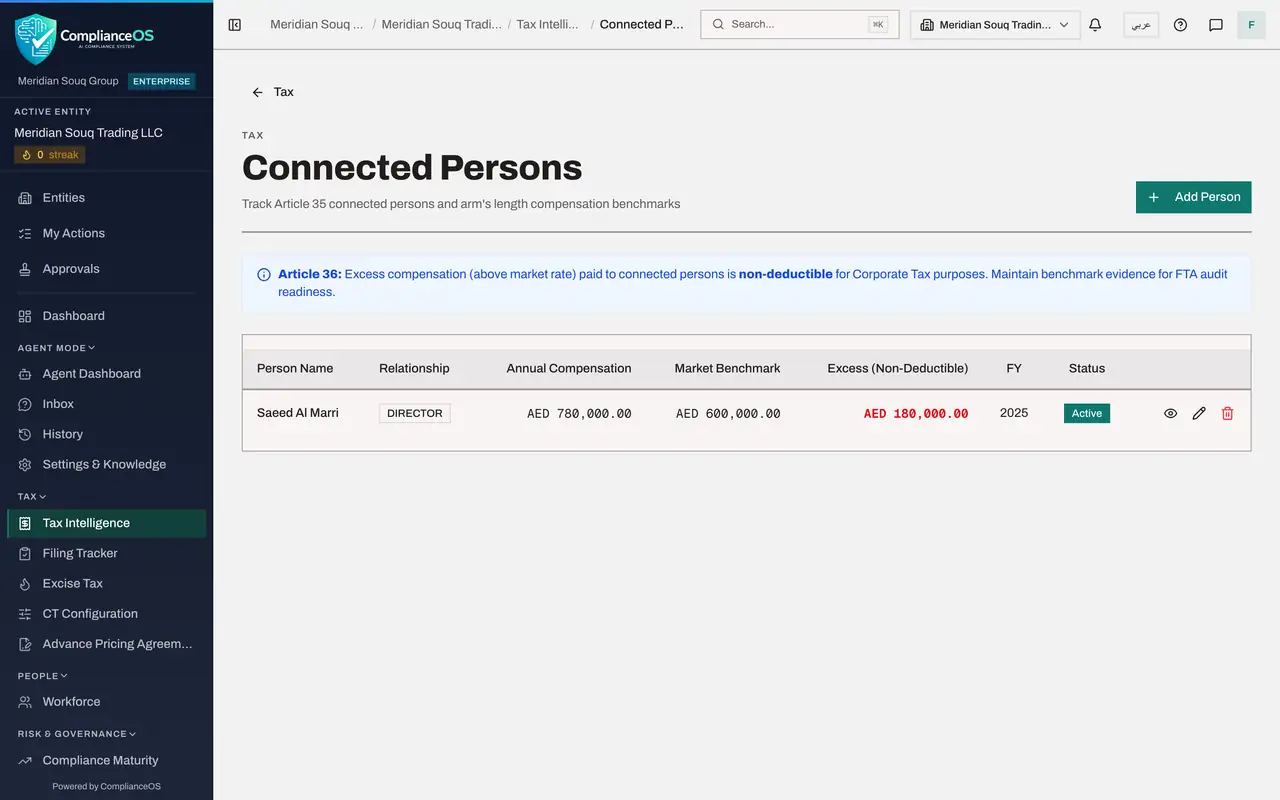
The row shows the relationship, the yearly pay, the benchmark and, in red, the Excess, which is not deductible: 180,000 dirhams. The year and the status Active follow. The corporate tax return for 2025 will disallow that excess.
- 9
Select the eye to view the full record
Three buttons end the row. Select the eye, View full detail. A window shows the record in full, including the benchmark source and the date it was added. Select Close when you have read it.
- Select View full detail
- 10
Close the detail and select the pencil
Select Close, then select the pencil, Edit compensation and benchmark. The same boxes open for correction, with a tick box called Active. Clear Active when a person stops being connected, instead of deleting the history.
- Select Close
- Select Edit compensation and benchmark
- 11
Correct the note and select Save Changes
Changing the pay or the benchmark works the excess out again. Here only the note needs more detail. Add the reference of the board minute, then select Save Changes.
- Type Notes (optional):
Remuneration approved by the board on 12 February 2025. Board minute r… - Select Save Changes
- Type Notes (optional):
- 12
Add a second person to practise deleting
Select Add Person again and record Huda Al Marri as a Relative, with pay of 96000 and a benchmark of 96000 for 2025, then select Add Connected Person. Her pay equals the benchmark, so her excess is zero.
- Select Add Person
- Type e.g. John Smith:
Huda Al Marri - Select Select relationship...
- Choose Relative
- Type e.g. 600000:
96000 - Type e.g. 450000:
96000 - Select Add Connected Person
- 13
Select the bin on her row
Suppose that record was entered by mistake. Select the bin, Delete, at the end of Huda Al Marri's row. A window asks you to confirm and warns that the compensation and benchmark record is removed and cannot be restored.
- Select Delete
- 14
Select Delete to confirm
Select Delete in the window. The record is removed and only Saeed Al Marri remains. If you opened the window by mistake, Cancel leaves the record as it was.
- Select Delete
How to check it worked
Saeed Al Marri is listed under Connected Persons for 2025 with pay of AED 780,000, a benchmark of AED 600,000 and an excess of AED 180,000, and the practice record for Huda Al Marri is gone.
Common mistakes
- Entering monthly pay. Both amount boxes are yearly figures in dirhams.
- Leaving Fiscal Year on the current year when the pay belongs to an earlier one. The excess is taken into the return of the year you enter.
- Writing the name differently from the name on the payments. Payments are matched to connected persons by name, so use the name that appears as the supplier on the transactions.
Check your understanding
1. A director is paid AED 780,000 a year and the market benchmark is AED 600,000. What does Excess, non-deductible, show?
- A.AED 0
- B.AED 180,000
- C.AED 600,000
- D.AED 780,000
Show answer
Answer: B. AED 180,000
The excess is the pay above the benchmark: 780,000 minus 600,000. That part cannot be deducted for corporate tax.
2. What happens when you select the bin on a connected person's row?
- A.The person is removed at once
- B.A window asks you to confirm, and warns that the record cannot be restored
- C.The person is marked inactive
- D.Nothing; only an administrator can delete
Show answer
Answer: B. A window asks you to confirm, and warns that the record cannot be restored
Delete asks for confirmation first. Select Cancel if you only meant to look at the record.