Lesson 9 of 29
Assess a transfer-pricing record and keep its documents
What you will be able to do
This lesson is for the tax manager. You will ask for a risk assessment of a transfer-pricing record, run the tested-party analysis, attach the supporting documents, and produce the local file and the CT-TP1 disclosure from the TP Docs menu.
Before you start
- You are signed in with the Tax manager role for Meridian Souq Trading LLC.
- The sale of goods to Meridian Souq E-Commerce FZ-LLC is recorded under TP Records (lesson 8).
- You have the group's master file and the supply agreement as PDF files.
Steps
- 1
Open the Transfer Pricing tab
In Tax Intelligence select Analysis, then Transfer Pricing. The record from the last lesson is in the list. Its Risk column reads Not assessed.
- Select Analysis
- Select Transfer Pricing
- 2
Select AI Assess
Select AI Assess on the row. The AI assistant reads the record and, after a few seconds, puts a rating in the Risk column: Low, Medium, High or Critical. A record rated High or Critical is counted in the Risk flagged tile.
- Select AI Assess
- 3
Read the record's detail
When the assessment finishes, the record's detail opens under the row; the small arrow beside the pencil closes and opens it. The detail has the tested-party analysis, the arm's-length adjustment, the AI assistant's risk flags, documentation gaps and recommendations, and three boxes for documents.
- 4
Select Run tested-party analysis
Select Run tested-party analysis, and select the same button in the window that asks you to confirm. FAR stands for functions, assets and risks. The AI assistant scores both companies on each from 1, simple, to 5, complex, and proposes the less complex one as the tested party, with its reasons and its confidence. Read the reasons before you rely on the choice. Re-run analysis repeats it after the facts change.
- Select Run tested-party analysis
- Select Run tested-party analysis
- 5
Read the arm's-length adjustment box
Arm's-length adjustment shows any correction recorded for this transaction when its price is outside the market range. It says none has been recorded. A draft adjustment does not touch the corporate tax return until it is confirmed; the next lesson shows where adjustments are entered.
- 6
Attach the master file
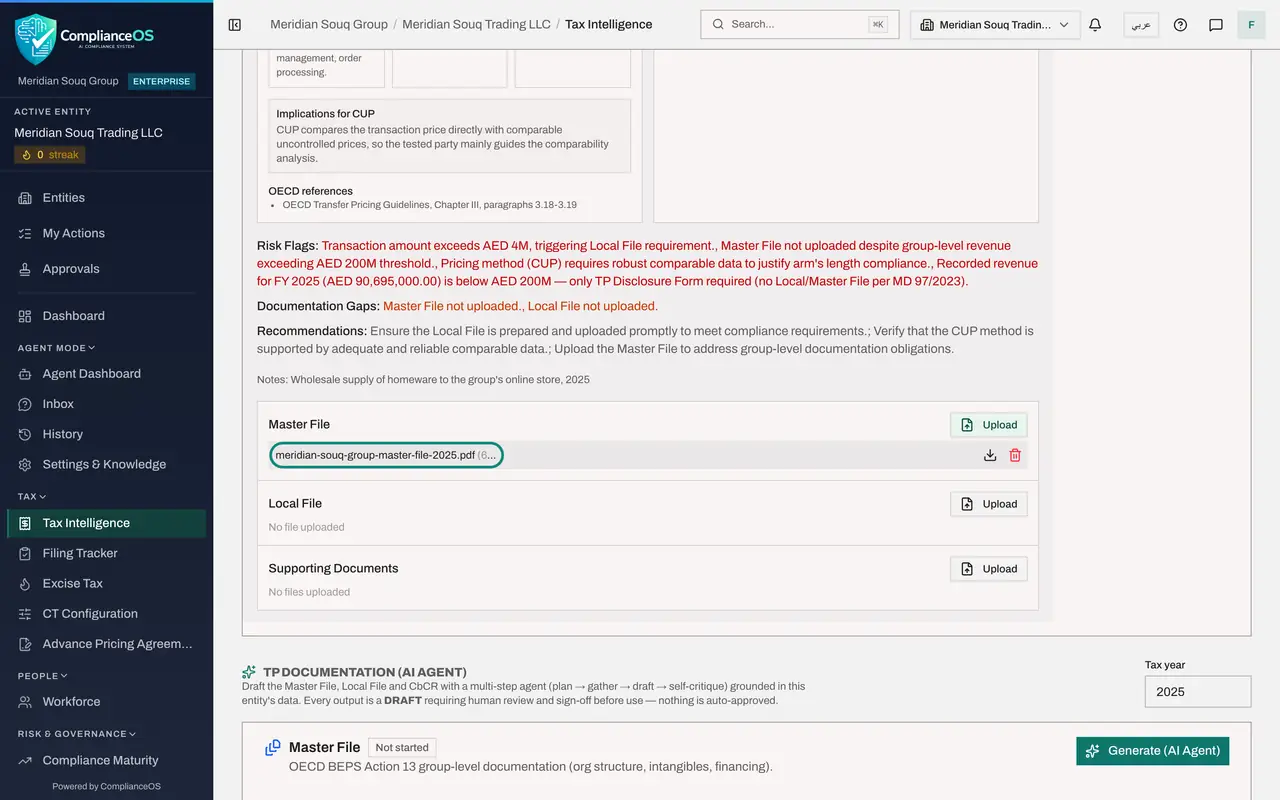
Scroll to the three document boxes: Master File, Local File and Supporting Documents. In the Master File box select Upload and choose the group's master file from your computer. A message confirms File uploaded and the file is listed in the box with its size. The Local File box stays empty for now; lesson 27 shows the AI agent drafting a local file.
- Select Upload
- 7
Attach a supporting document
In the Supporting Documents box select Upload and choose the signed supply agreement between the two companies. Any file that backs up the price belongs here: agreements, price lists, comparison studies.
- Select Upload
- 8
Open the TP Docs menu
Scroll up and select TP Docs above the list; the button shows the year of the records, 2025. The menu builds documents from the records: the Local File, the Master File and the country-by-country report, or CbCR, as Word files, and the CT-TP1 disclosure as Excel or PDF.
- Select TP Docs 2025
- 9
Choose Generate Local File
Choose Generate Local File. A Word file called TP Local File 2025 is downloaded. It is a starting draft built from the record: complete it, have it reviewed, then attach the final version to the record.
- Select Generate Local File (.docx)
- 10
Choose Generate CT-TP1 Disclosure
Open TP Docs again and choose Generate CT-TP1 Disclosure, Excel. CT-TP1 is the transfer-pricing disclosure form filed with the return. A message explains that related-party transactions for the year are below 40 million dirhams, so the form is not required, and that this was a dry run: nothing is saved.
- Select TP Docs 2025
- Select Generate CT-TP1 Disclosure (.xlsx)
- 11
Select CT-TP1 history
Select CT-TP1 history. It keeps every saved version of the disclosure form, to download again as Excel, PDF or data. Because no form was required, it says no versions have been generated. Select Close.
- Select CT-TP1 history
- 12
Close the history and find TP Documentation, AI Agent
Select Close. Below the list is TP Documentation, AI Agent. It offers to draft the Master File, the Local File and the country-by-country report for the Tax year you type in, working in the background and grounding the text in this entity's data. Each result is a draft that needs a person's review and sign-off before use. Check that Tax year, on the right, shows the year you are documenting, here 2025, before you select Generate, AI Agent.
- Select Close
How to check it worked
The record shows a risk rating instead of Not assessed, its detail lists a tested party, the Master File and Supporting Documents boxes each hold a file, and a Word file called TP Local File 2025 is in your downloads.
Common mistakes
- Treating the AI assessment as a ruling. The risk flags, gaps and recommendations are written by the AI assistant from the record. Check each one against the facts before you act on it.
- Expecting a CT-TP1 form every year. The disclosure is only required when related-party transactions for the year add up to more than AED 40 million. Below that, the menu tells you so and saves nothing.
- Attaching the group's master file under Local File. The master file describes the whole group; the local file describes this entity's own transactions.
Check your understanding
1. What does the tested-party analysis decide?
- A.Which company pays the tax
- B.Which of the two parties the pricing method is applied to, normally the less complex one
- C.Whether the transaction is exempt
- D.The price of the goods
Show answer
Answer: B. Which of the two parties the pricing method is applied to, normally the less complex one
The method is tested on the party with the simpler functions, assets and risks, because reliable comparisons are easier to find for it.
2. Related-party transactions for the year total AED 4.25 million. What happens when you choose Generate CT-TP1 Disclosure?
- A.A form is created and filed
- B.A message says the total is below AED 40 million, the form is not required, and nothing is saved
- C.An error
- D.The record is deleted
Show answer
Answer: B. A message says the total is below AED 40 million, the form is not required, and nothing is saved
The disclosure form is only needed above the AED 40 million threshold. CT-TP1 history stays empty.