Lesson 20 of 29
Follow the filed return: Filing Tracker, packages and penalties
What you will be able to do
This lesson is for the tax manager. After the return has been signed off and locked, you will confirm that the Filing Tracker shows it as filed, find the stored filing package, see what locking has done to the transactions, check the penalty recorded for late filing, and download the package for the tax authority's portal.
Before you start
- You are signed in with the Tax manager role for Meridian Souq Trading LLC.
- The compliance officer has approved and locked the 2025 corporate tax return (lessons 18 and 19).
- The 2025 return was due on 30 September 2026, nine months after the year end, and was filed thirteen days late.
Steps
- 1
Open the Filing Tracker
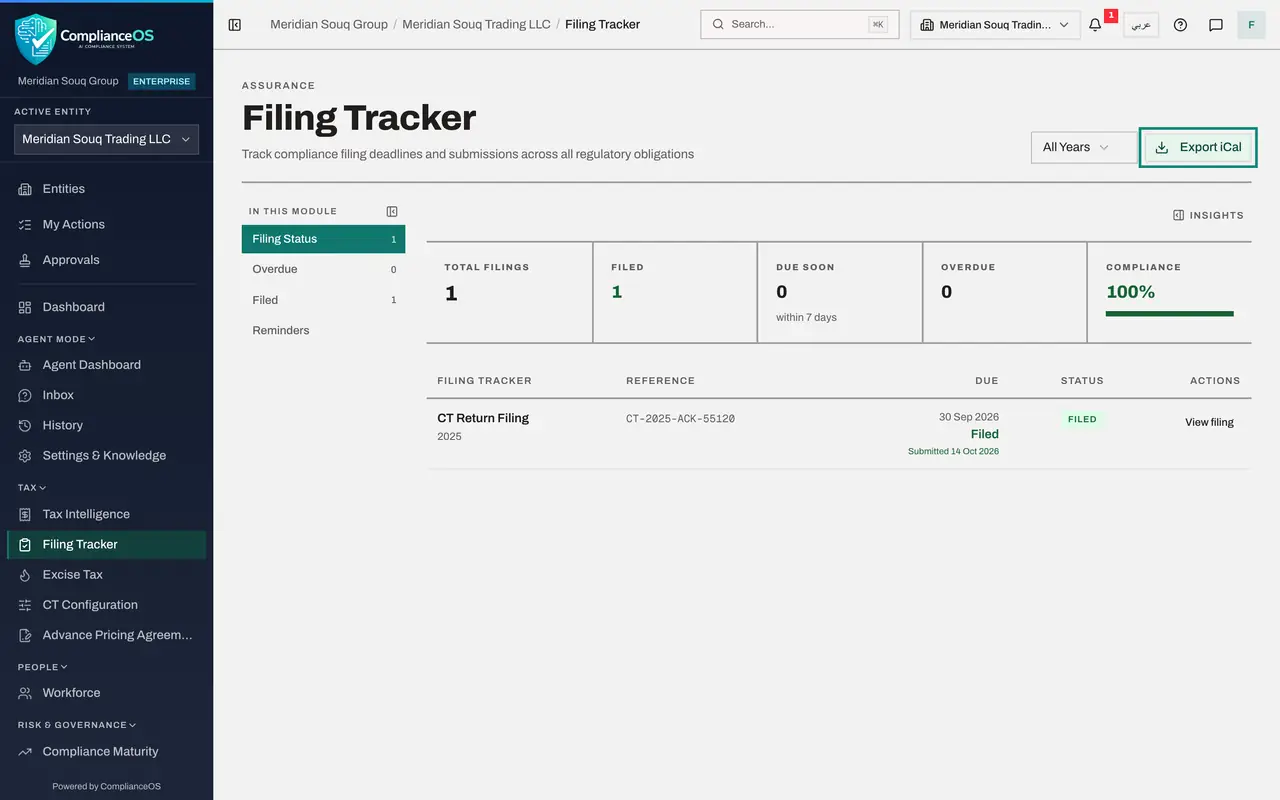
In the left menu, under Tax, choose Filing Tracker. It lists the deadlines the entity has to meet. The tiles count the filings, how many are filed, how many are due within seven days and how many are overdue, and give a compliance percentage: one of one filed, 100 percent.
- 2
Read the corporate tax return's row
The row CT Return Filing 2025 was created when the return was first computed. It now shows the reference the compliance officer typed, the due date of 30 September 2026, the status Filed and the date it was submitted. Before the lock, this row read Overdue and offered File the return.
- 3
Select View filing
Select View filing on the row. It opens the filed return: the Corporate Tax Return page for 2025, with the status Filed and a PDF button for the return as filed.
- Select View filing
- 4
Select Filed in the list on the left
Choose Filing Tracker in the left menu again and select Filed in the list on the left. It lists each completed filing: CT Return Filing 2025, filed on 14 October 2026, with the note that it was filed through the tax return, so there is no separate filing record, and a button, Open the return. Deadlines that are not tax returns are completed here with Record filing instead.
- Select Filing Tracker
- Select Filed1 (1)
- 5
Select Reminders
Select Reminders. Default reminders for this entity decides who is warned before a filing deadline. Reminders on switches them on. Remind before the deadline lists the lead times, suggested as 30, 14, 7, 3 and 1 days before. Who gets reminders names the people, or everyone with access if left empty, and Escalate after sets how many days overdue triggers a further notice. The yellow line says no default is saved yet, so no reminders are sent until the settings are saved.
- Select Reminders
- 6
Select Export iCal
Go back to Filing Status. Export iCal, at the top right, downloads the deadlines as a calendar file that Outlook, Google Calendar and Apple Calendar can open. The list beside it, All Years, limits the tracker to one year.
- Select Filing Status1 (1)
- 7
Open Submitted Packages
Open Tax Intelligence, select More, then Submitted Packages under Filing, corrections and sign-off. It lists every period that has been filed and locked. The 2025 corporate tax period is here: type CT, the period, the date filed, the reference, one document and the status Locked. View opens the package with the acknowledgement stored in the Evidence Vault. The buttons at the top filter by VAT or corporate tax.
- 8
See what the lock did to the transactions
Go back to Tax Intelligence. Scroll the Transactions table sideways to its last column: every 2025 row now carries a small lock marked CT beside its buttons. The corporate tax category is frozen because the row is part of a filed return. A correction to a filed year is made through a voluntary disclosure.
- 9
Check the Penalties tab
Select Analysis, then Penalties. Penalty History shows what was recorded when the late return was filed: a late filing penalty of 500 dirhams, with interest of 10,998.75 on the tax that was paid late, at the status Accrued. Above it, the FTA Penalty Calculator estimates a penalty before it happens: choose the tax, the violation and the number of months late, then select Calculate Exposure.
- Select Analysis
- Select Penalties
- 10
Open CT Filing for the portal package
Select More, then CT Filing. The page QFZP and CT Filing first states the regime for the year: this entity is not a free zone person, so it files under the standard regime. Below, EmaraTax filing package offers a ZIP file with the return as data for the portal and a PDF of the submission.
- 11
Select Download
Check that Fiscal year shows 2025 and select Download. Keep the ZIP file with the working paper; it is the same return in the layout the portal expects.
- Select Download
- 12
Look at Voluntary Disclosures
Select Back to Tax, then More, then Voluntary Disclosures. A voluntary disclosure corrects a return that has already been filed. For the tax manager the page is read only: a line says that creating and submitting voluntary disclosures requires admin or compliance officer access. The next lesson shows the compliance officer making one.
How to check it worked
The Filing Tracker shows CT Return Filing 2025 with the reference CT-2025-ACK-55120 and the status Filed, Submitted Packages lists the locked 2025 period, and Penalty History shows the late filing penalty.
Common mistakes
- Recording the filing by hand in the tracker. For a tax return the tracker follows the return itself: the deadline is completed when the return is approved and locked.
- Trying to reclassify a transaction of a locked year. The rows show a lock; a correction to a filed year goes through a voluntary disclosure.
- Overlooking the Penalties tab after a late filing. A late return adds a fixed penalty for each month, and the tab shows what has been recorded so that it can be provided for in the accounts.
Check your understanding
1. How did the deadline CT Return Filing 2025 become Filed in the tracker?
- A.Someone ticked it in the tracker
- B.It was completed when the return was signed off and locked
- C.It is marked filed on the due date by itself
- D.The Federal Tax Authority updated it
Show answer
Answer: B. It was completed when the return was signed off and locked
The tracker row for a tax return is tied to the return. Before filing it said the return is still a draft and filing it completes this deadline.
2. Who can create a voluntary disclosure to correct the filed return?
- A.Any user
- B.The tax manager
- C.A compliance officer or an administrator
- D.Nobody
Show answer
Answer: C. A compliance officer or an administrator
The Voluntary Disclosures screen tells the tax manager so. Lesson 21 shows the compliance officer doing it.